
Search for online privacy advice and you will find page after page recommending a VPN. Many VPN comparison websites use affiliate links, which means they may earn a commission when readers subscribe. The financial incentives can be substantial. For example, NordVPN publicly lists commissions of 40% for new annual and two-year subscriptions and 100% for new one-month subscriptions. Rates vary between providers and campaigns, but these incentives make transparent disclosures and independent testing especially important.
That does not automatically make VPN reviews dishonest. It does mean readers deserve a more balanced explanation, including when a VPN provides limited additional protection. For many ordinary people, a VPN solves a narrower privacy problem than its marketing suggests.
Nexvolu does not earn commissions from VPN subscriptions or accept paid VPN placements in this article. Here is our independent, practical assessment.
Table of Contents
- Quick Answer
- What a VPN Actually Does
- The 14-Threat Audit
- Why the Internet Got Safer
- When You Need a VPN
- When You Don’t Need a VPN
- The Trust Transfer
- VPN Necessity Score
- VPN Costs and Benefits
- What to Do Instead
- Nexvolu’s Verdict
- Frequently Asked Questions
- The Bottom Line
Do I Need a VPN? The 40-Second Answer
Most people do not need a consumer VPN for everyday browsing. Modern websites use HTTPS to protect much of the data exchanged between your device and the website. A VPN may still be useful if you want to reduce your ISP’s visibility into your browsing, regularly use untrusted networks, need to mask your public IP address, or face internet restrictions. If your employer requires a VPN, use its approved corporate service rather than purchasing a personal subscription.
What a VPN Actually Does (And What It Doesn’t)
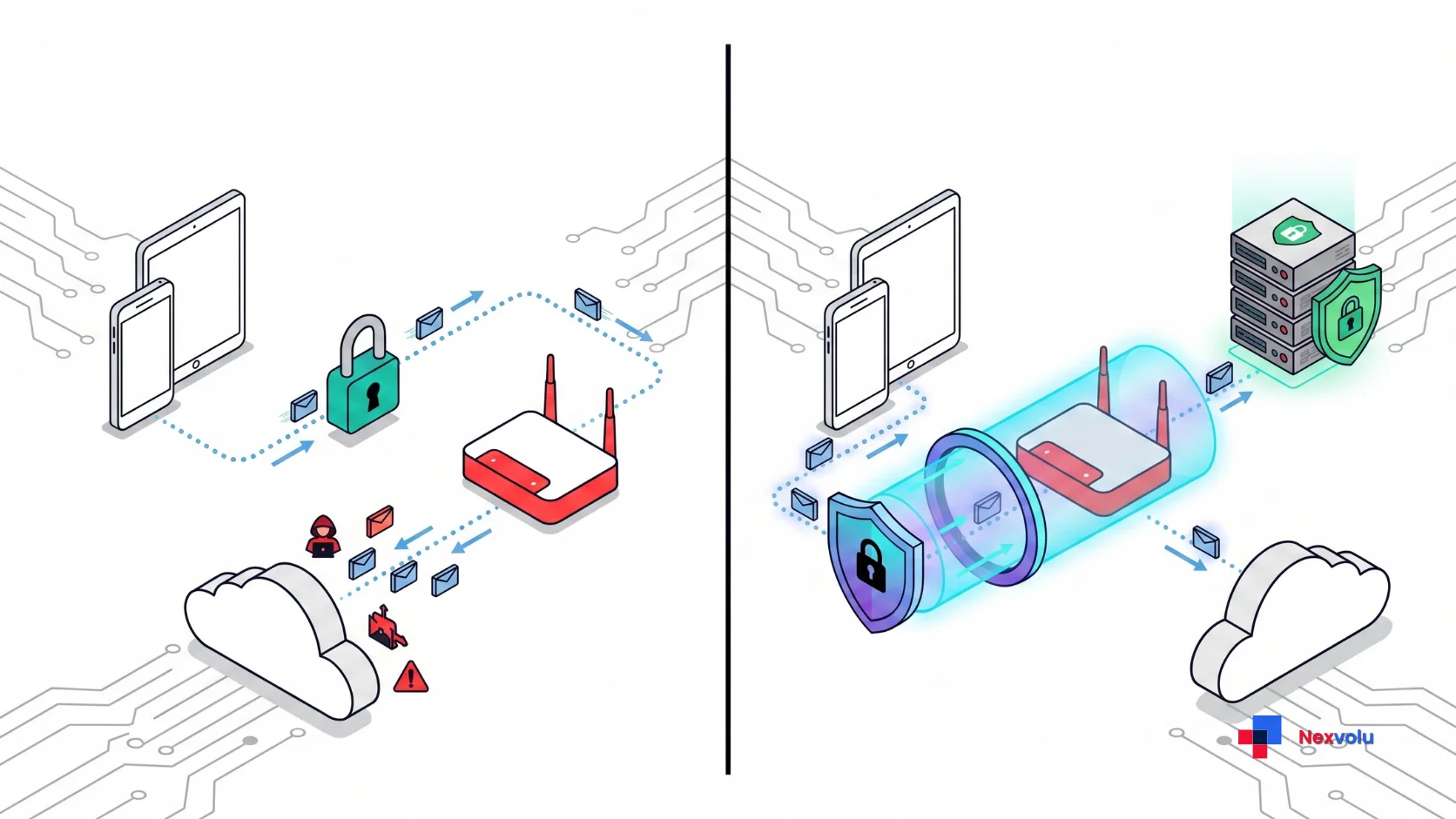
A VPN, or virtual private network, creates an encrypted connection between your device and a server operated by the VPN provider. Your internet traffic is routed through that server before reaching its destination. This provides two main privacy benefits: it reduces what your local network and ISP can observe, and it replaces your public IP address with the VPN server’s IP address. However, the protection has limits, and your VPN provider becomes another party you must trust.
The Two Things It Actually Changes
First, a full-tunnel VPN can prevent your local network and ISP from directly seeing the DNS requests and destination information carried inside the encrypted tunnel. They can still see that you are connected to a VPN server, along with connection times and data volumes. Depending on DNS settings, network configuration, and available traffic information, they may still infer some activity. The VPN provider, meanwhile, becomes the service handling your outgoing traffic.
Second, websites generally see the VPN server’s public IP address instead of your home or mobile public IP address. This can make your connection appear to come from another city or country. However, websites can still identify you through account logins, cookies, browser fingerprinting, and other location signals. Some services also block known VPN addresses, so changing your apparent location does not guarantee access to restricted content.
These are the main privacy effects of a consumer VPN. Features such as ad blocking, malicious-domain filtering, password management, and breach monitoring are additional services that some providers bundle into their subscriptions. They should be evaluated separately rather than treated as automatic benefits of an encrypted VPN connection.
What HTTPS Already Does for You
Here is the part many VPN buying guides understate: HTTPS already protects most ordinary web traffic. According to the 2025 HTTP Archive Web Almanac, 98.8% of mobile web requests in its dataset used HTTPS. This encryption protects the contents of communication between your browser and the website, making it much harder for someone on the same Wi-Fi network to read your passwords, messages, or banking information.
A VPN adds another encrypted connection between your device and its server. That can protect traffic from observation by the local network, but it does not replace HTTPS. If you visit an unencrypted HTTP website, the connection between the VPN server and that website may still be exposed. Your VPN provider may also be able to observe destination information that HTTPS does not hide.
In other words, a VPN can add a layer of network privacy, but it is not the difference between safe and unsafe browsing on every public Wi-Fi network.
Notably, the US Federal Trade Commission put it plainly in its own consumer guidance: “Because of the widespread use of encryption, connecting through a public Wi-Fi network is usually safe.”
The 14-Threat Audit: What a VPN Can and Cannot Protect
Instead of arguing in generalities, we compared 14 common privacy and security concerns against the actual capabilities of a typical consumer VPN. This is an editorial comparison, not a laboratory security test. The results assume a properly configured full-tunnel VPN without DNS or IP leaks. Actual protection varies by provider, device, network configuration, and country.
The 14 Common Threats Compared
| # | Threat | VPN’s Actual Effect | What Provides Better Protection |
|---|---|---|---|
| 1 | Your ISP seeing which sites you visit | Direct privacy benefit, but not complete invisibility | Full-tunnel VPN and secure DNS |
| 2 | Websites seeing your real IP address | Masks your public IP, with possible leaks and other identifiers | VPN and browser privacy settings |
| 3 | A network operator blocking websites | May bypass some network restrictions | Approved network access or VPN |
| 4 | Country-level censorship or geo-blocking | May help, but access is not guaranteed | Appropriate circumvention tools and local legal guidance |
| 5 | Someone on the same Wi-Fi reading an unencrypted page | Protects traffic only up to the VPN server | HTTPS |
| 6 | Evil-twin or fake hotspots | Encrypts traffic after the tunnel connects, but does not verify the hotspot | Verify the network, use HTTPS, or a trusted mobile hotspot |
| 7 | Cross-site advertising trackers | Hides one tracking signal: your public IP | Tracker blocking, privacy settings, cookie controls |
| 8 | Regional price discrimination | Changes apparent IP location, but results vary | Compare prices and review account and location settings |
| 9 | Data brokers building a profile on you | Limited effect on IP-based identification | Privacy rights, opt-outs, and data minimization |
| 10 | Phishing emails and fake login pages | No direct protection | Passkeys and phishing-resistant authentication |
| 11 | Malware, ransomware, and malicious downloads | No core VPN protection | Security updates and endpoint protection |
| 12 | Account takeover from reused passwords | No direct protection | Unique passwords, MFA, and passkeys |
| 13 | Google, Meta, and Apple tracking you while signed in | Does not prevent account-based tracking | Account privacy controls and data minimization |
| 14 | A company you use suffering a data breach | Cannot prevent the company’s breach | Unique credentials and limiting stored personal data |
How to Read the Audit
The result: a consumer VPN has two main privacy benefits. It can reduce the visibility your ISP and local network have into your internet activity, and it can mask your public IP address from websites. Some additional situations benefit conditionally, but five of the fourteen threats remain outside the protection offered by a standard VPN.
The distinction matters. A VPN can make certain parts of your online activity less visible without making your accounts, devices, or personal information automatically more secure. Privacy and security overlap, but they are not the same thing.
Why the Internet Got Safer Without You Noticing
The advice that everyone needs a VPN on public Wi-Fi is not entirely wrong, but it comes from a different stage of internet security. In 2010, the Firesheep browser extension demonstrated how attackers on shared networks could hijack sessions when websites transmitted authentication cookies without encryption. Modern HTTPS adoption has made that particular type of interception much harder on properly configured websites.
Three Security Changes That Made Browsing Safer
In particular, three changes killed that attack:
- Widespread HTTPS adoption. Free certificates, automatic HTTPS upgrades, and browser warnings have encouraged websites to encrypt their connections. The 2025 HTTP Archive data shows that HTTPS is now used for more than 98% of mobile web requests in its dataset.
- HSTS and secure cookies. HTTP Strict Transport Security allows participating websites to tell browsers to use HTTPS rather than falling back to an unencrypted connection. Secure cookies also prevent browsers from sending protected cookies over ordinary HTTP. However, these protections are not implemented universally across every website.
- Encrypted DNS. DNS-over-HTTPS and DNS-over-TLS can protect domain lookups from being observed on a local network. However, default settings differ. Chrome can use automatic secure DNS with an unencrypted fallback, while Firefox’s default rollout varies by country. Encrypted DNS also moves DNS-query visibility to the selected resolver rather than eliminating that trust relationship.
VPN Infrastructure Has Its Own Security Risks
VPN infrastructure itself can also become an attack surface. Verizon’s 2025 Data Breach Investigations Report found that vulnerability exploitation accounted for 20% of analyzed breaches. Within its dataset of 1,930 vulnerability-exploitation vectors, VPN and edge devices represented 22%, compared with 3% in the previous report.
These findings concern enterprise network infrastructure, such as corporate VPN gateways and other exposed edge devices, rather than consumer VPN subscriptions. The lesson is that VPN software and infrastructure must also be properly secured and updated.
You DO Need a VPN If…
A VPN may be worth considering if one or more of the following situations applies to you. However, the right choice depends on your actual privacy needs, the reliability of the provider, and any local restrictions on VPN use. A subscription is not automatically the answer to every situation.
- You travel to or live in a country that censors the internet. A VPN with appropriate anti-censorship features may help access blocked news, messaging apps, and websites. However, authorities can block VPN connections, restrict unauthorized services, or impose legal consequences for circumvention. Research the local situation and safety risks before relying on one.
- You are a journalist, researcher, activist, or handle sensitive sources. Reducing the amount of browsing information visible to a network operator may matter in your work. However, a commercial VPN is only one part of a broader digital security plan. Device security, secure communications, account protection, and the VPN provider’s own trustworthiness also matter.
- Your employer requires one. Some organizations require a corporate VPN to access internal systems securely. Use the approved service and configuration provided by your employer. A personal consumer VPN is not a substitute for your company’s corporate VPN.
- You genuinely object to your ISP collecting or sharing browsing-related information. In the United States, Congress repealed the FCC’s 2016 broadband privacy rules in 2017, changing the federal regulatory framework for ISP privacy. This did not create an unrestricted right for every ISP to sell all customer browsing information. FTC enforcement and state privacy laws may still apply. A VPN can shift some browsing visibility from your ISP to its provider, so compare the two companies’ privacy policies and data practices.
More Situations Where It Pays Off
- You spend most of your working life on networks you do not control. Digital nomads, consultants living in hotels, people who work from airports several times a month. Therefore, the cumulative exposure to badly configured and hostile networks justifies it.
- You use P2P or torrenting and want to limit the exposure of your home IP address to other peers. A VPN can route your P2P traffic through its server and mask your public IP from other participants. However, your VPN provider becomes another party you must trust, and the VPN does not make copyright infringement or other unlawful activity legal.
- You need a stable, known IP address for an approved work or client system. Some VPN providers offer dedicated IP addresses that can be allow-listed by a service. However, use your employer’s approved corporate VPN whenever its security policies require one.
- You regularly share a network with people you do not trust. Student accommodation, shared houses, landlord-managed routers, and building-wide connections can create additional privacy concerns. A VPN can encrypt traffic between your device and its server, reducing what the network operator can observe, but it does not protect your device against every local-network attack.
- You want to access content that is licensed in another country. A VPN may change the location a streaming service sees, but platforms actively identify VPN connections and enforce their licensing restrictions. Check the service’s terms before relying on this use case.
If none of those nine describe you, keep reading because the alternative list is probably where you belong.
You Probably Don’t Need a VPN If…
- You browse from home on a properly secured router with WPA2 or WPA3 encryption, updated firmware, and a strong administrator password.
- Your main devices are a phone and a laptop kept up to date, on HTTPS sites.
- Your “public Wi-Fi” is a café twice a month for email and a news site.
- You already sign in to Google, Meta, Amazon, or Apple throughout the day. A VPN can mask your public IP address, but it does not disconnect your account, erase cookies, or prevent those services from associating activity with your signed-in profile.
- You bought it because a YouTube sponsorship read said hackers were stealing data at airports.
- You want to stop ads following you around. That is a browser and account-settings problem, not a network problem.
The uncomfortable version: in short, for a typical logged-in consumer, the tunnel improves privacy against your ISP and the café router, and improves it not at all against the companies that hold the overwhelming majority of your data.

The Trust Transfer Nobody Explains
Here is the single most important concept in this article, and it is missing from nearly every buying guide, because it complicates the sale.
Crucially, a VPN does not eliminate the party that can see your browsing. It relocates it.
What Changes When You Connect Through a VPN?
| Who Can See It | Without a VPN | With a VPN |
|---|---|---|
| Your ISP | Can observe connection metadata, destination IPs, and usually DNS lookups unless encrypted DNS is used. | Sees your VPN connection, timing, and traffic volume; destination visibility is reduced with a properly configured tunnel. |
| Café or hotel network | Can observe network traffic and metadata; HTTPS protects website contents. | Mainly sees the VPN connection and related metadata. |
| VPN provider | Not involved in your internet connection. | May see DNS requests and destination information, but HTTPS generally protects website contents. |
| Websites you visit | Usually see your public IP address. | Usually see the VPN server’s public IP address. |
| Google, Meta, Apple, and other signed-in services | Can associate activity with your account. | Can still associate activity with your account. |
| Your employer on a managed device | May collect activity through device and network monitoring. | May still collect activity through device monitoring and corporate security tools. |
What the Trust Transfer Means in Practice
The VPN provider is the important part of this comparison. A VPN does not eliminate every party capable of observing your online activity; it changes which parties can see particular pieces of information. Your ISP generally loses some visibility into your destinations, while your VPN provider handles your outgoing traffic. HTTPS still protects website contents in transit, and your accounts, cookies, and other identifiers remain separate tracking signals.
That shift can be valuable when you specifically want to reduce ISP or local-network visibility. It is less useful when your main concern is account-based tracking, advertising profiles, or malware. Choosing a VPN therefore requires evaluating its privacy practices rather than assuming that moving your traffic automatically makes it private.
Why a VPN Provider’s Logging Policy Matters
A no-logs policy matters because your VPN provider may have access to connection and destination information that your ISP would otherwise observe. However, a provider’s promise not to store activity is not proof by itself.
Look for independent security and privacy audits from identifiable firms, clear explanations of what information is collected, and published details about data retention. Repeated audits and documented responses to legal requests can provide additional evidence, although no audit guarantees that a provider will never collect data or experience a security incident.
RAM-only infrastructure can reduce the persistence of certain server-stored information, but it is not a substitute for a transparent privacy policy, sound security practices, and independent verification.
The Nexvolu VPN Necessity Score
We built this because “it depends” is not a useful answer. This is Nexvolu’s practical self-assessment framework, not a scientifically validated security test. Score yourself by adding the points for every statement that genuinely applies to your circumstances. Use the result as a starting point for deciding whether a VPN could provide meaningful benefits.
Calculate Your Score
| Statement | Points |
|---|---|
| I live in or regularly travel to a country that censors the internet. | +3 |
| I connect to networks I do not control several times a week. | +3 |
| I am a journalist, activist, researcher, or handle sensitive sources. | +3 |
| My ISP’s privacy policy or applicable local rules allow it to collect or share browsing-related information, and I object to that. | +2 |
| I use P2P or torrenting and my ISP has sent notices. | +2 |
| I share a network with people or a landlord I do not fully trust. | +1 |
| I want content licensed to another country. | +1 |
| I compare prices across regions when booking travel. | +1 |
| I want my home IP hidden from forums, game servers, and small websites. | +1 |
| I browse personally on a work device on a shared network. | +1 |
How to read your score
- 0-3 – Skip it for now. Focus on unique passwords, multi-factor authentication, automatic software updates, and secure browsing. These measures may address more relevant everyday security risks than a consumer VPN subscription.
- 4-7 – Situational. A VPN may be useful for specific situations, such as hotel Wi-Fi, business travel, or shared networks. Consider a monthly subscription first rather than committing to a long-term plan before checking its reliability.
- 8-12 – Consider subscribing. Your circumstances suggest a recurring privacy benefit. Compare providers based on independent audits, privacy policies, security features, and performance. Start with a shorter plan until you know the service meets your requirements.
- 13+ – Strong use case. Your circumstances suggest a meaningful need for additional network privacy. Choose a reputable, independently audited provider, understand its privacy policy and jurisdiction, and combine it with secure DNS, unique passwords, multi-factor authentication, and device protection. For sensitive professional or personal work, consider a broader digital security plan rather than relying on a VPN alone.
What a VPN Costs vs What It Buys
Month-to-month consumer VPN subscriptions commonly cost around $10 to $13. Longer plans can reduce the advertised monthly equivalent to roughly $2 to $4, although the total amount is usually charged upfront. Security.org’s September 2026 pricing analysis found an average monthly cost of $11.79 and an average monthly equivalent of $3.32 for its sampled 36-month plans. Over three years, that works out to approximately $119.
Prices, introductory offers, and renewal rates vary, so compare the full payment and renewal terms rather than focusing only on the advertised monthly figure.
By comparison, set that against the alternatives for the same money:
- A family password manager for a year, which helps everyone create unique passwords and reduces the risk of credential-stuffing attacks caused by password reuse.
- A hardware security key or two, which provides strong phishing-resistant authentication for important accounts that support security keys.
- A data-broker removal service, which may help reduce some exposed personal information, although removal is not guaranteed and coverage varies between services.
Consequently, if your score above was low, all three of those beat a subscription on security value per pound. Admittedly, that is not an argument that VPNs are a scam. It is an argument about ordering. A VPN is a reasonable fourth purchase and a poor first one.
What to Do Instead If You Skip the VPN
If you decided against subscribing, do these six things this week. Together they cost almost nothing and outperform a VPN for the average person.
- Turn on automatic updates for your operating system, browser, and phone. Updates help close known security vulnerabilities and reduce the risk of attacks against outdated software.
- Install a password manager and let it generate a unique password for every account. Importantly, this single change removes the most common route into your accounts.
- Turn on multi-factor authentication for important accounts. Prefer passkeys or hardware security keys where supported, followed by a reputable authenticator app. SMS verification is generally a weaker option, but it is still better than having no additional authentication.
- Consider enabling DNS-over-HTTPS or DNS-over-TLS in your browser or operating system. Encrypted DNS can prevent your local network from directly reading ordinary DNS lookups, although the selected DNS resolver still receives those requests. It does not hide every destination signal, but it provides an additional privacy option without requiring a VPN subscription.
- Ask your phone to forget unfamiliar open networks and disable automatic joining of public Wi-Fi hotspots. Before connecting, confirm the network name with the venue. These steps reduce the risk of accidentally joining a fake hotspot, although they cannot eliminate every evil-twin attack.
- Audit your Google, Meta and Apple privacy settings. Turn off ad personalisation and delete stored activity. This is where your real profile lives.
Nexvolu’s Verdict
A VPN is a useful privacy tool, but it is not an essential security purchase for every internet user.
Best for: People who regularly use untrusted networks, need to reduce ISP visibility, travel to locations with internet restrictions, or want to mask their public IP address.
Less useful for: People mainly concerned about phishing, malware, password reuse, account-based tracking, and company data breaches. A standard VPN does not directly solve these problems.
Advantages: Masks your public IP address, encrypts traffic between your device and the VPN server, and can reduce browsing information visible to your local network and ISP.
Limitations: Moves some trust to the VPN provider, does not make you anonymous, cannot replace HTTPS, and does not automatically prevent malware, phishing, or account compromise.
Our recommendation: Decide based on your actual privacy needs rather than advertisements or claims that every public Wi-Fi connection is dangerous. For many everyday users, unique passwords, multi-factor authentication, software updates, and sensible browser privacy settings are better first priorities.
Frequently Asked Questions
Is a VPN Useful on a Home Network?
Usually not for everyday security. On a properly secured home network, HTTPS already protects most website contents while they travel between your device and the website. A VPN can reduce the DNS and destination information visible to your ISP, depending on its configuration, but your ISP can still see that you are connected to a VPN and observe connection metadata. Consider one if ISP visibility is a specific privacy concern, not simply because you browse from home.
Home networks are the environment a VPN helps least, because the two parties it hides you from are the local network operator you and your ISP. Meanwhile, everything else stays the same: your devices, your accounts, your logged-in sessions. If ISP visibility is the concern, weigh whether you trust the VPN company more than your ISP, and check whether encrypted DNS gets you most of what you want for free.
Is a VPN Necessary on Public Wi-Fi in 2026?
For ordinary browsing, a VPN is not always necessary on public Wi-Fi. The FTC says public Wi-Fi is usually safe because most websites now use encryption. HTTPS helps protect passwords, messages, and other website contents from someone observing the local network.
However, public networks still carry risks, including fake hotspots, malicious captive portals, and vulnerable devices. A trusted VPN can add protection by encrypting traffic between your device and its server, but it does not verify that a hotspot is legitimate or protect you from every attack. The NSA also recommends using a trusted VPN or personal hotspot when sensitive work requires connecting through public Wi-Fi.
Occasional browsing on a reputable café network is different from regularly handling sensitive information on networks you cannot trust. Choose your protection based on the activity and network involved.
Does a VPN make me anonymous?
No. A VPN hides your IP address from websites and your browsing from your ISP. It does not make you anonymous. The moment you sign in to any account, that service knows exactly who you are, VPN or not.
Anonymity requires defeating browser fingerprinting, cookies, account logins, payment trails and behavioural patterns none of which a VPN touches. Providers that market “anonymous browsing” are describing IP masking. If your goal is stronger anonymity, Tor may be more appropriate than a commercial VPN, but it also has limitations and requires careful security practices.
Can my ISP still see what I do if I use a VPN?
A properly configured full-tunnel VPN generally prevents your ISP from directly seeing the DNS requests and destination information carried inside the encrypted tunnel. Your ISP can still see that you are connected to a VPN server, along with connection times, traffic volume, and other metadata. Depending on the configuration and network conditions, some activity may still be inferred.
Your VPN provider becomes the service handling your outgoing traffic and may have access to DNS requests and destination information. HTTPS continues to protect the contents of your website sessions from both your ISP and VPN provider. A VPN therefore shifts some visibility rather than making all internet activity invisible.
Is a free VPN safe?
Some free VPNs are safe enough for limited use, but you need to evaluate them carefully. A free subscription is not automatically unsafe, just as a paid subscription is not automatically trustworthy.
Check the provider’s privacy policy, independent security audits, ownership, funding model, data limits, and past security disclosures. Avoid unfamiliar VPN apps that collect excessive permissions or provide little information about how they handle user data. Reputable providers may offer limited free plans, but these can restrict bandwidth, server locations, or available features.
Does a VPN stop hackers?
A VPN can reduce the ability of someone on your local network to inspect traffic between your device and the VPN server. However, it does not protect against every kind of hacking. Phishing, malware, ransomware, stolen credentials, and company data breaches require different security measures. Use unique passwords, multi-factor authentication, updated software, and phishing-resistant authentication wherever supported.
Will a VPN stop ads and tracking?
Partly, and less than advertised. Changing your IP address removes one tracking signal, but advertisers rely mainly on cookies, browser fingerprints, and your logged-in accounts all of which follow you through a VPN tunnel unchanged.
Many VPN apps bundle a tracker blocker, and that component does help but it is a separate feature you can get free from a browser extension. If cross-site tracking is your concern, a privacy-focused browser, tracker blocking, and switched-off ad personalisation in your Google and Meta accounts will do more than any VPN.
Does a VPN slow down my internet?
It can reduce internet speed because your traffic takes an additional route through the provider’s server and requires encryption processing. The actual impact varies with your internet connection, server distance, VPN protocol, server congestion, and device performance.
Latency can matter more than download speed for competitive gaming, video calls, and other real-time activities. To reduce performance problems, choose a nearby server, use a modern protocol such as WireGuard where available, and consider split tunnelling if your provider supports it.
Do I need a VPN for streaming Netflix?
It can make your connection appear to come from another country, but Netflix does not guarantee access to that country’s full catalogue. When it detects a VPN, you may only see titles available worldwide. Netflix also does not support VPN use on ad-supported experiences or for live events.
VPN compatibility can change as streaming services identify and restrict VPN connections. If accessing region-specific content is your main reason for subscribing, check Netflix’s current rules and your VPN provider’s refund policy before committing to a long-term plan.
Are VPNs legal?
VPNs are legal in most countries, but some governments restrict unauthorized services, require approval or licensing, or prohibit certain forms of VPN use. The exact rules and their enforcement differ between countries and can change over time.
Using a VPN does not make an otherwise illegal activity lawful, and circumventing internet restrictions may carry additional risks in some locations. Before travelling, check current local regulations using reliable government or legal sources rather than assuming a VPN is permitted everywhere.
Do I need a VPN on my phone?
The answer is similar to using a VPN on a laptop. Mobile networks use encryption over the wireless connection, but that does not prevent your mobile carrier from observing certain connection metadata or handling your DNS requests. HTTPS protects website contents, while a VPN can reduce some of the destination information visible to the carrier by routing traffic through its server.
A VPN does not stop apps from collecting information you have permitted them to access, and it does not hide your identity when you sign in to accounts. For everyday mobile privacy, review app permissions, install updates, restrict unnecessary tracking, and use trusted networks. A VPN can provide an additional layer when you specifically need to reduce network-level visibility.
What is a no-logs policy and does it matter?
A no-logs policy is a provider’s commitment not to retain certain information about your VPN activity. It matters because your VPN provider handles your outgoing traffic and may have access to connection or destination information, depending on its configuration.
Look for independent audits, transparent privacy policies, clear data-retention practices, and publicly documented responses to legal requests. RAM-only infrastructure can reduce the persistence of some stored information, but it does not automatically guarantee that a provider collects no data. Review the scope and date of an audit rather than relying on a marketing claim alone.
Does a VPN hide my IP address from websites?
Yes. This is one of the two things it reliably does. Sites see the VPN server’s IP address, However, your account login, browser fingerprint, cookies, and other device or location signals can still identify you.
At the same time, be aware of leaks and limits. Misconfigured DNS, WebRTC in your browser, or a dropped connection without a kill switch can expose your real address. Shared VPN IPs also carry reputations, which is why you may hit more CAPTCHAs, blocked sign-ups, or refused bank logins while connected.
Should You Use a VPN for Online Banking?
Usually not. Banking websites and apps generally use encrypted connections to protect login details and financial information. A VPN does not replace those protections or make a weak banking password stronger. It may also trigger additional security checks if your connection appears to come from an unfamiliar location.
When banking on an unfamiliar public network, using your mobile connection is a simple alternative. If you choose to use a VPN, select a reliable nearby server and follow your bank’s security guidance. Unique passwords, multi-factor authentication, and accessing your bank through its official app or website remain more important.
Does a VPN protect me from viruses and malware?
No. A VPN encrypts and reroutes traffic; it does not inspect files or block malicious downloads. If you download an infected file through a VPN tunnel, it arrives perfectly encrypted and perfectly infected.
Some providers bundle malicious-domain blocking features that can prevent connections to certain known harmful websites. These are additional security features, not a replacement for antivirus software or other endpoint protection.
Should I use a VPN for torrenting?
This service can be useful for P2P because it routes your traffic through the provider’s server and can hide your home public IP address from other peers. However, it also moves some network visibility to the VPN provider, and protection depends on the provider’s configuration, privacy practices, and connection reliability.
If you choose to use one, check whether the provider explicitly supports P2P traffic, offers a reliable kill switch, and publishes independent security or privacy audits. A VPN does not change copyright law or make unauthorized downloading legal.
The Bottom Line
Most people considering a subscription want to know whether it addresses an actual risk in their everyday internet use. HTTPS has reduced some risks once associated with public Wi-Fi, but it does not make every network, website, or device automatically safe.
Use the Nexvolu Necessity Score as a starting point rather than a definitive security assessment. If your main concerns are password reuse, phishing, malware, or account-based tracking, address those problems with the appropriate security tools first.
If you regularly need to reduce ISP visibility, mask your public IP address, or access the internet under specific network restrictions, a reputable VPN may be a worthwhile addition. Before choosing one, read our guide to whether password managers are safe.
A VPN is neither a universal security shield nor automatically a waste of money. Its value depends on your actual privacy needs, the networks you use, and the parties you want to limit visibility to.