
Is This Fake DHL Text Real? The Short Answer
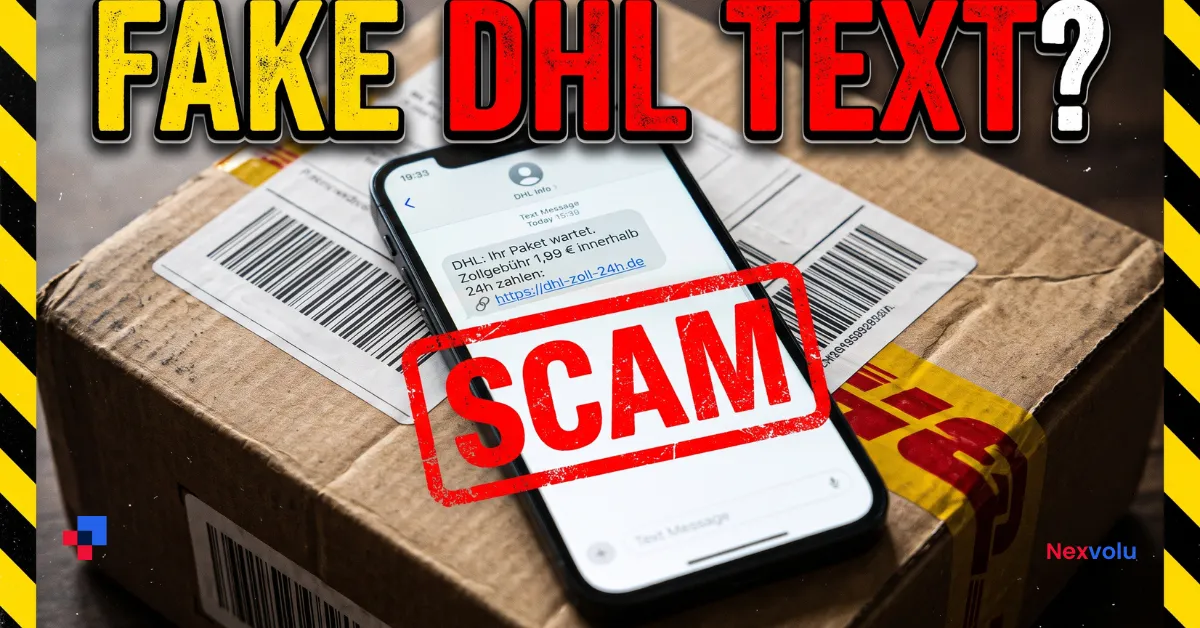
You got a fake DHL text saying your DHL parcel is on hold because of an unpaid customs fee of 1.99 euros. Pay within 24 hours, it warns, or the parcel goes back to the sender. There is a link to pay.
Is it real? Almost certainly not. This is a fake DHL text, a scam known as smishing, which is phishing by SMS. The message is designed to look urgent and cheap enough to pay without thinkin
g. The real goal is not your 1.99 euros. It is your card details, which the fake payment page collects and then uses for much larger charges, or sells on.
You can settle it in about 30 seconds, without tapping the link. Open the DHL website or app yourself, type in your tracking number, and read the real parcel status. If a genuine customs charge exists, it will show there. If there is nothing, delete the text.
This is the SMS companion to our guide on email scams. The checks here are for texts, which work differently from email. For the email version, read How to Spot a Phishing Email: 7 Checks Before You Click.
The Message: What a Fake DHL Text Looks Like
The most common version, word for word, reads like this:
DHL: Your parcel is on hold due to an unpaid customs fee of 1.99 EUR. Pay within 24 hours or it will be returned to the sender: https://dhl.com-redelivery.eu/p/8KX2Q
Other versions use different amounts and wording. The German consumer advice centre Verbraucherzentrale has published real examples reported by readers, including “Um Ihr Paket zu erhalten Sie müssen eine Zollsteuer von 1,99 EURO zahlen” (to receive your parcel you must pay a customs tax of 1.99 euros), plus similar messages asking for 0.99, 2.99, 3.84 or 3.99 euros. Some say the delivery address is incomplete, and some pretend to be Deutsche Post, DPD, Hermes or UPS.
The pattern is always the same: a small problem, a small fee, a short deadline, and a link. Sender names in texts can be faked, so the name may show as “DHL” or “DHL-Service”. It never includes your name, a working tracking number, or the name of the shop that sent the parcel. That absence is itself a clue.
Some of these texts do more than steal card details. Similar parcel texts have spread harmful Android apps, such as FluBot and TeaBot, first seen in a large wave around Easter 2021. Never install an app from a text message link.
Why This Fake DHL Text Works So Well
This scam works because of three small tricks, and each one is cheap to pull off.
- The amount is tiny. A fee of 1.99 euros feels too small to worry about, so people pay without stopping to think. That is the point. The fee is not the prize. Your card number, expiry date and security code are. Once those are typed into the fake page, the scammers can try much larger charges, or sell the details on.
- The deadline creates pressure. “Pay within 24 hours or it will be returned to the sender” is meant to stop you checking. A real customs process does not run on a 24-hour text message countdown. If a parcel genuinely has a customs charge, it waits for you, and you pay through an official channel.
- Almost everyone is expecting a parcel. Online shopping is so common in Germany that a message about a held parcel feels plausible. The scammers send the same text to thousands of numbers, knowing that some recipients really do have a parcel on the way. That coincidence makes the message feel personal, even though it was sent blindly.
How to Read the Link: The Domain Trick
The link is where the scam gives itself away. Take the example above:
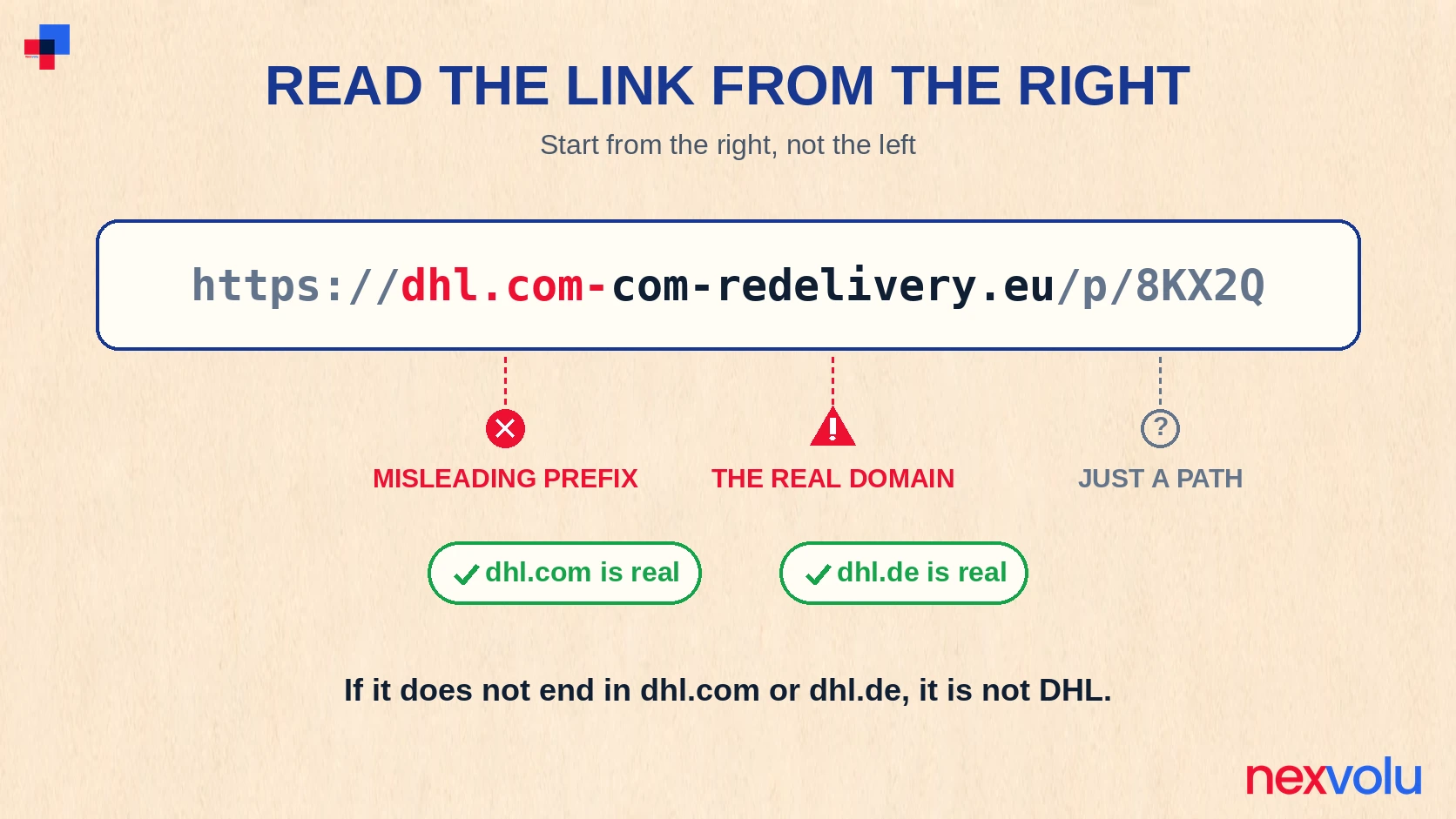
https://dhl.com-redelivery.eu/p/8KX2Q
At a glance it starts with “dhl.com”, so it looks like DHL. It is not. To read any web address, start from the right, not the left. The real domain is the part just before the first single slash. Here that is “com-redelivery.eu”, the site you would actually visit. The “dhl.com-” at the front is only a prefix the scammers added. DHL has nothing to do with com-redelivery.eu.
Real DHL web addresses end in dhl.com or dhl.de, and nothing else after the name. Anything with extra words glued on with hyphens, like dhl.com-redelivery.eu or dhl-zustellung-info.com, is not DHL. Other tricks include replacing a letter with a number, such as dh1 instead of dhl, or adding an odd ending such as .com.eu.
Here is a quick way to check any link in a parcel text, without tapping it:
- Look at the part just before the first slash. That is the real domain.
- Ask whether it ends in dhl.com or dhl.de, with nothing extra attached. If it does not, it is not DHL.
- Look for your tracking number and your name in the message. A real DHL message has them. A fake one almost never does.
- If you are still unsure, do not tap. Type dhl.com or dhl.de into your browser yourself and check the tracking number there.
On a phone, press and hold the link to see the full address without opening it. The lock icon next to a web address only means the connection is encrypted, not that the site is genuine. Scam sites use that lock too.
What Real DHL Does and Does Not Do in Germany
German customs, the Zoll, explains that import duties are normally charged by the parcel carrier when the parcel is delivered. The Verbraucherzentrale quotes the rule plainly: when the parcel arrives, the carrier bills you for the import duties it paid in advance. You do not pay a customs fee in advance through a website link. You pay at delivery, or through an official channel you reach yourself.
There is one exception: some parcel services offer advance payment, but only if you registered for it in advance, and the message then always contains your tracking number and the sender name. A surprise text with a link and no tracking number is not that service.
DHL itself says the only payments it requests by email or SMS are for customs duties and taxes, with a safety step: a one-time code goes to your registered contact before the payment is processed. A genuine DHL duty or tax message comes from “DHL”, contains your 10-digit tracking number and the shipper name, and names the shipment and the shipper. DHL also says a suspicious SMS asking for payment from any sender other than “DHL” did not come from DHL.
What a real DHL message has, and a fake DHL text does not
A real DHL message has all of these. A fake one has none of them:
- It comes from “DHL”, not from a random number or a similar-looking name.
- Your 10-digit tracking number is in it, and it returns a result on dhl.com or dhl.de.
- The shipper, the shop or company that sent the parcel, is named.
- No payment link appears in a surprise text.
- Nor does it ask you to install an app, or for your full card details on a page reached from a text.
When the message you received has none of these, treat it as fake. If you are expecting a parcel, open dhl.de or the official Post and DHL app yourself, type in the tracking number from your order confirmation, and read the status there. A tracking number from the text that returns no result on the official site is not valid, and the message was not sent by DHL.
The 30-Second Check
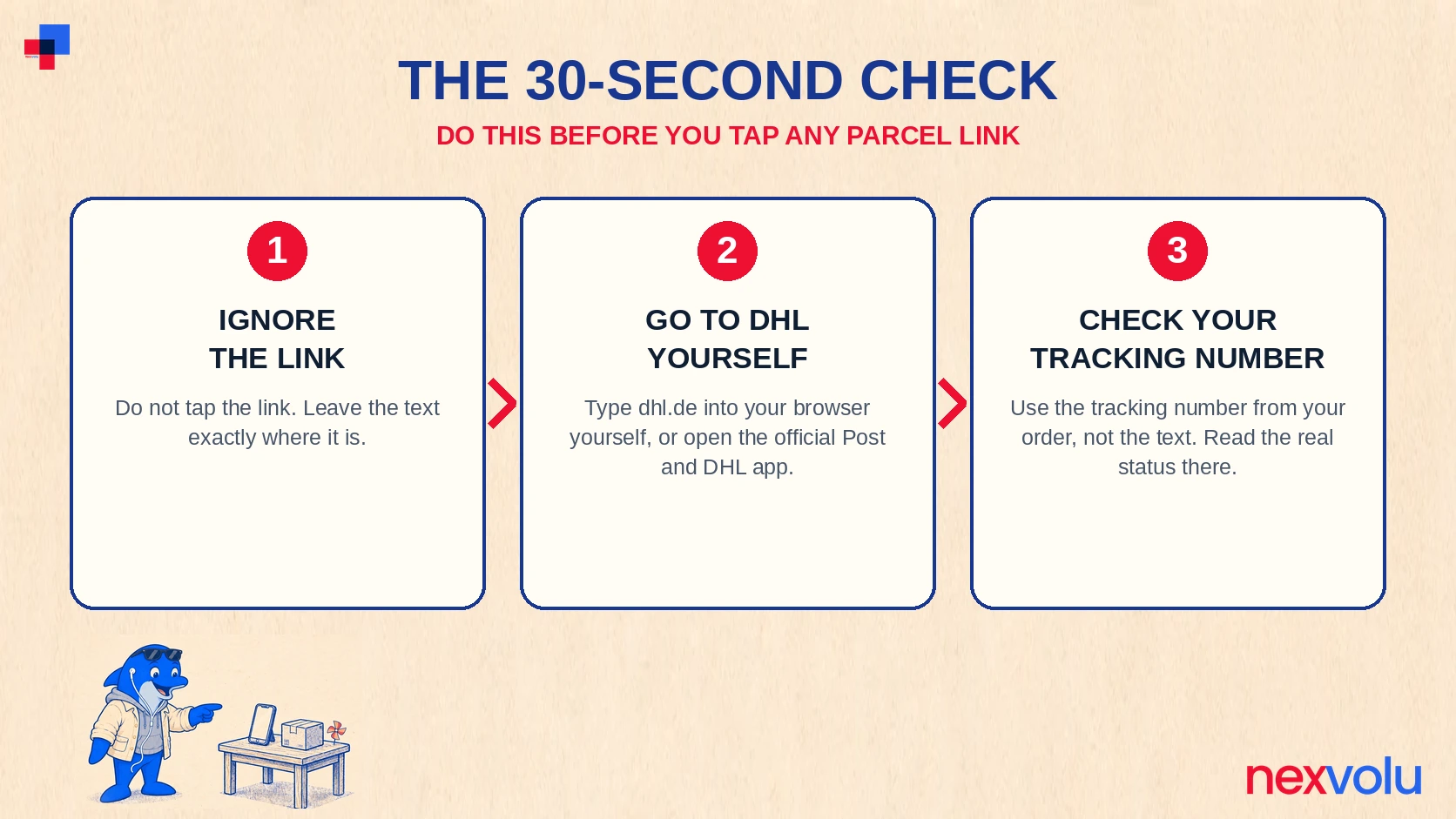
Do this every time a parcel text asks you to pay or tap a link. It takes half a minute.
- Do not tap the link. Leave the text exactly where it is.
- Check whether you are expecting a parcel. Look at your recent orders. If you ordered nothing, the message is fake and you can delete it.
- Go to dhl.de or open the official Post and DHL app yourself. Type the address in by hand. Never use the link in the text.
- Enter your tracking number from your order confirmation or the shop’s shipping email, not the number in the suspicious text.
- Read the real status. If a charge is due, the official page will say so and show the official way to pay. If the parcel does not exist, or there is no charge, delete the text.
No tracking number means nothing to check.
What to Do If You Already Clicked
Tapping the link does not automatically mean you lost money, but what you did next matters.
If you only opened the page and entered nothing, close it and delete the text. You are most likely fine, but watch your accounts for the next few days.
If the page asked you to install an app, and you did, uninstall it immediately. Then run a security scan with your phone’s built-in security tool or a reputable antivirus app, and check for apps with permissions they should not have, especially access to your contacts or permission to send texts. The FluBot and TeaBot apps spread through these texts read contacts and send out more scam texts from the infected phone. If you are unsure whether the app is fully removed, a phone shop or your mobile provider can help. A factory reset is the last resort if the phone keeps behaving strangely.
If you entered details on the fake DHL text page
If you entered card details, act now, not tomorrow. Call your bank or card issuer immediately, tell them you entered card details on a suspected fake DHL page, and ask them to block the card. If a payment has already gone through, ask about disputing it. In Germany you can also block a card through the central blocking hotline, the Sperr-Notruf, on 116 116, free from a German phone and available around the clock, or +49 116 116 from abroad. Check your statements daily for the next few weeks, including small amounts, because scammers often test a stolen card with a tiny charge first. If you entered a password, change it at once, and everywhere else you used it. Turn on two-factor authentication too, and store the backup codes safely. Our guide on where to store 2FA backup codes explains how.
If you entered login details for an account, change that password immediately, turn on two-factor authentication, and check for changes you did not make, such as a changed recovery email or new forwarding rules. If the account is your email, treat it as urgent, because email access can reset your other accounts.
What to Do If You Already Paid
First, call your bank or card issuer and report the payment as fraud. Ask whether it can be stopped, reversed, or disputed as a chargeback. The bank can tell you what evidence it needs, such as the text message, the link, and the payment confirmation. Keep screenshots of the text, the fake page, and your bank statement showing the charge.
Second, block the card if you have not already done so, using the Sperr-Notruf on 116 116 or your bank’s own blocking line. A card whose details scammers hold should not stay active while you wait.
Third, report the fraud to the police. In Germany, all federal states accept criminal complaints online through their online police stations, known as Internetwache or Onlinewache depending on the state. You can also report in person. A police report number helps your bank with the dispute and helps the authorities track the scam.
How to Report a Fake DHL Text in Germany
Reporting takes a few minutes. It gets fake domains taken down, warns others, and gives the authorities evidence.
- Report it to DHL. Send the details to phishing@dhl.com, the address DHL gives on its fraud awareness page. For Germany, DHL also gives phishing-dpdhl@deutschepost.de. Include the full text, the link, the sender name or number, and the time you received it. Do not delete the message until you have reported it.
- Send it to the Verbraucherzentrale phishing radar. The consumer advice centre in North Rhine-Westphalia collects these messages at phishing@verbraucherzentrale.nrw. Its published examples, including the 1.99 euro text, come from readers’ reports.
- Tell your mobile provider about the number if it offers spam reporting. You can also report unwanted SMS to the Bundesnetzagentur, the federal network agency, through its complaints process.
- If you lost money, report it to the police. Use your state’s online police station, or go to a local station. If you only received the text and lost nothing, the DHL and Verbraucherzentrale reports are enough.
Do not forward the text to 7726. That short code is the spam reporting route in the US and the UK, not in Germany, and it will not reach anyone who can act on a German scam text.
FAQ: Fake DHL Text in Germany
I got a DHL text about a €1.99 customs fee. Is it fake?
Almost certainly, yes. A real DHL customs message comes from the sender “DHL”, includes your 10-digit tracking number and the shipper name, and never asks you to pay through a link in a surprise text. Check the parcel yourself on dhl.de or in the official DHL app with the tracking number from your order. If there is no charge there, the text is fake.
Does DHL ever ask for payment by text message?
DHL says the only payments it requests by email or SMS are for customs duties and taxes. A genuine message includes a one-time code sent to your registered contact, plus your tracking number and the shipper name. What DHL does not do is send a surprise text with a payment link and no tracking number, and it never asks you to install an app to release a parcel. If the message has no tracking number and no shipper name, it is not from DHL, whatever the sender name says.
How do I check whether my DHL parcel really has a customs fee?
Do not use the link in the text. Open dhl.de, or the official Post and DHL app, and enter the tracking number from your order confirmation. The official page shows the real status, and any genuine charge, with the official way to pay. In Germany, import duties are normally billed by the carrier when the parcel is delivered, not paid in advance through a website link.
I paid the €1.99. What should I do now?
Call your bank or card issuer immediately, report the payment as fraud, and ask about stopping or disputing it. Block the card through your bank or the Sperr-Notruf on 116 116. Keep screenshots of the text and the payment. Then report the text to phishing@dhl.com and, if you lost money, to the police through your state’s online police station. Do not pay anyone who offers to recover the money for a fee.
The Bottom Line
A fake DHL text about a 1.99 euro customs fee is one of the most common smishing scams in Germany. It works because the amount is small, the deadline is short, and almost everyone is waiting for a parcel. The check is simple and never requires tapping the link. Read the domain from the right, look for your tracking number and the shipper name, and verify the parcel yourself on dhl.de or in the official DHL app. No tracking number, no shipper name, and a link that does not end in dhl.com or dhl.de means the text is fake. Delete it and report it to phishing@dhl.com.
The same rule that protects you from a fake DHL text protects you from almost every delivery scam: never pay or check a parcel through a link someone sent you. Go to the courier yourself. To sharpen the same habit for email, read How to Spot a Phishing Email: 7 Checks Before You Click.
Checked against DHL’s fraud awareness page and the Verbraucherzentrale’s parcel SMS warning (Stand 22 July 2026) on 11 November 2026. Scam wording and fake domains change often, so check the official DHL site for the latest warnings. This article is general information, not legal or financial advice.
Related reading
- How to Spot a Phishing Email: 7 Checks Before You Click
- AI Voice Scam: How to Spot a Deepfake Call
- Where Should You Store 2FA Backup Codes?
- Are Password Managers Safe? The Honest Threat Model
- Zelle Scam Refund: Will Your Bank Pay You Back?
- Does Your Child Have a Credit File? How to Check and Freeze a Minor’s Credit