
Do I Need a VPN? The Honest Answer Most Sites Won’t Give
Search “do I need a VPN” and you will find page after page telling you yes. Scroll to the bottom of almost any of them and you will find the same small line of text: we may earn a commission if you buy through links on this page. VPN affiliate programmes pay some of the highest commissions in consumer tech often 40% to 100% of a first-year subscription. Still, that does not make those articles dishonest. It does mean almost none of them are structurally capable of telling you the most useful thing: that for a large number of ordinary people, a VPN solves a problem they no longer have.
Nexvolu does not sell VPNs, take VPN affiliate money, or run VPN ads on this page. So here is the version nobody is paid to write.
Do I Need a VPN? The 40-Second Answer
Most people do not need a VPN for everyday browsing. Modern websites already encrypt your traffic, which closes the old public Wi-Fi risk. A VPN is genuinely worth paying for if you travel to censored countries, use untrusted networks constantly, need to hide browsing from your ISP, or your employer requires one.
What a VPN Actually Does (And What It Doesn’t)
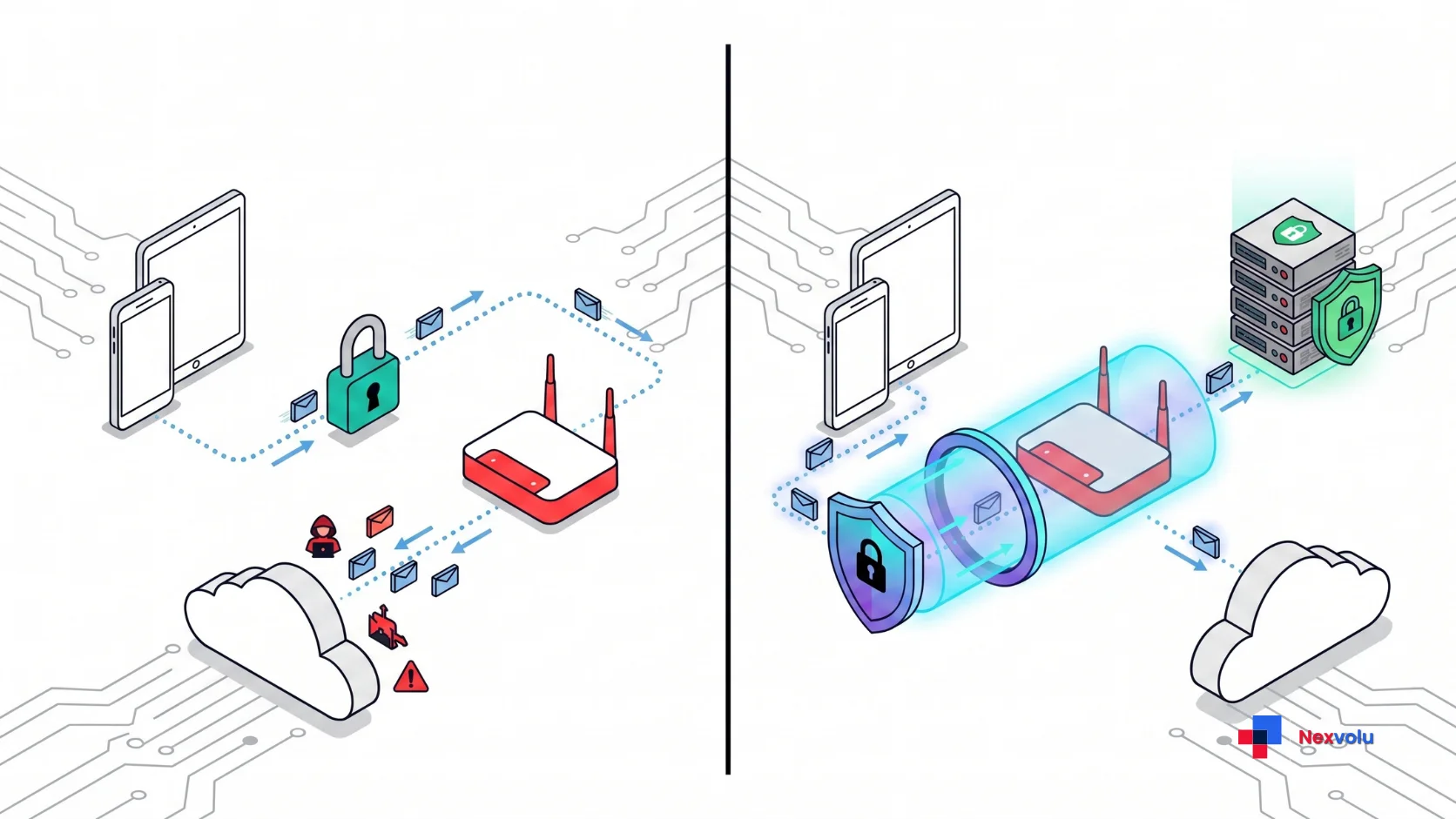
A VPN virtual private network does exactly one thing at a technical level. Essentially, it builds an encrypted tunnel from your device to a server run by the provider, and sends all your internet traffic through it. As a result, two consequences follow, and only two.
The Two Things It Actually Changes
First, your local network and your internet provider stop being able to see where you are going. They can see that you have an encrypted connection to a VPN server, and nothing beyond that. Your ISP loses the list of domains you visit.
Second, websites stop seeing your real IP address. They see the VPN server’s IP address instead, which is why a VPN can make you appear to be in Tokyo when you are in Manchester. That is the whole basis of using a VPN to reach geo-blocked content.
That is it. Everything else marketed as a benefit is therefore either a bundled extra product (an ad blocker, a password manager, a breach monitor) or a misunderstanding.
What HTTPS Already Does for You
In fact, here is the part the affiliate pages skate over. Since roughly 2018, the overwhelming majority of web traffic has moved to HTTPS, which encrypts the contents of your connection between your browser and the website. The lock icon in your address bar means that even on a hostile network, a snooper cannot read your password, your messages, your bank balance, or the pages you load. In other words, the tunnel adds a second encrypted layer on top of one that already exists. Two locks on a door is not nothing but it is a much smaller upgrade than “protect yourself on public Wi-Fi” implies.
Notably, the US Federal Trade Commission put it plainly in its own consumer guidance: “Because of the widespread use of encryption, connecting through a public Wi-Fi network is usually safe.”
The 14-Threat Audit: What a VPN Really Fixes
Instead of arguing in generalities, we built a coverage audit. Specifically, we took the fourteen threats that consumers actually ask about pulled from People Also Ask boxes, the top VPN buying guides, and years of Reddit threads and scored what a VPN does about each one.
| # | Threat | Does a VPN fix it? | What actually fixes it |
|---|---|---|---|
| 1 | Your ISP logging which sites you visit | ✅ Fully | VPN – this is its core job |
| 2 | Websites seeing your real IP and rough location | ✅ Fully | VPN |
| 3 | A network operator blocking sites (school, office, hotel) | ✅ Fully | VPN |
| 4 | Country-level censorship or geo-blocking | ✅ Fully | VPN (obfuscated servers where needed) |
| 5 | Someone on the same Wi-Fi reading an unencrypted page | 🟡 Partly | HTTPS already covers this on almost every site |
| 6 | Evil-twin or fake hotspot | 🟡 Partly | VPN helps; browser certificate warnings do more |
| 7 | Cross-site advertising trackers | 🟡 Partly | Browser hardening, tracker blocking, cookie controls |
| 8 | Price discrimination by region | 🟡 Partly | VPN plus a clean browser profile; often defeated |
| 9 | Data brokers building a profile on you | 🟡 Partly | Opt-outs, removal services, less data sharing |
| 10 | Phishing emails and fake login pages | ❌ Nothing | A password manager that refuses to autofill on fakes |
| 11 | Malware, ransomware, malicious downloads | ❌ Nothing | OS updates, endpoint protection, app-store discipline |
| 12 | Account takeover from reused passwords | ❌ Nothing | Unique passwords plus two-factor or passkeys |
| 13 | Google, Meta and Apple tracking you while signed in | ❌ Nothing | Account privacy settings; signing out; separate profiles |
| 14 | A company you use suffering a data breach | ❌ Nothing | Breach monitoring, unique credentials, minimal data given |
How to Read the Audit
The result: of fourteen commonly cited threats, a VPN fully solves 4, partly helps with 5, and does nothing at all for 5. Indeed, nine of the fourteen nearly two thirds are unaffected or barely affected by whether you subscribe. If your mental model was “a VPN makes me safe online,” the audit is the correction: a VPN makes you less visible, which is a different thing from being less vulnerable.
Why the Internet Got Safer Without You Noticing
The “you need a VPN on public Wi-Fi” advice is not a lie. It is a fossil. It was excellent advice in 2012, when a free browser extension called Firesheep could let anyone in a coffee shop hijack the Facebook session of anyone else in that coffee shop. That worked because sites sent session cookies in plain text.
In particular, three changes killed that attack:
- HTTPS everywhere. Free certificates and browser pressure pushed the web from a minority of encrypted traffic to nearly all of it. Browsers now warn loudly before loading an insecure page.
- HSTS and secure cookies. Sites can now instruct browsers to refuse unencrypted connections entirely, which removes the downgrade trick attackers relied on.
- Encrypted DNS. DNS-over-HTTPS and DNS-over-TLS, now on by default in major browsers and operating systems, hide the lookups that used to leak your browsing list to the local network.
The irony worth sitting with: VPN infrastructure itself has become an attack surface. Verizon’s 2025 Data Breach Investigations Report found that edge devices and VPN concentrators were involved in 22% of breaches caused by vulnerability exploitation, up from around 3% the previous year. Those are corporate VPN appliances rather than consumer apps, but the direction of travel matters. A VPN is not a neutral shield you add to a system. It is another piece of software, run by another company, that has to be trusted and patched.
You DO Need a VPN If…
This is the short list the affiliate pages should have written. If one or more of these is true, a VPN is a sensible purchase and you should stop reading and go buy a reputable one.
- You travel to or live in a country that censors the internet. This is the strongest case there is. A VPN restores access to news, messaging apps, and services that are blocked at a national level.
- You are a journalist, researcher, activist, or handle sensitive sources. Hiding the fact that you visited a particular domain from your ISP has real consequences in your work.
- Your employer requires one. Not optional, not a decision corporate VPNs exist to reach internal systems. Use the one they give you.
- You genuinely object to your ISP monetising your browsing history. In the US, ISPs have been permitted to sell customer browsing data since 2017. A VPN moves that visibility from your ISP to your VPN provider, which is only an upgrade if you trust the VPN more.
More Situations Where It Pays Off
- You spend most of your working life on networks you do not control. Digital nomads, consultants living in hotels, people who work from airports several times a month. Therefore, the cumulative exposure to badly configured and hostile networks justifies it.
- You use P2P or torrenting and your ISP sends notices. Whether or not the underlying activity is lawful where you are, a VPN is the standard technical answer to ISP-level monitoring of P2P traffic.
- You need a stable, known IP address for work allow-listed access to a client system, for example. Some VPN providers sell dedicated IPs for this.
- You share a network with people you do not trust. Student halls, houseshares, a landlord-managed router, a building-wide connection. You cannot audit that router, and a VPN means you do not have to.
- You want content licensed to another country and accept that it may stop working. Legitimate reason, unreliable outcome. See the streaming section below.
If none of those nine describe you, keep reading because the alternative list is probably where you belong.
You Probably Don’t Need a VPN If…
- You browse from home on a router you control, with a password you set.
- Your main devices are a phone and a laptop kept up to date, on HTTPS sites.
- Your “public Wi-Fi” is a café twice a month for email and a news site.
- You already sign in to Google, Meta, Amazon, or Apple all day. For example, the tunnel hides your IP address from them, and nothing else. They know who you are because you told them.
- You bought it because a YouTube sponsorship read said hackers were stealing data at airports.
- You want to stop ads following you around. That is a browser and account-settings problem, not a network problem.
The uncomfortable version: in short, for a typical logged-in consumer, the tunnel improves privacy against your ISP and the café router, and improves it not at all against the companies that hold the overwhelming majority of your data.

The Trust Transfer Nobody Explains
Here is the single most important concept in this article, and it is missing from nearly every buying guide, because it complicates the sale.
Crucially, a VPN does not eliminate the party that can see your browsing. It relocates it.
| Who can see it | Without a VPN | With a VPN |
|---|---|---|
| Your ISP | Every domain you visit | Only that you connected to a VPN |
| The café or hotel network | Every domain you visit | Nothing useful |
| The VPN provider | Nothing, not involved | Every domain you visit |
| Websites you visit | Your real IP address | A shared VPN IP address |
| Google / Meta / Apple, signed in | Everything you do in their products | Everything you do in their products |
| Your employer, on a work device | Whatever their software logs | Whatever their software logs |
Clearly, row three is the entire debate. You are choosing to be watched by a subscription company in a jurisdiction you probably cannot name instead of by a regulated telecoms provider in your own country. That is sometimes a clear win a censored country, a hostile network, a journalist’s threat model. Sometimes it is a lateral move dressed up as a security upgrade.
Why a No-Logs Policy Is the Whole Ballgame
For this reason, a no-logs policy matters, and consequently an unaudited claim of one is worth very little. The only meaningful evidence is an independent audit by a named firm, published in full, repeated on a schedule, ideally supported by a court case in which the provider genuinely had nothing to hand over. Ultimately, marketing copy that says “strict no-logs policy” with no audit link attached is a promise, not a control.
The Nexvolu VPN Necessity Score
We built this because “it depends” is a useless answer. Score yourself. Add up the points for every statement that is true of you.
| Statement | Points |
|---|---|
| I live in or regularly travel to a country that censors the internet | +3 |
| I connect to networks I do not control several times a week | +3 |
| I am a journalist, activist, researcher, or handle sensitive sources | +3 |
| My ISP is legally allowed to sell my browsing data and I object to that | +2 |
| My employer requires a VPN to reach work systems | +2 |
| I use P2P or torrenting and my ISP has sent notices | +2 |
| I share a network with people or a landlord I do not fully trust | +1 |
| I want to watch content licensed to another country | +1 |
| I compare prices across regions when booking travel | +1 |
| I want my home IP hidden from forums, game servers, and small sites | +1 |
| I browse personally on a work device on a shared network | +1 |
How to read your score
- 0-3 – Skip it. Spend the money on a password manager and turn on two-factor authentication everywhere. You will get more real security per pound than a VPN can offer you.
- 4-7 – Situational. Do not subscribe annually. Install a reputable VPN and switch it on for specific situations: hotel Wi-Fi, a conference, a trip. Many providers bill monthly for this exact reason.
- 8-12 – Yes, subscribe. A VPN addresses a real and recurring part of your life. Buy a longer term for the discount and pick on audit history, not on speed-test charts.
- 13+ – Non-negotiable. Your threat model is above consumer level. Choose an independently audited, RAM-only provider, understand its jurisdiction, and pair it with hardened DNS, a password manager, and 2FA. A VPN alone is not your answer, only part of it.
What a VPN Costs vs What It Buys
Month-to-month, consumer VPNs cluster around $10 to $13. Multi-year plans routinely cut that by 70% or more, landing near $2 to $4 a month which is why every review site pushes the two-year deal. Over three years, a mid-tier subscription runs roughly $100 to $150.
By comparison, set that against the alternatives for the same money:
- A family password manager for a year, which prevents the credential-stuffing attacks that cause a large share of consumer account compromises.
- A hardware security key or two, which effectively ends phishing against your most important accounts.
- A data-broker removal service for a year, which attacks the profile problem a VPN cannot touch.
Consequently, if your score above was low, all three of those beat a subscription on security value per pound. Admittedly, that is not an argument that VPNs are a scam. It is an argument about ordering. A VPN is a reasonable fourth purchase and a poor first one.
What to Do Instead If You Skip the VPN
If you decided against subscribing, do these six things this week. Together they cost almost nothing and outperform a VPN for the average person.
- Turn on automatic updates for your OS, browser, and phone. After all, unpatched software is the actual entry point in most consumer compromises.
- Install a password manager and let it generate a unique password for every account. Importantly, this single change removes the most common route into your accounts.
- Turn on two-factor authentication, preferring an app or a passkey over SMS. Moreover, SIM swapping makes SMS the weakest option.
- Switch on encrypted DNS in your browser or OS settings. It hides your lookups from the local network one of the few genuine privacy wins a VPN gives you, available free.
- Tell your phone to forget open networks and disable auto-join for public Wi-Fi. That kills the evil-twin scenario more effectively than a VPN does.
- Audit your Google, Meta and Apple privacy settings. Turn off ad personalisation and delete stored activity. This is where your real profile lives.
Nexvolu’s Verdict
Nexvolu Editorial Score: 6/10 – worth it for a specific minority, oversold to everyone else.
Overall, a VPN is a well-built tool with a narrow and genuine job: it hides your destinations from your network and your address from websites. For people whose lives include censorship, constant untrusted networks, sensitive work, or an ISP they refuse to trust, it is close to essential and the 6/10 becomes a 9/10.
By contrast, for everyone else it has been sold, aggressively and profitably, as general-purpose internet safety which it is not, and never was. The web fixed the problem the marketing still describes. Buy one if your score says so. Do not buy one because a sponsored video told you airports are dangerous.
Frequently Asked Questions
Do I need a VPN at home?
Usually not. On a router you control with a password you set, the main thing a home VPN changes is that your ISP can no longer see which sites you visit. If that specifically bothers you, a VPN solves it. It will not make your home network more secure in any other way.
Home networks are the environment a VPN helps least, because the two parties it hides you from are the local network operator you and your ISP. Meanwhile, everything else stays the same: your devices, your accounts, your logged-in sessions. If ISP visibility is the concern, weigh whether you trust the VPN company more than your ISP, and check whether encrypted DNS gets you most of what you want for free.
Do I need a VPN on public Wi-Fi in 2026?
Far less than you have been told. Because nearly all sites now use HTTPS, someone on the same network cannot read your passwords or messages. The FTC’s own guidance says connecting through public Wi-Fi is usually safe. A VPN still adds a layer, and is sensible if you use such networks constantly.
The residual risks are narrow: an unencrypted site, a hostile captive portal, or a fake hotspot you willingly join. Of course, a tunnel helps with all three, but so does never ignoring certificate warnings, disabling auto-join, and using your phone’s hotspot when the network looks suspect. Frequent travellers get real value here. By contrast, someone in a café twice a month does not.
Does a VPN make me anonymous?
No. A VPN hides your IP address from websites and your browsing from your ISP. It does not make you anonymous. The moment you sign in to any account, that service knows exactly who you are, VPN or not.
Anonymity requires defeating browser fingerprinting, cookies, account logins, payment trails and behavioural patterns none of which a VPN touches. Providers that market “anonymous browsing” are describing IP masking. If genuine anonymity is your requirement, Tor plus strict operational discipline is the tool, and even that has limits.
Can my ISP still see what I do if I use a VPN?
No, and this is the clearest benefit a VPN offers. Your ISP sees an encrypted connection to a VPN server, plus how much data you moved and when. It cannot see which sites you visited or what you did there.
What it can still see is metadata: that you use a VPN, which provider, connection times, and volume. In most places that is unremarkable. Be aware that the visibility does not vanish it moves to your VPN provider, which is why audited no-logs claims matter far more than server counts.
Is a free VPN safe?
Generally no. Running VPN infrastructure is expensive, so free providers monetise somewhere else usually by logging and selling browsing data, injecting ads, or throttling you into upgrading. A free VPN often makes your privacy worse than no VPN at all.
Free tiers remain extremely popular; according to provider-side estimates, roughly half of all VPN users are on one. The safe exceptions are limited free tiers from reputable paid providers, and non-profit or research-backed services with published funding. If you cannot identify how a free VPN pays its bills, assume the answer is you.
Does a VPN stop hackers?
Only one narrow category. A VPN prevents someone on your local network from observing your traffic. It does nothing against phishing, malware, ransomware, credential stuffing, or a breach at a company holding your data which is how consumer accounts are actually compromised.
In our 14-threat audit, a VPN did nothing for five of the most common consumer attacks. If “stop hackers” is your goal, unique passwords, two-factor authentication and prompt updates deliver dramatically more protection than a subscription. Use a VPN for visibility, not for defence.
Will a VPN stop ads and tracking?
Partly, and less than advertised. Changing your IP address removes one tracking signal, but advertisers rely mainly on cookies, browser fingerprints, and your logged-in accounts all of which follow you through a VPN tunnel unchanged.
Many VPN apps bundle a tracker blocker, and that component does help but it is a separate feature you can get free from a browser extension. If cross-site tracking is your concern, a privacy-focused browser, tracker blocking, and switched-off ad personalisation in your Google and Meta accounts will do more than any VPN.
Does a VPN slow down my internet?
Yes, always, though often not enough to notice. Encryption and the detour through a distant server add overhead. On a modern protocol with a nearby server, expect roughly 5% to 20% loss; on a far-away server, considerably more.
Latency matters more than raw speed for real-time use. Competitive gaming and video calls suffer most, streaming and browsing least. If speed matters, pick the closest server, use a current protocol such as WireGuard, and consider split tunnelling so that only the traffic that needs the VPN goes through it.
Do I need a VPN for streaming Netflix?
Only if you want a different country’s catalogue, and it works unreliably. Netflix blocks VPNs on ad-supported plans entirely, and on other plans limits VPN users to titles Netflix owns globally. Streaming services actively detect and block VPN IP ranges.
This is a permanent arms race: providers rotate IPs, platforms block them again. One that unblocks a library today may fail next month. It is a legitimate reason to buy one just do not buy an annual plan expecting a guarantee, and check your provider’s refund window before committing.
Are VPNs legal?
In most countries, yes – the UK, US, Canada, Australia and the EU all permit VPN use. A handful of countries including China, Russia, Iran and Belarus restrict, license, or ban them. Using a VPN never legalises something that is otherwise illegal.
Rules also change and enforcement varies from “technically banned, widely ignored” to “actively prosecuted”. If you travel, check current local law before you land rather than assuming. Corporate VPN use is legal essentially everywhere, since it is standard business infrastructure.
Do I need a VPN on my phone?
Roughly the same answer as on a laptop, with one difference: mobile data is already encrypted between your phone and the network, so the public Wi-Fi case is the only one that really changes. Using mobile data instead of public Wi-Fi is often the simpler fix.
Meanwhile, apps are the bigger mobile privacy problem, and no tunnel solves it – apps you have granted permissions to send data regardless of which tunnel it travels through. If you want mobile privacy, audit app permissions, turn off ad tracking identifiers, and prefer mobile data over unknown networks.
What is a no-logs policy and does it matter?
A no-logs policy is a provider’s promise not to record what you do while connected. It matters enormously, because a VPN moves the ability to watch your browsing from your ISP to the provider. Unverified, it is only a promise.
Look for a full independent audit by a named firm, published rather than summarised, and repeated on a schedule rather than once. RAM-only server infrastructure and a track record of genuinely having nothing to give investigators are stronger evidence than any marketing page. Jurisdiction matters too, but audits matter more.
Does a VPN hide my IP address from websites?
Yes. This is one of the two things it reliably does. Sites see the VPN server’s IP address, which means they see the server’s approximate location rather than yours.
At the same time, be aware of leaks and limits. Misconfigured DNS, WebRTC in your browser, or a dropped connection without a kill switch can expose your real address. Shared VPN IPs also carry reputations, which is why you may hit more CAPTCHAs, blocked sign-ups, or refused bank logins while connected.
Do I need a VPN for online banking?
No. Banking apps and sites already use strong encryption and certificate pinning, so an extra tunnel adds nothing meaningful. It can actively hurt: banks often flag logins from unfamiliar or foreign IP addresses and lock the session.
If you bank on public Wi-Fi and feel uneasy, switch to mobile data rather than a VPN. If you do use one, connect through a server in your own country. The genuine banking protections are a unique password, two-factor authentication, and never following a link from an email to sign in.
Does a VPN protect me from viruses and malware?
No. A VPN encrypts and reroutes traffic; it does not inspect files or block malicious downloads. If you download an infected file through a VPN tunnel, it arrives perfectly encrypted and perfectly infected.
Some providers bundle a malicious-domain blocker, which offers modest help by refusing known bad sites closer to a DNS filter than to antivirus. Real malware defence comes from keeping software updated, using built-in protections such as Windows Defender or macOS Gatekeeper, and installing software only from sources you trust.
Should I use a VPN for torrenting?
If you use P2P, yes – this is one of the clearest practical cases. BitTorrent exposes your IP address to every other peer in the swarm, and ISPs monitor P2P traffic and send notices. In effect, it removes both exposures.
Choose a provider that permits P2P, offers a kill switch that cuts traffic if the tunnel drops, and has a credible audited no-logs record otherwise you have simply changed who holds the record. A VPN conceals your address; it does not change the legality of downloading copyrighted material where you live.
The Bottom Line
Most people asking “do I need a VPN” are asking because something told them they were unsafe. Usually they are not the web quietly fixed the problem that advice was written for. Run the Necessity Score honestly. If you land at 8 or higher, buy a good one and pick it on audits. If you land at 3 or lower, close the tab, install a password manager, and enjoy the money you did not spend.
The question was never “is a VPN good”. It is “is a VPN good for me” and for the first time, you have a way to answer that which nobody was paid to write.
References
- Federal Trade Commission, Consumer Advice – Are Public Wi-Fi Networks Safe? What You Need To Know
- Verizon – 2025 Data Breach Investigations Report
- Security.org – How Much Does a VPN Cost?
- Security.org – VPN Usage Statistics
- Netflix Help Center – Netflix and VPN or proxy use


