
Are Password Managers Safe? The Honest Threat Model
Are password managers safe? In March 2025, federal investigators tied a $150 million cryptocurrency theft to a password manager breach that had happened almost three years earlier. Every stolen vault still carried full encryption at the moment of the theft. The thieves waited, cracked the weak ones offline, and were still draining wallets in late 2025.
That is the story people half-remember when they ask whether password managers are safe. It sounds like a reason to keep using sticky notes.
It isn’t. Because when you read the incident closely, a specific pattern shows up: nobody broke the encryption. They broke the humans who chose short master passwords, and the old settings on accounts nobody had upgraded. Everyone with a strong master password on modern settings walked away untouched from the worst breach the industry has had.
So the honest answer to “are password managers safe” isn’t a flat yes or no. A password manager moves your risk from a place you can’t control (dozens of websites that keep getting breached) to a place you can (one master password and a few settings). Whether that’s an upgrade depends on what you do in the first five minutes.
Rather than a ranked product list, this guide walks the threat model – what an attacker actually gets in a provider breach, what zero-knowledge encryption really promises, what the 2026 research changed – then a five-minute setup walkthrough.
Are password managers safe?
Password managers are safe for almost everyone, because your vault is encrypted on your device before it ever reaches the provider’s servers. A breach of the provider gives attackers an encrypted file, not your passwords. The real risk is a weak master password, outdated encryption settings, or a compromised device, not the vault itself.
Are Password Managers Safe After a Provider Breach?
Start with the fear, because it’s reasonable: you’re putting every password in one basket, and that basket is a jackpot target.
Here’s what a provider breach really looks like, using the worst documented case. In August 2022, an attacker got into LastPass’s development environment and took source code. Months later, a second intrusion used a keylogger on a senior engineer’s home computer to reach an internal vault of keys, which unlocked backups of customer data. According to the UK Information Commissioner’s Office, that backup included both unencrypted fields such as the website URLs stored in each vault and encrypted fields containing usernames and passwords.
Above all, read that split again. The attacker walked out with a list of every site you have an account on, in plain text, plus a locked box holding the credentials for them. Then the clock started. Because the vault copies sat on the attacker’s own hardware, there was no rate limit, no lockout, no alert email. Krebs on Security put it plainly: offline access gives thieves all the time in the world.
In fact, that’s exactly what happened. TRM Labs reported in December 2025 that attackers were still cracking and draining vaults from the 2022 theft years later, and that they went after crypto holders first a stolen seed phrase pays instantly.
The Four-Rung Breach Ladder
So the breach ladder has four rungs, and a provider breach only gets an attacker to the second one:
| Rung | What the attacker has | What stops them |
|---|---|---|
| 1. Server access | Encrypted vault blobs + metadata like site URLs | Nothing – assume this can happen |
| 2. Offline cracking | Unlimited guesses at your master password | Master password strength + KDF settings |
| 3. Vault decrypted | Every credential you stored | 2FA on critical accounts |
| 4. Accounts drained | Money, identity, email | Breach monitoring and fast rotation |
In particular, every victim in the LastPass fallout fell down rungs 2 and 3. The encryption held; the passphrases didn’t.
Are Password Managers Safe Because of Zero-Knowledge Encryption?
Vendors use “zero-knowledge” as a marketing word, so it’s worth pinning down where it stops.
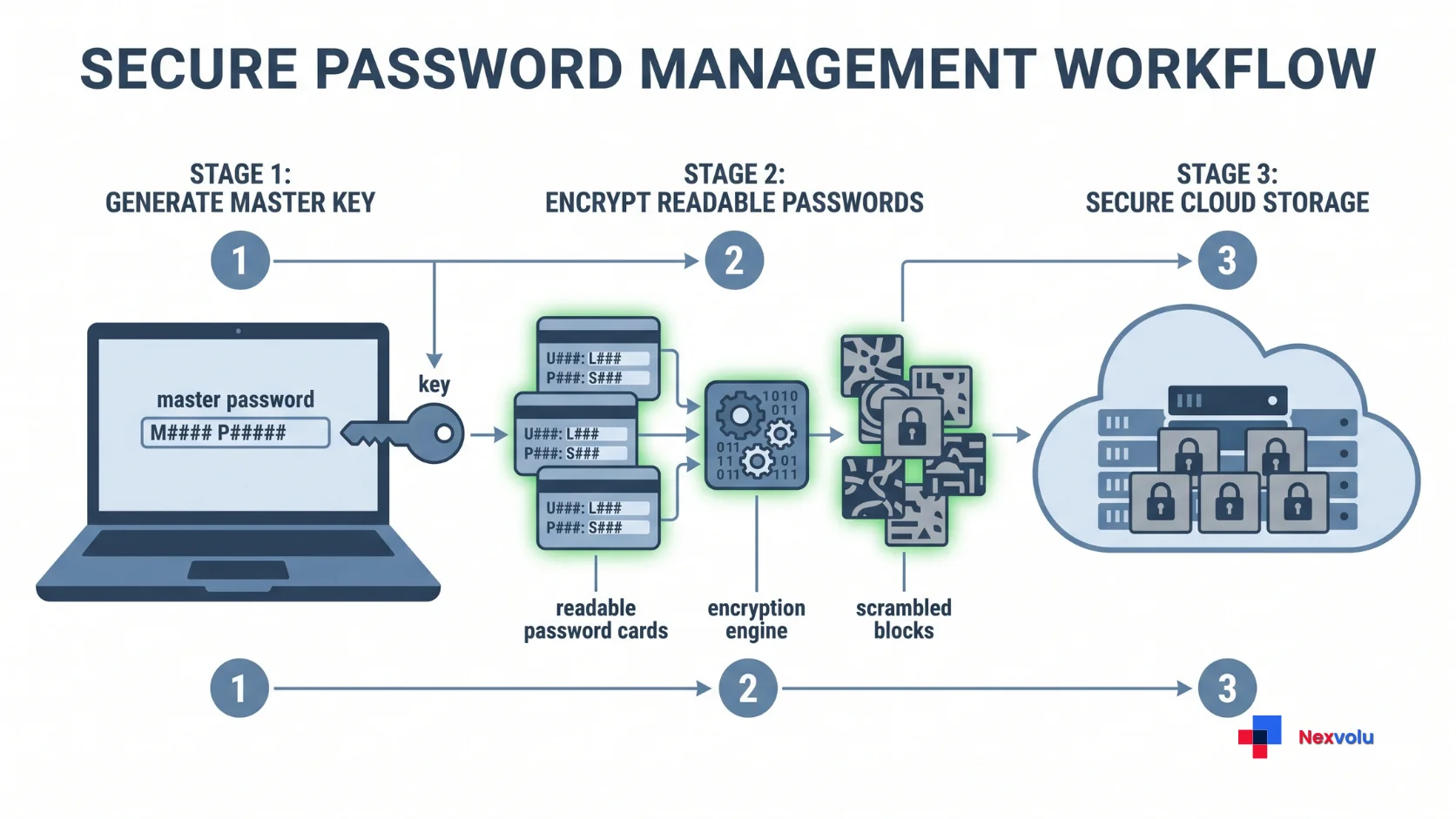
When you type your master password, it never leaves your device not in plain form, not hashed, not “securely transmitted.” Your device runs it through a key derivation function (KDF), which deliberately burns time and memory to turn a human-length password into a cryptographic key. That key encrypts your vault locally with AES-256 or an equivalent cipher. The provider stores the resulting scramble and genuinely cannot read it.
The One Setting Nobody Checks
The KDF decides whether you survive rung 2, and almost nobody checks it. OWASP’s current guidance is 600,000 iterations for PBKDF2-HMAC-SHA-256, or Argon2id with at least 19 MiB of memory. Bitwarden meets or beats that by default. Accounts created years ago, though, keep their old settings until someone changes them manually the quiet vulnerability in a lot of vaults right now.
In comparison, 1Password takes a different route. Alongside your master password it generates a 128-bit Secret Key on your device, and you need both to derive the unlock key. The company never receives it. As a result, an attacker cannot brute-force a stolen vault at all, because the attacker is missing 128 bits of true randomness, so a LastPass-style theft would have produced no cracked accounts.
What zero-knowledge does not promise: that the metadata is hidden, that the software running in your browser is honest, or that a hostile server can’t misbehave in other ways.
Are Password Managers Safe After the 2026 ETH Zurich Study?
On 16 February 2026, researchers from ETH Zurich and the Università della Svizzera italiana published a comparative security analysis of cloud password managers. They modelled a malicious server meaning a compromised or dishonest provider and found 27 attack scenarios across Bitwarden, LastPass and Dashlane, three platforms serving more than 60 million people. They analysed 1Password as well.
The headlines said password managers are “less secure than promised.” That’s fair about marketing language, but misleading as advice to a normal user. Here’s why.
The researchers did not break AES, and they didn’t crack anyone’s master password. Instead, they found design gaps that only matter once the server is already in attacker hands: fields left unencrypted that shouldn’t be, and public keys in sharing features that clients never properly authenticate, letting a hostile server swap in a key it controls. Dashlane traced one issue to legacy cryptography kept for backwards compatibility. Bitwarden, meanwhile, said it had fixed or was remediating seven of the ten reported issues, while it accepted three as deliberate design trade-offs.
Are Password Managers Safe Despite the 27 Attack Scenarios?
Our read: the study is a real argument that sharing features are the weakest part of modern vaults, and that “zero-knowledge” shouldn’t be sold as an absolute. It is not an argument for going back to reused passwords. The Swiss researchers said as much.
One practical takeaway is actionable today: turn on two-factor authentication for the vault account itself. Several of the modelled attacks assume the attacker can act as your account, and 2FA breaks that assumption.
The math nobody shows you
Every article tells you to pick a strong master password. However, almost none of them show what “strong” buys you. So here’s a transparent estimate you can check yourself.
How Long a Master Password Survives Offline
Assumptions (stated openly): an attacker with a rig capable of roughly 10 billion raw SHA-256 operations per second. PBKDF2 with 600,000 iterations costs about 1.2 million SHA-256 compressions per guess, giving roughly 8,300 guesses per second on that rig. Scale it to a hundred such machines about 830,000 guesses per second. These are order-of-magnitude figures, and every number is an average time-to-crack.
| Master password | Possible combinations | Estimated time to crack |
|---|---|---|
| 8 characters, lowercase + digits | 2.8 trillion | About 20 days |
| 12 characters, mixed but predictable | ~100 quadrillion | Roughly 2,000 years |
| 4 random words (Diceware) | 3.7 quadrillion | About 70 years |
| 5 random words (Diceware) | 28 quintillion | Over 500,000 years |
Two things jump out. For example, the eight-character password that feels “fine” for a shopping site is a three-week job for an attacker holding your vault file that’s the LastPass story in one row. And four random words already puts you outside any realistic attack window, while five puts you outside physics. You need length and real randomness words picked by a generator, not by your brain.
What Old KDF Settings Do to These Numbers
Now run the same math against old settings. A legacy vault still on 5,000 KDF iterations is 120 times cheaper to attack. That 20-day password becomes a four-hour job. Same password, same encryption, different setting and it’s a setting sitting in your account security page right now.
Are Password Managers Safe from Browser and Device Attacks?
The threat model most guides skip lives outside the encryption entirely. Three parts deserve attention.
Your browser extension. At DEF CON 33 in August 2025, researcher Marek Tóth demonstrated DOM-based extension clickjacking: an invisible overlay sits exactly where the autofill dropdown appears, so one click anywhere on a malicious page can hand over credentials, card details, even 2FA codes. The disclosure covered eleven password managers with a combined 40 million installs, and most of them have since shipped fixes. The lesson isn’t “stop using extensions” it’s keep them updated and switch autofill to click-to-fill.
Your recovery path. A vault you can’t get back into is a vault you’ll abandon. 1Password issues an Emergency Kit with your Secret Key, Proton Pass uses a recovery phrase, Bitwarden supports opt-in organizational recovery. Therefore, print it. Otherwise, digital-only backups simply recreate the single point of failure you set out to remove.
Your device. If a keylogger is running on your computer, no vault design saves you that’s precisely how attackers compromised the LastPass engineer’s machine.
In short, all three are things you control. That’s the real argument for password managers: they convert unmanageable risk into managed risk.
Are Password Managers Safe Compared With Browsers, Paper, and Memory?
| Method | Breach resistance | Unique passwords | Phishing protection | Realistic weak point |
|---|---|---|---|---|
| Dedicated password manager | Strong – encrypted vault, offline-cracking resistant | Yes, generated | Good – autofill checks the domain | Weak master password |
| Browser saved passwords | Moderate – tied to your OS or Google account | Partial | Decent on modern browsers | Anyone with your unlocked device |
| Paper notebook | Excellent against remote attacks | In theory, rarely in practice | None | Fire, loss, typing fatigue leading to reuse |
| Memory | Perfect secrecy | Almost never | None | Reuse – the biggest cause of account takeover |
Why Password Reuse Is the Bigger Risk
Meanwhile, the last row is where most people live, and the data condemns it. Verizon’s 2025 Data Breach Investigations Report, analysing single sign-on logs, found credential stuffing made up a median 19% of all authentication attempts, and that only 49% of a typical user’s passwords were distinct.
In other words, a password manager ends reuse the vulnerability attackers exploit constantly. Compare that with the LastPass breach, which needed a sophisticated intrusion, three years of offline computing, and you personally choosing a weak master password.
Try it this week: pick your five most valuable accounts email first, then bank, then anything holding money or identity and give each one a freshly generated password. If you do nothing else from this article, do that.
How to Set Up a Password Manager Safely in Five Minutes
Skip the research paralysis. After all, any well-audited option beats what you’re doing now, and switching later is a two-minute export.
- Pick one and install it. Bitwarden for free and open-source, 1Password for the Secret Key design, Proton Pass if you’re already in that ecosystem, KeePassXC if you refuse to sync to a cloud.
- Make the master password four or five random words. In other words, let the generator pick them, not your memory. Write it on paper once and store it where you keep your passport.
- Turn on two-factor authentication for the vault itself. The 2026 research made this non-optional. Authenticator app or hardware key, not SMS.
- Save your recovery kit offline before you add a single password.
- Check your KDF settings. In Bitwarden: Account Settings → Security → Keys. If it sits below 600,000 iterations, raise it. This one setting beats switching providers.
- Import your browser passwords, then delete them from the browser. After all, two copies is two chances to leak.
- Run the built-in security report and fix the flagged weak, reused and breached credentials by value, not list order.
- Set autofill to click-to-fill. Slightly slower, and it closes the clickjacking attack class.
After that, the remaining passwords rotate naturally, because you can change each one the next time a site makes you log in.
Are Password Managers Safe in a Passkey World?
The honest 2026 update: passkeys are slowly replacing passwords, and your password manager is where that transition will happen.
The FIDO Alliance’s State of Passkeys 2026 report counts 5 billion passkeys in active use, with 90% awareness and 75% of people having enabled one somewhere. Passkeys are phishing-resistant by design there’s no shared secret to steal or type into a fake page.
But only 49% use them regularly even when offered, because coverage is patchy. Your bank may support them; your utility portal won’t. So the realistic 2026 setup is a password manager that also stores passkeys the strong option where it exists, generated passwords everywhere else. A vault today isn’t a bet against passkeys. It’s the container both live in.

Nexvolu’s Verdict
The verdict: Password managers are the single highest-return security decision available to a normal person, and weak master passwords and stale settings caused every documented disaster, not broken encryption.
Best for: Anyone with more than a dozen accounts, anyone who has reused a password, and anyone holding crypto or business logins.
Skip it if: you have five accounts, no money online, and a notebook you never lose.
Pros: Ends password reuse, the cause of most account takeovers · Encrypts locally, so a provider breach yields a locked file · Flags breached and weak credentials automatically.v
Cons: One master password becomes a real single point of failure · Browser extensions have been a repeated soft spot · Sharing features are the weakest link in current designs, per the 2026 ETH Zurich analysis.
Standout: The most underreported detail in the LastPass story isn’t the encryption it’s that every vault stored its website URLs unencrypted. Attackers knew exactly which victims held crypto before they cracked a single vault. Metadata chose the targets.
Nexvolu Editorial Score: 9/10 – an editorial score, not a lab test: near-perfect on value, with a point held back because recovery and sharing still ask too much of users.
Frequently asked questions
Are password managers safe from hackers?
Password managers are safe from hackers in the sense that matters most: your vault is encrypted on your device with a key derived from your master password, so a breach of the provider hands attackers an unreadable file rather than your credentials. So far, no major provider breach has actually broken that encryption.
The qualifier is that attackers can hammer a stolen vault offline, without rate limits, for years. A four-word random passphrase on modern key derivation settings puts cracking beyond any realistic budget, while an eight-character password can fall in weeks. Add two-factor authentication on the vault account and you’ve closed the paths that actually produced victims.
What happens if my password manager gets hacked?
If someone breaches your provider, attackers typically obtain encrypted vault copies plus some unencrypted metadata, such as the list of websites you have accounts on. They cannot read your passwords without your master password, but they can attempt to guess it offline for as long as they like.
Respond in order. Change the master password, which re-encrypts the vault with a new key going forward. Rotate credentials for your highest-value accounts first email, banking, anything holding cryptocurrency. Confirm 2FA is active everywhere it’s offered, since it blocks an attacker who does eventually recover a password. Then expect phishing: the leaked site list tells attackers exactly which services to impersonate.
What if I forget my master password?
In a true zero-knowledge system, forgetting the master password usually means losing the vault. The provider cannot reset it, because they never held the key that’s the same property protecting you from a server breach. Recovery depends entirely on material you saved in advance.
Every major provider offers something: 1Password’s Emergency Kit, Proton Pass’s recovery phrase, Bitwarden’s opt-in organizational recovery, and biometric unlock on a device still logged in. Above all, print the recovery material the day you sign up and store it with documents you’d never throw away.
Is a password manager safer than my browser’s saved passwords?
A dedicated password manager is meaningfully safer than browser-saved passwords, mainly because of what surrounds the encryption: stronger key derivation, a separate master password rather than your OS or Google login, cross-browser portability, and security reports that flag reused or breached credentials.
Still, modern browsers beat reuse, so treat this as a ranking rather than a warning. The practical gap shows up twice: anyone with your unlocked laptop can usually view browser passwords behind one OS prompt, and browsers rarely nudge you to fix reuse. If you’re moving over, import the browser set into your vault, then delete the browser copies.
Are free password managers safe?
Free password managers can be entirely safe, and the free tier of a well-audited product beats a paid product with a weak security record. Bitwarden’s free plan includes unlimited passwords across unlimited devices with the same encryption as its paid tiers, and KeePassXC is free, open-source, and stores everything locally.
Scrutinise evidence rather than price: security whitepapers, independent audits, a public vulnerability disclosure process, and a habit of answering researchers instead of dismissing them. In addition, the 2026 ETH Zurich study is a useful filter read how each vendor replied. Avoid unknown free apps with no audit history, since the business model behind a free vault matters as much as the code.
Do I still need a password manager if I use passkeys?
You still need a password manager, because passkey coverage is incomplete. The FIDO Alliance’s 2026 report counts 5 billion passkeys in active use with 90% consumer awareness, yet only 49% of people use them regularly when available, mainly because so many services still haven’t implemented them.
Until that changes, most accounts will keep asking for a password especially older or smaller services. Use a password manager that stores both, so passkeys handle your major accounts and generated passwords cover everything else from one place. When a service adds passkey support, your vault already holds it.
Conclusion
So, are password managers safe? Yes, and three things are worth keeping.
First, the encryption has never been the failure point. In the worst breach the industry has recorded, three things hurt people instead: a short master password, an old key derivation setting, and metadata that told attackers who to target first.
Second, the risk you carry right now is not hypothetical: roughly one in five login attempts on a typical service is someone trying a stolen password, and about half of a typical person’s passwords aren’t unique.
Finally, the fix is small. Four random words, 2FA on the vault, one printed recovery kit, and a KDF setting at 600,000 or above past the point where any documented attack has succeeded.
Share this with the person in your life who still keeps passwords in a notes app – they’re the reason breach lists keep working.
What’s stopping you – the master password, the recovery worry, or the afternoon it takes to move everything? Tell us in the comments.
References
- Feds Link $150M Cyberheist to 2022 LastPass Hacks – Krebs on Security, March 2025
- LastPass 2022 Breach Led to Years-Long Cryptocurrency Thefts – The Hacker News, December 2025
- 2022 LastPass data breach – Wikipedia (ICO findings)
- Password managers less secure than promised – ETH Zurich, February 2026
- Zero Knowledge (About) Encryption – IACR ePrint 2026/58
- DOM-based Extension Clickjacking – Marek Tóth, DEF CON 33
- Password Storage Cheat Sheet – OWASP
- Encryption Key Derivation – Bitwarden
- About your Secret Key – 1Password
- The State of Passkeys 2026 – FIDO Alliance
- 2025 Data Breach Investigations Report – Verizon


