


Your Google Ads search terms audit starts with a simple question: are you paying for searches that match what you actually sell? The search terms report can reveal irrelevant queries, but a click without a conversion is not automatically wasted spend.
To audit it, check conversion tracking, review visible searches by cost, and classify each term as keep, investigate, or exclude. Then test each proposed negative keyword against searches you still want to reach. This guide walks through a fictional example for a local service business.
Table of contents
Understand the Google Ads search terms report
A search term is what a person types into Google or a Search Network site. A keyword is a word or phrase an advertiser adds to an ad group to help match ads to searches. The two can differ. For example, a keyword about commercial plumbing could match a search for a plumbing job rather than a business needing repairs.
A negative keyword tells Google Ads not to show an ad for searches that match the exclusion under its applicable match rules. This can reduce irrelevant traffic, but a poorly chosen negative can also block valuable demand.
Google’s search terms report shows queries used by a significant number of people that triggered your ads. Some lower-activity searches are omitted to protect user privacy. Search terms insights can provide additional context by grouping searches into categories and subcategories, including aggregated “other search terms,” without revealing every individual query. Therefore, neither view should be treated as a complete record of every paid search.
This tutorial focuses on standard Search campaigns. Performance Max has a separate Search terms and landing pages report, while Search terms insights also provide grouped search themes for eligible Search, Performance Max, and Shopping campaigns. Reporting coverage and exclusion controls differ by campaign type and inventory, so do not assume this workflow covers every placement. For a broader decision about acquisition channels, see Nexvolu’s SEO vs PPC guide for small businesses.
Prepare your Google Ads search terms audit
Confirm the business goal and conversion tracking
Start with the offer, service area, and outcome. For a local plumber, a booked commercial repair may be valuable; an employment application is not. A retailer or recruiting business might reach the opposite conclusion for the same word.
Next, check which conversion actions are included in the campaign’s selected goals. Confirm that meaningful business outcomes, such as qualified leads, booked appointments, or completed sales, are configured correctly.
Google Ads distinguishes primary and secondary conversion actions. Primary actions can appear in the Conversions column and be used for bidding when the campaign uses the relevant goal. Secondary actions are generally reported in All conversions rather than Conversions, unless included in a custom goal.
Test the relevant forms or calls using an appropriate approved method, and check for missing or duplicate events. If the business cares about qualified leads rather than raw form submissions, use CRM or offline conversion information where available to distinguish the two. Otherwise, a reported form submission should not automatically be treated as a qualified lead.
Ask sales or the client which inquiries became qualified opportunities when that information is available. A form submission alone does not prove a search was profitable. Likewise, revenue is not the same as gross profit.
Pick a useful date range
Choose a period long enough to include useful spend and typical sales cycles. A 30- to 90-day starting range may help, but it is not a universal rule. Compare equivalent periods and note major offer, targeting, or tracking changes.
Allow for conversion lag: the delay between an ad interaction and the eventual conversion. Recent clicks may not have had time to convert, so their cost may already be recorded while some conversions are still missing. Depending on the configured conversion window, conversions can be reported up to 90 days after an ad click.
Check your usual time to conversion and the reporting window before judging recent performance. Google’s conversion delay reporting and Days to conversion breakdown can help you understand when additional conversions are likely to appear.
Open the Google Ads search terms report
In Google Ads, select Campaigns → Insights and reports → Search terms. Choose the relevant Search campaign and date range. Interface labels can change, and access or available columns may vary.
Add or inspect the Search term, campaign, ad group, clicks, cost, conversions, cost per conversion, and conversion value columns where relevant. Keep the Match type column visible too.
The Keyword column is not displayed by default. To enable it, select Columns → Attributes, tick Keyword, and apply the change. This helps identify which advertiser-added keyword triggered the search. Where network mix matters, use the available Network segmentation to distinguish Google Search from Search partners.
Sort by cost to prioritize the highest-spend queries, then download the report if a spreadsheet makes review easier.
Before labeling spend, confirm whether the view includes only the campaigns and networks you intend to assess. Record the date range, currency, filters, and conversion actions. This makes the result easier to compare later.
Review and classify Google Ads search terms
A Google Ads search terms audit should separate intent from performance. Read each query in the context of its specific campaign, landing page, service area, and offer. Then assign one of three decisions:
- Keep: the search fits the offer or has credible business value. Review relevant conversions and lead quality before making changes.
- Investigate: the intent is unclear, data is thin, tracking may be incomplete, or conversions may arrive later. Check the landing page and sales feedback before excluding it.
- Exclude: the search clearly conflicts with the campaign’s purpose, and the proposed negative has an acceptable risk of blocking other searches.
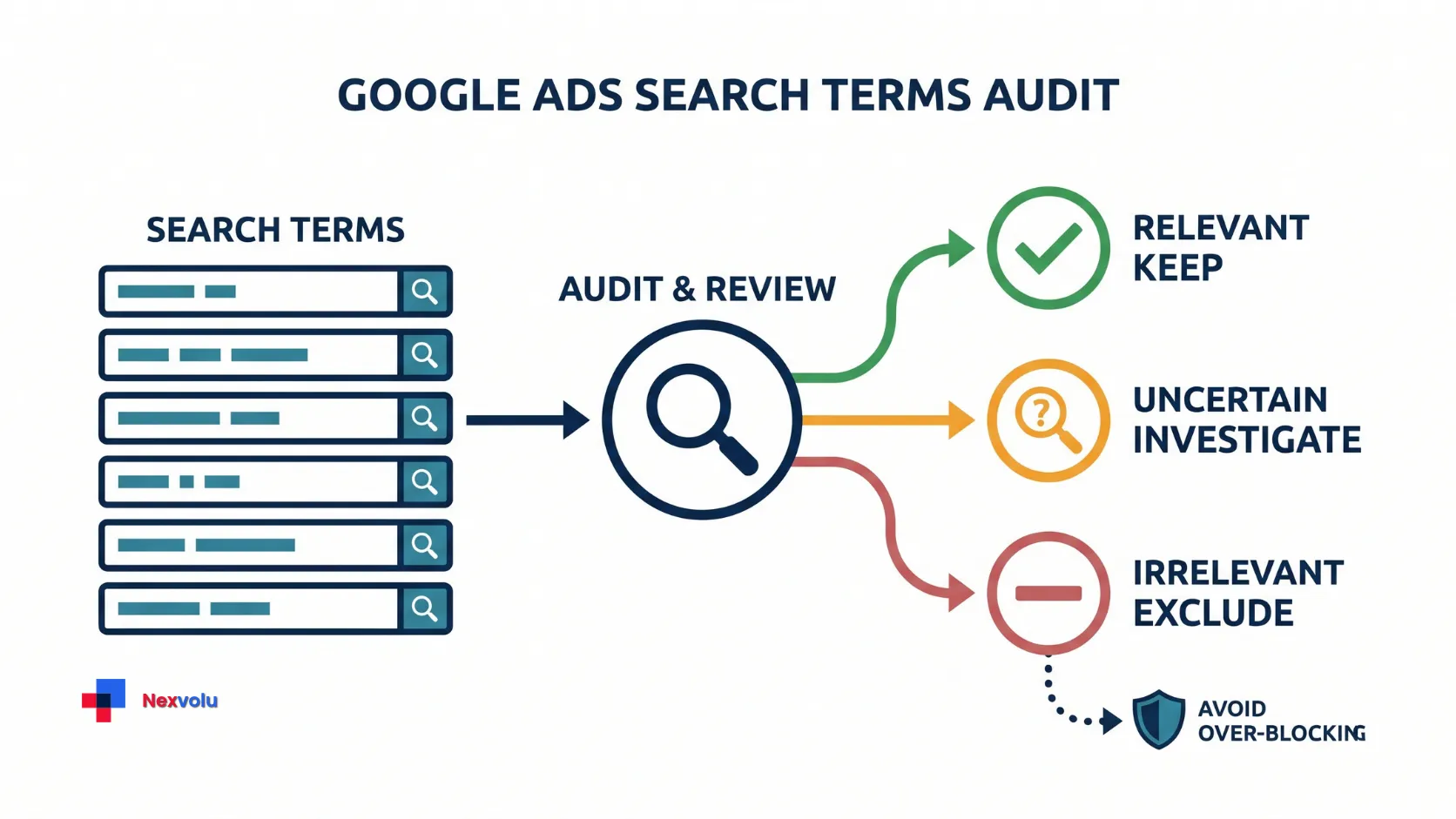
Sort by cost to prioritize, not to declare the most expensive row waste. A costly term could generate strong customers. Conversely, several small irrelevant terms can add up. Look for recurring intent patterns, such as job seekers in a campaign selling services.
If a relevant term has no conversions, compare its spend with the business’s target cost per qualified lead. That target is a review trigger, not an automatic cutoff. Check click volume, attribution, conversion lag, tracking, and whether the offer and landing page fit. The right next step may be to improve the page, verify measurement, or gather more evidence.
A fictional Google Ads search terms example
The following figures are illustrative, not account data. Assume a business sells commercial plumbing repairs and inspections in one city. It does not sell training or recruit through this campaign. For this example, assume the conversion column represents qualified leads rather than unqualified form submissions. Its target cost per qualified lead is $100; this is a business-specific planning assumption, not a universal benchmark.
| Search term | Clicks | Cost | Qualified leads | Decision and reason |
|---|---|---|---|---|
| commercial plumber near me | 20 | $160 | 2 | Keep: Relevant, but verify lead quality. |
| commercial plumbing jobs | 12 | $96 | 0 | Exclude candidate: Job-seeking intent conflicts with the offer. |
| commercial plumbing course | 8 | $64 | 0 | Exclude candidate: Training is not sold. |
| commercial plumbing inspection cost | 10 | $120 | 0 | Investigate: Relevant service research, but no recorded qualified leads yet. |
| emergency commercial plumber | 5 | $50 | 1 | Keep: Relevant, subject to the actual service and lead quality. |
The visible rows total $490. The two clearly mismatched rows total $160, or about 32.7% of this illustrative table ($160 ÷ $490). This is not a percentage of the account’s total spend, a measured savings figure, or a prediction. Some paid searches may be hidden, and not every excluded click would necessarily have occurred again.
The inspection-cost query spent more than the assumed $100 target without a recorded conversion. That makes it a priority for investigation, not proof of waste. Perhaps the firm sells inspections and the page does not mention pricing; perhaps the conversion has not arrived or tracking failed. Check before acting.
Choose negative keywords for search terms
Google’s negative keyword guidance distinguishes three Search match types. They behave differently from positive keyword matching. Examples below describe Search campaigns and assume the quoted terms are entered with the indicated syntax.
| Negative keyword type | Example search it can block | Example it does not necessarily block |
|---|---|---|
Broad: plumbing jobs | jobs in plumbing | plumbing job |
Phrase: "plumbing jobs" | commercial plumbing jobs | jobs in plumbing |
Exact: [commercial plumbing jobs] | commercial plumbing jobs | commercial plumbing jobs near me |
Broad negatives exclude searches containing all specified terms, even when they appear in a different order. Phrase negatives require the specified terms in the same order but can allow additional words. Exact negatives exclude the exact search terms in the same order without additional words.
Unlike positive keywords, negative keywords do not automatically expand to synonyms, singular/plural forms, or other close variants. However, Google automatically accounts for capitalization and misspellings. Check other meaningful variations separately when they matter to your campaign.
Test exclusions against valuable search terms
For the fictional repair campaign, a phrase negative such as "plumbing jobs" could block commercial plumbing jobs. It could also block commercial plumbing jobs needed urgently—which might describe work a customer needs done rather than employment. That is a real trade-off, not an automatic win.
A narrower exact negative, [commercial plumbing jobs], limits the exclusion to that exact search under the rule above, but it may leave other job-seeking searches eligible. Negative keywords do not automatically cover every singular, plural, synonym, or close variation. Review the actual query patterns and the searches you still want to reach before deciding which additional exclusions are appropriate. Do not copy a generic “jobs” or “free” list without checking your business model.
Google says negative keywords added to a Search campaign directly from the search terms report default to negative exact match. Always inspect the syntax and selected match type before saving.
Choose the exclusion scope deliberately. An ad-group negative affects that ad group, while a campaign negative affects the relevant campaign. A reusable negative keyword list only affects the campaigns to which it is applied. Account-level negative keywords are broader: they apply across Search and Shopping inventory in relevant campaign types.
Do not confuse a shared negative keyword list with account-level exclusions. Review all affected campaigns and offers before applying a broad exclusion.
Apply search term exclusions and check results
In the standard Search terms report, select a clearly irrelevant query and choose Add as negative keyword. Choose the appropriate ad group, campaign, or reusable negative keyword list. Inspect the actual negative-keyword syntax and match type before saving; a keyword added directly from this Search campaign report defaults to negative exact match unless you change it.
Google’s instructions explain the available choices for adding exclusions from the report. Some alternative reporting views, such as the Report Editor, do not support adding negative keywords directly.
Before making a batch change, record the proposed negative, match type, scope, reason, date, and examples of useful searches it might block. Have the account owner approve significant changes. Avoid changing targeting, landing pages, and conversion settings all at once if you want a clearer interpretation of what happened.
Afterward, compare similar periods while accounting for seasonality, budget, and conversion delay. Revisit visible query patterns, qualified leads, cost, and relevant traffic. If a valuable query disappears or lead volume drops, investigate the exclusion and remove or narrow it if appropriate. An observed improvement alone does not prove the negative caused it.
Make your Google Ads search terms audit repeatable
A first pass finds candidates; a regular review catches changes in offers and search behavior. For a new or fast-moving campaign, consider reviewing more often. For a stable, low-volume account, a monthly review may be sufficient. Adjust the cadence to spend, risk, and how quickly meaningful data arrives.
Use this checklist each time:
- Confirm campaign scope, dates, currency, and conversion health.
- Sort visible terms by cost and check commercial relevance.
- Classify terms as keep, investigate, or exclude.
- Test candidate negatives against searches you want to retain.
- Record the exact negative keyword, its match type, affected campaign or ad group, reason for exclusion, any useful searches at risk, approval, and review date.
- Recheck qualified outcomes and traffic after a suitable conversion window.
A Google Ads search terms audit is not a hunt for a perfect list of negatives. It is a repeatable way to protect relevant demand while questioning spend that does not fit the business.
Frequently asked questions
Should I exclude every search term with zero conversions?
No. Zero recorded conversions can reflect a small sample, a longer buying cycle, reporting delay, or broken tracking. First consider relevance and measurement; then decide whether more evidence, a landing-page change, or an exclusion is appropriate.
Can the report show all wasted spend?
No. Google omits some low-volume queries for privacy, and the report does not by itself show every business outcome. It can surface suspicious visible searches, but it cannot establish the value of every click or measure all account waste.
How often should I review search terms?
There is no universal schedule. Start more frequently when launching, spending heavily, or changing targeting. For a stable smaller account, a monthly review can be a practical starting point. Increase the frequency if irrelevant queries are accumulating quickly.