

UTM tracking mistakes in GA4 can split campaign data, hide its source, or make reports difficult to trust. A capital letter, a stripped parameter, or a link tagged on the wrong page can turn a simple report into a difficult investigation.
The fix is not to add more tags everywhere. It is to use a shared naming convention, tag appropriate external links, and test the full path from click to report. This guide shows the mistakes to look for and three illustrative campaign examples you can adapt.
Table of contents
What UTM parameters do in GA4
UTM parameters are labels added to a destination URL. Common UTM tracking mistakes in GA4, such as inconsistent values, missing fields, or redirects that remove query parameters, can make campaign reports fragmented or misleading. UTMs tell Google Analytics 4 (GA4) about a marketing link when a visitor arrives and the measurement setup can collect the visit. They do not create traffic or guarantee that every click appears as a session.
Source identifies the referring publisher or platform, such as newsletter or linkedin. Medium describes the marketing method, such as email, social, or referral. Campaign names the broader initiative, such as spring_launch. Optional utm_content can distinguish two links in the same campaign.
For example, a newsletter button and a social post can share the same campaign name but use different sources and mediums. Google’s campaign URL guidance recommends including source, medium, and campaign for tagged links. Other parameters can add useful detail where relevant.
Common UTM tracking mistakes in GA4
1. UTM tracking mistakes in GA4: Inconsistent names
LinkedIn and linkedin are different UTM values. Likewise, spring-sale and spring_sale can create separate campaign rows. That fragmentation makes one initiative look like several.
Choose lowercase and a consistent separator. Keep an approved list of source, medium, and campaign values in a shared register. Google notes in its UTM naming guidance that values are case-sensitive, even though its default channel rules are not.
2. UTM tracking mistakes in GA4: Missing parameters
For a manually tagged campaign, use all three core parameters: utm_source, utm_medium, and utm_campaign. A link with only utm_campaign cannot reliably identify its source or marketing medium, so those dimensions may appear as (not set).
This also matters when auto-tagging is enabled. If a Google or marketing-platform click identifier such as GCLID or DCLID cannot be used as intended and a UTM parameter is present, GA4 derives cross-channel traffic-source values from the UTM parameters alone. Missing relevant parameters can then produce (not set) values.
Where appropriate, include utm_id and utm_source_platform as well. Use them when they have a defined reporting purpose, rather than adding unnecessary fields.
3. UTM tracking mistakes in GA4: The wrong medium
The medium must describe the actual placement. For example, linkedin / social can be classified as Organic Social, while linkedin / paid_social can qualify for Paid Social when the source matches Google’s recognized social-source rules. A partner article labeled with email may instead be classified as Email because the medium indicates email traffic.
GA4’s default channel groups use rule-based definitions. For manually tagged traffic, source and medium combinations determine the channel, and some rules also use campaign names. Integrated advertising platforms can provide additional information for classification. Custom and primary channel groups can use different rules, so verify the resulting Session default channel group instead of assuming a label will always produce the same result.
4. UTM tracking mistakes in GA4: Internal links
Avoid adding campaign UTMs to internal navigation links, banners, or buttons that take visitors between pages on your own website. An internal click is not a new external acquisition source.
GA4 does not start a new session or replace the campaign already associated with an existing session simply because new campaign parameters appear mid-session. However, newly collected campaign values can be associated with events for which they were collected and used in event-based attribution. This can make event-level reports or key-event attribution misleading, even when the original session source remains unchanged.
Instead, measure internal promotions with appropriately configured events or promotion tracking. Use cross-domain measurement where separate domains need to share a journey; do not substitute internal UTMs for a properly configured cross-domain setup.
5. UTM tracking mistakes in GA4: Redirects that strip tags
A link may look correct in an email draft but pass through a shortener, tracking service, or redirect that removes its query string. If the final landing page does not receive the intended parameters before the tag collects the page, GA4 may not receive the intended campaign information.
Click the actual published link, not just the address in your spreadsheet. Check the final URL and each relevant redirect. Some sites deliberately remove parameters after collection, so a cleaned address alone does not prove failure; inspect the tag or debug event as well.
6. UTM tracking mistakes in GA4: Auto-tagging conflicts
When GA4 is linked to Google Ads, keep auto-tagging enabled unless there is a documented reason to change the configuration. Google Ads auto-tagging uses identifiers such as GCLID to provide platform-specific reporting information that manual UTM labels alone cannot supply.
When manual tagging and auto-tagging are used together, Google uses auto-tagged values for source, medium, and other traffic-classification dimensions. Manually added utm_content and utm_term can still populate their Manual Ad Content and Manual Term dimensions.
If GCLID or DCLID cannot be used as intended and UTM parameters are present, GA4 can instead derive cross-channel traffic-source values from those UTMs exclusively. In that situation, provide all relevant parameters rather than relying on one partial tag. Check account linking, identifier preservation, and reporting requirements before changing an established advertising setup. Read Google’s manual and auto-tagging guidance.
For campaign-level search decisions, the Google Ads search terms audit covers a different, useful check.
7. UTM tracking mistakes in GA4: Personal information
Never put a customer’s email address, name, phone number, or other identifying information into campaign parameters. URLs can appear in browser history, logs, analytics tools, and shared links. Google specifically warns against sending personally identifiable information in URLs and campaign dimensions.
Use non-personal campaign and creative labels instead. Review automated email-platform substitutions as well as manually created links. See Google’s guidance on avoiding personally identifiable information.
A UTM campaign naming convention your team can use
A shared naming convention helps prevent UTM tracking mistakes in GA4 before campaign data reaches the report. Use the same campaign name for related placements, while keeping the source and medium specific to each link. The following is a starting policy, not a universal GA4 requirement.
| Field | Team rule | Example |
|---|---|---|
| Source | Lowercase platform or publisher name | linkedin |
| Medium | One approved label for the actual marketing method | email, social, paid_social, referral |
| Campaign | Lowercase initiative name with consistent separators | spring_launch |
| Content | Optional placement or creative identifier | header_button |
Use social for organic social placements and an appropriate paid label, such as paid_social, for paid social campaigns. A stable campaign ID (utm_id) or source-platform value (utm_source_platform) can add further reporting detail when needed. Document these values instead of inventing new labels for individual links.
Keep a register with the owner, destination, campaign name, launch date, approved URL, and test status. If a platform adds tags automatically, record that process too. Avoid including customer identifiers or sensitive business information.
Before choosing mediums, compare them with GA4’s current rules and your own reporting needs. A campaign name that accidentally matches another channel rule can affect classification. Naming consistency alone cannot guarantee the desired default channel.
Three worked UTM examples
These fictional examples show how to avoid UTM tracking mistakes in GA4. example.com is a demonstration domain, not a tested Nexvolu destination. Each URL targets the same imaginary launch page and uses the same campaign name. The expected values describe what to check, not a promise that every click will become a measured session.
Email UTM tracking example
https://example.com/guide/?utm_source=newsletter&utm_medium=email&utm_campaign=spring_launch&utm_content=header_button
Intended result: newsletter / email and spring_launch in session-level campaign reporting; Email is the intended default channel. Check: click the sent test email, confirm tracking redirects preserve the parameters, and compare the collected values with the register. Also test a footer link with a different content label if you want to compare placements.
Organic social UTM tracking example
https://example.com/guide/?utm_source=linkedin&utm_medium=social&utm_campaign=spring_launch&utm_content=organic_post
Intended result: linkedin / social and the same campaign; Organic Social is the intended default channel. Check: open the actual post on both a desktop browser and a mobile app if practical. Follow the redirect chain and compare session source / medium with the campaign register. A paid placement needs a distinct, appropriate medium.
Partner UTM tracking example
https://example.com/guide/?utm_source=partner_blog&utm_medium=referral&utm_campaign=spring_launch&utm_content=article_link
Intended result: partner_blog / referral and the same campaign; Referral is the intended default channel. Check: ask the partner to use the exact URL, then click the live article link. Confirm that its redirects and the landing page preserve or collect the labels. A link in the partner’s newsletter would instead need an email-appropriate convention.
Google may change channel rules, and the property may use customized groups. Consequently, confirm the actual row and channel after launch rather than treating these examples as tested results.
How to validate UTM tracking in GA4
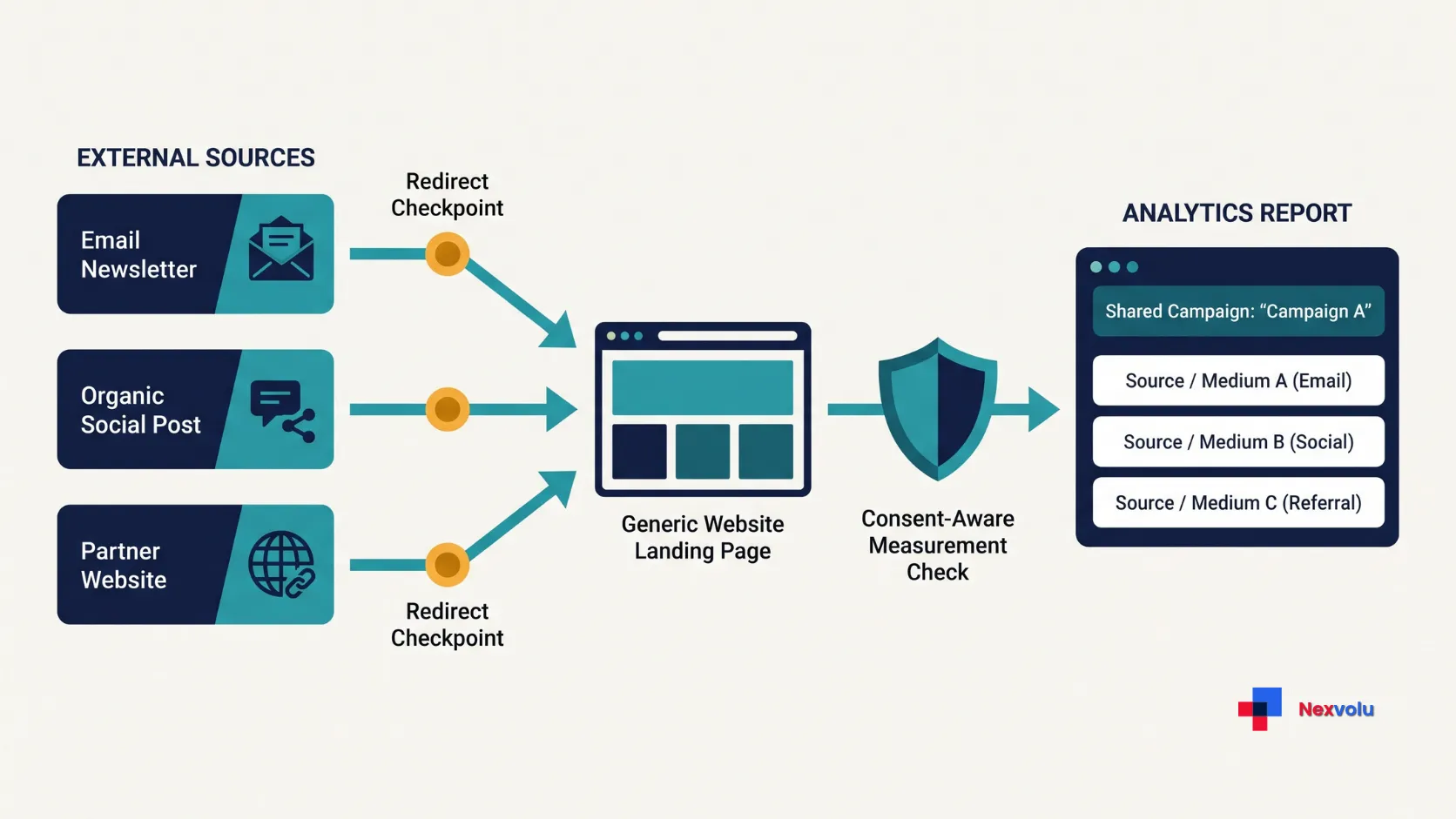
To prevent UTM tracking mistakes in GA4, check the journey in stages. A correct URL is only the first stage; the visitor must also reach a measured page under the applicable consent setup.
Build and test UTM tracking links
- Build the URL. Use Google’s Campaign URL Builder or an equivalent builder. Start the query string with
?, or use&when the destination already has a query string. Encode special characters correctly and put the query before any#fragment. - Click the real placement. Check the address before and after redirects, including mobile and desktop paths where relevant. Confirm that the destination and campaign labels are correct.
- Test collection. With permission and the intended consent choice, use Google Tag Assistant or GA4 DebugView to inspect the correct property and page events. A test should respect consent settings, not bypass them. DebugView may not show Analytics events when privacy controls or consent settings prevent collection; that alone does not establish a broken UTM.
Check UTM tracking data in GA4
- Inspect session reports. In Reports → Acquisition → Traffic acquisition, use Session source / medium and Session campaign to inspect campaign acquisition. For manually tagged traffic, also check Session manual source, Session manual medium, Session manual campaign name, and Session manual ad content where those dimensions are available. Use a suitable custom report or Exploration when the standard report does not expose the detail you need. Check the date range, filters, and property time zone.
- Compare scopes. Session dimensions describe session acquisition. First user dimensions describe how the user was first acquired; event-scoped attribution answers a different question. Use a separate test browser or profile when first-user history could confuse the test.
Confirm processed GA4 campaign data
- Review later. Use Realtime or DebugView for an initial collection check, then inspect the processed standard report. Realtime data is typically available within minutes, while standard GA4 reporting data can take 24–48 hours to process and may change during that period. Use DebugView and Realtime for initial collection checks, then confirm the processed campaign attribution in the relevant acquisition reports. See Google’s data freshness guidance.
Important reporting detail: GA4 does not populate UTM information in the Landing page + query string or Page path + query string dimensions. The complete URL information is available through the Page location dimension. Therefore, do not assume UTMs were lost simply because they are missing from a landing-page or page-path report. Check the appropriate session-level campaign dimensions and Page location instead. URL redaction or customized collection can affect what Page location contains.
A visit can be attributed under session rules rather than mirroring every click. Consent, blocked tags, redirects, processing, and filters can also affect results. For the related distinction between a click and a measured visit, see why Search Console clicks and GA4 sessions differ.
Troubleshoot misleading GA4 campaign reports
Diagnose UTM tracking mistakes in GA4 by matching the symptom to the checks below.
| What you see | Check first | Next action |
|---|---|---|
| Several rows for one campaign | Capitalization, separators, and spelling | Standardize future URLs; document earlier variants for analysis. |
| Unexpected Direct or missing campaign | Actual link, redirect chain, tag firing, consent, and reporting scope | Test the full path; do not assume one cause. |
| in a field | Missing parameters, integration behavior, and report dimension | Complete applicable tags and check Google’s guidance. |
| Unassigned channel | Source, medium, and current channel-group rules | Use an appropriate convention or review custom grouping. |
| Different Ads and GA4 values | Auto-tagging, account links, scope, and reporting dates | Inspect collection and attribution before changing tags. |
(not set) is a missing dimension value; Unassigned means no default channel rule matched. They are not interchangeable. Direct also does not prove that visitors typed your URL: missing referral information or attribution behavior can complicate interpretation.
Correcting UTM tracking mistakes in GA4 improves future collection; do not assume it rewrites historical campaign data. Keep a change log and group known variants in your analysis where appropriate. If the campaign matters commercially, compare validated outcomes and costs as well as sessions. Nexvolu’s SEO vs PPC guide for small businesses explains why channel decisions also need customer economics.
A prelaunch UTM tracking checklist
Use this checklist to prevent UTM tracking mistakes in GA4 before launch.
- Confirm the final destination and whether it already contains a query string.
- Choose approved source, medium, and campaign values; add content only when useful.
- Use lowercase and the team’s agreed separators. Check every spelling.
- Keep personal information and recipient-level identifiers out of the URL.
- Check the real link through all redirects and under the intended consent setup.
- Confirm the correct GA4 property receives test events, then check session dimensions after processing.
- Record the approved URL, owner, launch date, and expected reporting result.
- Recheck after launch and document any correction without silently changing old definitions.
Frequently asked questions
Why might an email campaign appear as Direct?
An untagged email link may not pass a usable referrer. A redirect can also remove parameters, or the measurement setup may not collect them. However, Direct alone does not identify the cause. Test the real email link, the destination, consent, and session reporting before drawing a conclusion.
Will UTMs fix missing GA4 sessions?
No. UTMs label campaign information; they do not fix a missing tag, blocked measurement, a consent configuration, or a broken destination. Test collection separately and respect the visitor’s consent choice.
Should every campaign link pointing to my website have UTMs?
Not every incoming link needs manual tags. Use UTMs for campaigns you control and need to distinguish, such as newsletters, social posts, and partner placements. Do not append your own acquisition UTMs to outbound links from your website to other websites; those links do not represent traffic arriving at your GA4 property.
Use outbound-click events or enhanced measurement when you want to measure visitors leaving your website. For integrated advertising platforms, use supported auto-tagging and add manual parameters only when there is a clear reporting reason.
The bottom line
Preventing UTM tracking mistakes in GA4 starts before the first click. Agree on a naming convention, test the actual link and redirects, then verify the right session-scoped dimensions in GA4. When a report looks wrong, investigate collection and attribution before assigning blame to a channel.


This is a highly relevant take on the current state of digital marketing. The emphasis on high quality, authoritative long form content is spot on. Building topical authority isn’t just about output volume anymore; it’s about creating exhaustive, value-packed pillars that address every layer of a user’s query. When you combine deep industry knowledge with clean on-page UX like clear tables of contents and scannable takeaways you move the needle on both organic traffic and audience trust. Great read!
Thank you! I completely agree that clean UX is the unsung hero of long-form content. You can write the most authoritative piece in the world, but if it looks like a wall of text, bounce rates spike. Layering user intent with scannable design is exactly how we build long-term audience trust today.