
The best AI meeting note takers are not necessarily the ones with the most features. Fathom is a strong free starting point for frequent calls, Otter is useful for live transcription, Fireflies suits people who want searchable team meeting notes, and Granola offers manually started, bot-free capture.
The differences matter. Fathom’s newer bot-free experience has platform restrictions, Fireflies offers a bot-free Chrome extension for Google Meet, and Granola captures device audio without adding a bot to the meeting. Free plans also limit different things, including meeting length, storage, advanced summaries, and history.
To compare the best AI meeting note takers, this guide uses published vendor documentation, not hands-on testing or independently measured transcription accuracy. It examines their free plans, paid starting prices, capture methods, privacy statements, and practical limitations. Nexvolu checked prices and product details on November 7, 2026. Always verify current availability, account settings, and checkout prices before choosing.
Table of contents
- Best AI meeting note takers compared
- Which of the best AI meeting note takers fits you?
- Best AI meeting note takers: free-plan limits
- Best AI meeting note takers: privacy and consent
- How to set up the best AI meeting note takers
- Review AI meeting notes before sharing
- Best AI meeting note takers: setup checklist
- Frequently asked questions
- Nexvolu’s verdict
Best AI meeting note takers compared
The table compares selected entry-level options among the best AI meeting note takers, not every plan or feature. “Best for” is an editorial fit based on published features; it is not a measured accuracy ranking. USD prices are per user per month as displayed, before tax. Confirm the billing interval and actual checkout price.
How we compared the best AI meeting note takers
We selected these four tools to represent different meeting workflows, not to produce a universal performance ranking:
- Capture and transcription: whether a tool uses a meeting bot, device audio, or live transcription.
- Free-plan restrictions: monthly minutes, per-meeting limits, storage, history, and AI credits.
- Paid entry price: the lowest relevant individual or professional plan displayed by the vendor.
- Privacy: published statements about model training, audio retention, and data controls.
- Practical fit: the type of meeting workflow each product aims to support.
The comparison uses vendor-published features and policies. Nexvolu has not independently measured transcription accuracy, speaker identification, or time saved. Product suitability is an editorial assessment, not a product-test result.
Best AI meeting note takers: Otter and Fireflies
| Tool and best fit | Free plan | Paid starting price | Capture method | Training and privacy |
|---|---|---|---|---|
| Otter – Live transcripts | 300 transcription minutes per month; 30-minute maximum per transcription; 3 lifetime audio/video imports; 25 most recent conversations accessible, with older conversations archived. | Pro: $8.49 and $16.99 displayed; billing and promotion unclear. Check checkout. | Live transcription and meeting-bot capture for Zoom, Google Meet, and Microsoft Teams. | Its privacy policy describes training proprietary AI technology on de-identified audio and transcripts that may contain personal information. Check current account terms and privacy rights. |
| Fireflies – Searchable team meetings | Unlimited eligible live transcription with Auto-join enabled; limited AI summaries; 20 one-time AI credits on sign-up according to its AI-credit guide; another free-plan guide says monthly. Storage limits apply. | Pro: $10 per seat/month billed annually, or $18 per seat/month billed monthly. | Meeting bot for supported platforms. The bot-free Chrome extension captures Google Meet audio in Chrome, not video. | Fireflies says it does not use personal information for AI model training and contractually prohibits its vendors from doing so. |
Best AI meeting note takers: Fathom and Granola
| Tool and best fit | Free plan | Paid starting price | Capture method | Training and privacy |
|---|---|---|---|---|
| Fathom – Frequent free calls | Unlimited recordings and transcripts; 5 advanced AI summaries per month. General summaries remain available afterward. | Premium: $16 per user/month with annual billing, or $20 per user/month with monthly billing. | Meeting-bot capture or a newer bot-free experience. Platform and rollout restrictions limit bot-free availability. | Fathom says it uses de-identified customer data to improve its proprietary AI models. Users can opt out; its AI subprocessors are not permitted to train on customer data. |
| Granola – Manually started, bot-free notes | Basic offers 30 days of meeting history, with limited history features compared with paid plans. | Business: $14 per user/month as displayed on the official pricing page. | Manually started device-audio capture without adding a meeting bot. Desktop supports multiple meeting platforms; mobile supports in-person meetings. | Granola says it uses anonymized meeting data to improve its internal models by default on Basic and Business. Users can opt out; Enterprise defaults to training off. |
How to read the comparison
The table shows prices in USD before applicable taxes. Annual discounts, billing intervals, eligibility, and checkout prices can change. Fireflies’ published pricing and help pages also differ on how its free storage allocation is described; check the storage shown in your own workspace rather than assuming it is a monthly allowance. Privacy statements above describe vendor policies and are not independent audits.
Which of the best AI meeting note takers fits you?
Best AI meeting note takers for frequent calls: Fathom
Among the best AI meeting note takers for frequent calls, Fathom is an attractive starting point if you want to record and transcribe meetings without paying for an individual subscription.
Its Free plan offers unlimited recordings and transcriptions. However, Fathom limits advanced summaries to the first five calls each month. After those five, Fathom still provides general summaries, but you lose access to the advanced summary features until the allowance resets.
Premium adds advanced summaries, AI-generated action items, custom meeting bots, and a conversational meeting assistant. The published individual price is $16 per user per month with annual billing or $20 with monthly billing.
Understand Fathom’s bot-free availability
Fathom now offers a choice between its traditional meeting-bot experience and a newer bot-free capture experience.
However, availability matters. As of October 30, 2026, Fathom 3.0’s bot-free experience is available to eligible Mac users. Windows support is still limited to a Microsoft Teams alpha. The older meeting-bot experience remains available on supported Mac and Windows setups.
The bot-free approach can reduce the need to add a visible recording bot to a call, but it does not remove the need to inform participants or follow applicable recording rules.
Check Fathom’s data-use settings
Fathom says it can improve its own proprietary models using de-identified customer data. Its contracts prohibit AI subprocessors, including Anthropic, OpenAI, and Google, from training on Fathom customer data.
Fathom also says users can opt out of its own model-improvement use through My Settings. Team Edition administrators can manage this for their organization.
Choose Fathom when frequent recording and transcription matter more than unlimited advanced summaries. Before upgrading, decide whether you genuinely need its additional action items, custom summaries, or conversational features.
See the current Fathom pricing page, free-versus-Premium explanation, and Fathom 3.0 rollout guide.
Best AI meeting note takers for live transcripts: Otter
Otter is one of the best AI meeting note takers to consider when you want live transcription and a searchable text record of meetings.
Its Basic plan provides 300 transcription minutes per month, but the plan limits each transcription to 30 minutes. It also allows only three lifetime audio or video imports. You can access your 25 most recent conversations, while Otter archives older conversations.
The per-meeting limit is particularly important. Ten 60-minute meetings would total 600 minutes, but the Basic plan’s 30-minute restriction would also prevent you from accessing the full transcript of each hour-long meeting.
Otter’s Pro plan increases the maximum meeting duration to 90 minutes and lists 1,200 in-app recording minutes, along with additional import and export features. Otter’s pricing page displayed $8.49 and $16.99, but its extracted page mixed billing and promotional states. Confirm the annual and monthly checkout amounts for your account before buying.
Understand Otter’s privacy statement
Otter’s current privacy policy describes using de-identified audio recordings and transcripts to train its proprietary AI technology. Importantly, the policy says transcripts may contain personal information.
Do not interpret the word “de-identified” as a guarantee that every transcript is free of personal or sensitive details. Also, the public privacy policy reviewed for this guide does not establish a simple model-training opt-out that every consumer account can use. Check your applicable account terms and contact Otter if you need a specific contractual or account-level answer.
Choose Otter if you value live transcription and speaker identification, but pay close attention to the 30-minute Basic limit before using it for longer meetings.
See Otter’s Basic plan limits, current pricing, and privacy policy.
Best AI meeting note takers for team search: Fireflies
Fireflies is among the best AI meeting note takers to investigate when colleagues need searchable meeting transcripts, shared notes, and workflows across multiple meetings. Its documentation covers a meeting bot, integrations, and a bot-free Chrome extension for Google Meet.
Its free plan needs a closer look because transcription, storage, and AI credits are separate.
For eligible free accounts created on or after September 1, 2026, enabling Auto-join calendar meetings can unlock unlimited transcription of eligible meetings. Without Auto-join, new free accounts have a limited number of transcription credits, with the initial allowance depending on the sign-up platform.
Unlimited transcription does not mean unlimited AI features. Fireflies’ AI-credit guide lists 20 one-time AI credits on free sign-up, shared across the workspace. However, another Fireflies free-plan guide describes 20 monthly credits, so confirm renewal in your account. See the AI-credit guide and other free-plan guide. Advanced AI features and usage can depend on the available credit balance.
Storage is a different restriction again. Fireflies measures it in stored meeting minutes, not a monthly transcription allowance. Its pricing page and help documentation describe the free storage allocation differently, so check your actual workspace before estimating how many meetings you can keep.
Understand the bot-free extension limitation
Fireflies’ Chrome extension can capture Google Meet audio in Chrome without adding the Fireflies Notetaker bot as a meeting participant. It also supports live notes and related browser features.
However, this is not a universal replacement for the meeting bot. The extension’s bot-free audio capture is for Google Meet in Chrome; Zoom and Teams require the appropriate bot-based workflow. The extension does not provide video recording by itself.
Check team sharing before enabling Auto-join
Fireflies’ account setup documentation describes automatic joining and recap-sharing choices. Review which calendar meetings it can capture and who receives the recaps before enabling the feature. Restrict capture to the meetings you actually want recorded rather than automatically processing every eligible calendar event.
This is especially important for teams that discuss clients, employees, financial information, or confidential projects. More searchable meetings can be useful, but only when the workspace has appropriate access controls.
For current limits, see the official Fireflies free-plan guide, AI credit explanation, and Chrome extension instructions.
Best AI meeting note takers without a bot: Granola
For people who prefer bot-free capture, Granola is one of the best AI meeting note takers to consider. It targets people who want notes without adding a separate bot to a video call.
Unlike a bot that joins the participant list, Granola requires you to start capture manually. Its desktop app captures microphone and meeting audio from your device and supports platforms such as Zoom, Google Meet, and Microsoft Teams. Its mobile app is designed for in-person meetings.
Granola’s Basic plan offers 30 days of meeting history. The Business plan, listed at $14 per user per month, includes unlimited meeting notes and history, along with additional integrations and features.
Understand Granola’s audio and transcript handling
Granola says it does not store meeting audio as a regular recording. Its desktop apps transcribe in real time; on mobile, the app may temporarily cache audio until transcription finishes. The service stores transcripts and notes, which have their own retention and deletion controls.
This distinction matters. A product can avoid storing a replayable audio recording while still processing meeting audio and retaining a detailed transcript.
Check Granola’s model-training setting
Granola says its contracts prohibit third-party AI providers such as OpenAI and Anthropic from training their models on Granola customer data.
However, Granola uses anonymized meeting data to improve its own models by default on Basic and Business plans. Users can opt out through:
Settings → Preferences → Data & sharing → Use my data to improve models for everyone.
Enterprise accounts have model training disabled by default at the organizational level, with administrators controlling the setting.
Choose Granola when manually started, bot-free capture and written meeting notes fit your workflow. Do not assume that bot-free capture means the conversation is unrecorded or that the resulting transcript is automatically private.
See Granola pricing, security and privacy information, and its model-training explanation.
Best AI meeting note takers: free-plan limits
The best AI meeting note takers on free plans depend on which restriction affects your meeting routine first. A monthly transcription allowance, a maximum meeting duration, stored-history limit, and AI credit balance are different things.
Consider these examples:
Fathom: Unlimited recordings and transcripts make it attractive for frequent calls. However, only the first five calls each month receive advanced summaries. General summaries remain available afterward.
Otter: Its 300 monthly minutes may look generous for occasional meetings, but the Basic plan limits each transcription to 30 minutes. Three lifetime audio/video imports and its accessible conversation history add further restrictions.
Fireflies: Eligible free accounts can unlock unlimited live transcription by enabling Auto-join. However, the free plan still has limited storage and AI usage. Its AI-credit guide describes 20 one-time credits shared across the workspace; another free-plan guide says monthly. Confirm renewal in your account. Automatic meeting capture also needs careful configuration.
Granola: Basic provides a different type of restriction: 30 days of meeting history. That can be sufficient for someone who processes notes quickly but inconvenient for research or projects that need older conversations.
Calculate your actual meeting usage
Estimate the number of meetings you attend each month and multiply by their usual length.
For example:
- Five 30-minute meetings = 150 minutes.
- Ten 45-minute meetings = 450 minutes.
- Twelve 60-minute meetings = 720 minutes.
Then check the longest meeting separately. A monthly total alone will not tell you whether a per-meeting cap prevents full transcription.
For a team, also establish whether the provider allocates storage and AI credits per person, per account, or across the workspace. Fireflies’ published storage descriptions differ, so verify the actual allocation displayed in your account.
Check what happens after a free allowance runs out
Before relying on a free plan, confirm whether:
- Transcription stops or continues with reduced access.
- Advanced summaries become unavailable.
- The provider archives or deletes older meetings.
- Exports and integrations become restricted.
- AI credits require a separate purchase.
- A paid upgrade changes existing recording or history access.
For example, Fireflies distinguishes between its meeting transcription allowance and AI credits. Its paid plans also have separate limits for uploaded media, even when the plan offers unlimited live meeting transcription.
A free plan is useful only when its restrictions fit your actual meeting routine. Do not upgrade until you know which restriction is causing a problem.
For a wider comparison of paid AI subscriptions, see when an AI subscription is worth paying for.
Best AI meeting note takers: privacy and consent
Even the best AI meeting note takers process conversations that may include personal information, client details, financial figures, employee discussions, or confidential business information.
Before choosing a tool, check five separate issues:
- Model training: Can the provider use meeting content to improve its own AI models or those of its service providers?
- Audio retention: Does it retain a replayable recording, temporarily process audio, or delete it after transcription?
- Transcript retention: How long do transcripts and generated notes remain accessible?
- Access and sharing: Who can open the meeting notes, recordings, and shared workspace?
- Consent and compliance: Are you permitted to capture the conversation and process the resulting personal information?
Compare the four vendors’ training policies
Otter: Its privacy policy describes using de-identified audio recordings and transcripts to train its proprietary AI technology. It also acknowledges that transcripts may contain personal information. Check the policy and applicable account terms before importing sensitive conversations.
Fireflies: Its privacy policy, updated September 28, 2026, says it does not use personal information for AI model training and contractually prohibits its vendors from doing so. Its zero-data-retention statement for third-party vendors applies to meeting content after processing by those vendors. It does not mean Fireflies itself never stores your meeting recordings, transcripts, or summaries.
Fathom: Fathom says it uses de-identified customer data to improve its own proprietary AI models. Users can opt out through their settings, and Fathom says its contracts prohibit AI subprocessors from training on customer data.
Granola: Granola says it uses anonymized meeting data to improve its internal models by default on Basic and Business plans. Users can opt out, while Enterprise accounts have model training turned off by default. It also says its third-party AI providers cannot use customer data to train their models.
These statements reflect the vendors’ published policies, not independent privacy audits. A training opt-out does not automatically delete existing meeting notes, prevent service processing, or restrict sharing.
Understand audio recording and transcript retention
Bot-free capture does not mean no recording or processing is taking place.
For example, Granola accesses microphone and device audio even though it does not add a visible meeting bot. It says it does not store a regular meeting audio recording, but it retains transcripts and notes according to its separate controls.
Likewise, a service that deletes audio after transcription may still retain the transcript, generated summary, and associated meeting information.
Review the provider’s current deletion policy and your account’s default retention settings. Pay particular attention to public links, workspace permissions, and automatic sharing.
Model training, chat history, retention, and deletion are separate controls; review each one for your account.
Tell participants before capture
Before using an AI meeting note taker, explain that the service may record, transcribe, summarize, or process the conversation. State why you are using it, who can access the resulting notes, and how long you intend to retain them.
Where possible, obtain agreement from everyone before starting. Offer manual notes or another suitable alternative when someone objects. Do not assume that a bot-free recording method removes the need for disclosure.
Recording rules for AI meeting note takers by country
Recording and privacy requirements differ by jurisdiction:
United States: Federal law generally establishes a one-party consent baseline, but states can impose stricter requirements. Some states primarily require consent from all participants, and requirements can differ between telephone and in-person conversations. See the Reporters Committee’s recording guide for state-specific information.
United Kingdom: The Information Commissioner’s Office says workplace audio monitoring is particularly privacy-intrusive. Employers need a strong justification, and certain monitoring activities may require a Data Protection Impact Assessment (DPIA). See its guidance on monitoring workers.
Canada: The Office of the Privacy Commissioner explains that PIPEDA’s fair information principles address consent, purpose, limiting collection, retention, and safeguards. Provincial privacy laws and the nature of the organization can also matter. See its PIPEDA fair information principles.
Australia: Workplace monitoring and recording can involve state or territory surveillance laws. The Office of the Australian Information Commissioner explains that where an employer retains monitoring records, the Australian Privacy Principles may also apply. See its workplace monitoring and surveillance guidance.
These are starting points, not a complete legal guide. Meeting participants may be in different jurisdictions, and employment, client confidentiality, sector-specific regulation, and cross-border data handling can introduce additional obligations. Seek qualified advice for regulated or high-risk meetings.
For workplace meetings, confirm the approved product, account, and permitted information before capture. Our guide to using AI at work explains why personal accounts and employer-managed accounts may have different protections.
How to set up the best AI meeting note takers
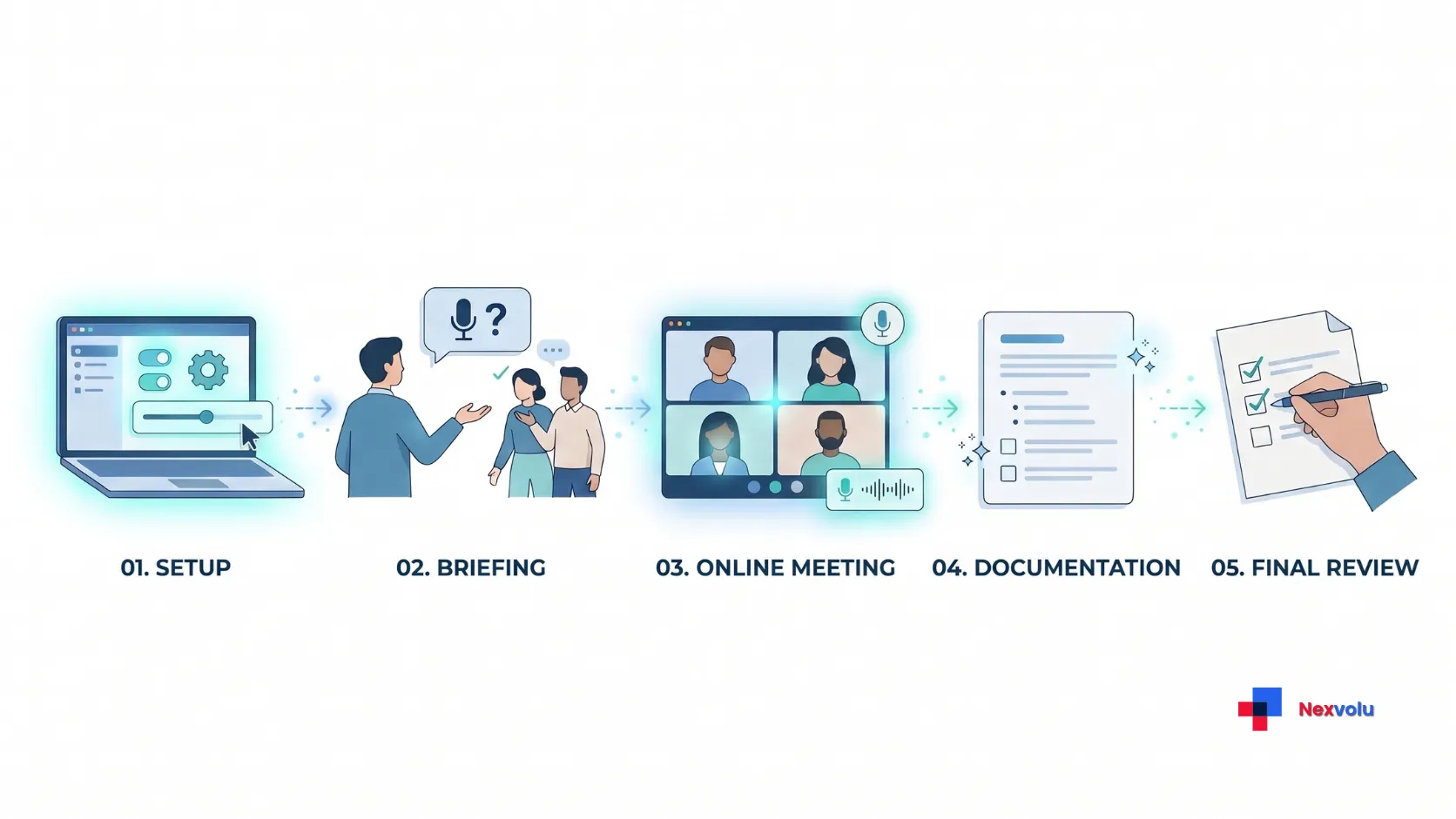
Use this workflow to trial the best AI meeting note takers on your shortlist. Menus and controls differ, so follow the provider’s current instructions for your account.
- Check your existing tools. Your organization may already provide an approved meeting assistant. Confirm whether it meets the task before adding another subscription.
- Choose a low-risk trial. Pick a routine meeting with willing participants. Avoid sensitive or regulated material until your organization approves the product and account.
- Set capture deliberately. Connect the relevant calendar or meeting application only when required. Choose between meeting-bot and bot-free capture where supported. Review microphone permissions, automatic joining, and calendar filters. For Fireflies, check which meetings Auto-join can capture and who receives automatic recaps. Do not enable broad automatic capture without reviewing these choices.
- Review privacy settings. Check model-training choices, retention, downloads, shared links, and default visibility. Use the most restrictive appropriate access and record the retention decision.
- Tell participants. Explain the tool before capture, seek agreement, and provide a way to decline. If someone objects, stop and use the agreed alternative.
- Run the meeting and review the result. Compare the summary with the source or your own notes. Correct speaker names, decisions, owners, and deadlines before distributing it.
- Decide whether to keep it. After several suitable meetings, assess useful time saved, correction effort, limits, and price. Delete trial material according to your policy.
Review AI meeting notes before sharing
Even the best AI meeting note takers can misattribute a decision or turn a suggestion into a commitment. Therefore, verify the items that create obligations: names, figures, decisions, owners, and dates. Compare them with the transcript or recording if available, and ask a participant when the source is unclear.
Use a simple status format: “Confirmed decision,” “Proposed action,” and “Owner or deadline not stated.” That separation prevents a guess from becoming an assignment. For example, if someone says “We might ask Maya to review it,” do not publish “Maya will review it Friday” unless the group actually agreed to that owner and date.
Use a simple meeting-note quality check
When evaluating a trial, review a few meetings against the same five criteria:
- Speaker identification: Are names and speakers attributed correctly?
- Decisions: Does the summary distinguish confirmed decisions from discussion and suggestions?
- Action items: Are task owners and deadlines supported by what participants actually said?
- Important details: Are numbers, dates, client names, and key facts accurate?
- Completeness: Did the summary omit an important disagreement, qualification, or unresolved question?
Record the errors you have to correct and the time spent reviewing each summary. After several suitable meetings, compare that effort with the time you would have spent taking and organizing notes manually.
This is a practical evaluation method, not a standardized accuracy benchmark. Do not use a single successful meeting as proof that a tool will consistently produce reliable notes.
If your service supports custom instructions, ask for a concise list of decisions, action items, owners, deadlines, and uncertainties. Do not expect the instruction to fix missing audio or remove every error. Our guide to writing better AI prompts shows how to specify a checkable output; our AI fact-checking guide explains how to verify important claims.
Best AI meeting note takers: setup checklist
- ☐ The organization approves the product and account for the meeting’s information.
- ☐ The plan covers typical meeting length, monthly volume, storage, and history requirements.
- ☐ I understand whether transcription, AI summaries, and credits have separate limits.
- ☐ Participants know what the tool will capture and how the team will use the material.
- ☐ I have configured automatic joining, calendar filters, and recap recipients appropriately.
- ☐ I have reviewed training, audio retention, transcript deletion, and sharing settings.
- ☐ The notes distinguish confirmed decisions from suggestions and unresolved issues.
- ☐ Someone has verified speaker names, numbers, dates, action owners, and deadlines.
- ☐ The team shares notes only with intended recipients and deletes them under the applicable retention policy.
- ☐ I have evaluated the tool across several suitable meetings before a paid commitment.
Frequently asked questions
What is the best free AI meeting note taker?
Fathom is one of the best AI meeting note takers to consider if you want unlimited free recordings and transcripts without managing a complicated transcription-credit system. Its free plan still limits advanced summaries to five calls per month. Fireflies is another option if you want eligible unlimited live transcripts through Auto-join and can work within its storage and AI-credit limits. Otter may suit occasional live transcription, while Granola offers manually started bot-free notes with 30 days of Basic history. Compare the actual restrictions before choosing.
Can an AI note taker work without a bot?
Yes. Granola captures device audio after you manually start it without adding a bot to the call. Fireflies offers a bot-free Chrome extension for Google Meet in Chrome, while Fathom’s newer bot-free experience is currently available to eligible Mac users, with Windows availability still limited.
These options have different device and platform restrictions. Bot-free does not mean the tool captures no audio. Inform participants and follow the applicable recording and privacy requirements.
Are AI meeting notes accurate enough to send immediately?
Not reliably enough for important decisions without review. Check the transcript or recording where available, especially for speaker names, numbers, deadlines, and commitments. If evidence is missing, mark the item as uncertain instead of guessing.
Does opting out of model training delete meeting recordings?
No. Training, retention, and sharing are separate controls. Review the provider’s deletion policy and your account settings; an opt-out does not automatically erase existing recordings or notes.
Nexvolu’s verdict
Start with Fathom for frequent free recordings, Otter for live transcripts, Fireflies for a shared searchable workflow, or Granola for bot-free capture. Then check the limitation that matters most: meeting length, summary credits, history, or data controls. The best AI meeting note takers save time only when you can use them with permission and trust the final notes enough to act on them.