
If Google Search Console says “Crawled, currently not indexed,” resist the urge to rewrite immediately. Google has crawled that URL, but the report says it is not indexed. The label alone does not tell you why, or prove that the content is poor.
Start by deciding whether the URL should appear in search. Then inspect its last known status, test the live page, and check its canonical signals, accessibility, and purpose. This guide walks through each decision, using a small WordPress site as an illustrative example.
Table of contents
What does crawled, currently not indexed mean?
Google’s Page indexing report defines this status simply: Google crawled the page, but did not index it. Google does not index every URL, and the status does not necessarily point to a problem that needs attention.
Crawling means fetching a page. Indexing means processing information and storing an eligible page in Google’s search index. A page that is indexed can still fail to appear for a particular query; indexing and ranking are different questions.
Do not confuse this status with Discovered – currently not indexed. In that case, Google knows about the URL but has not yet crawled it. The next checks may therefore differ.
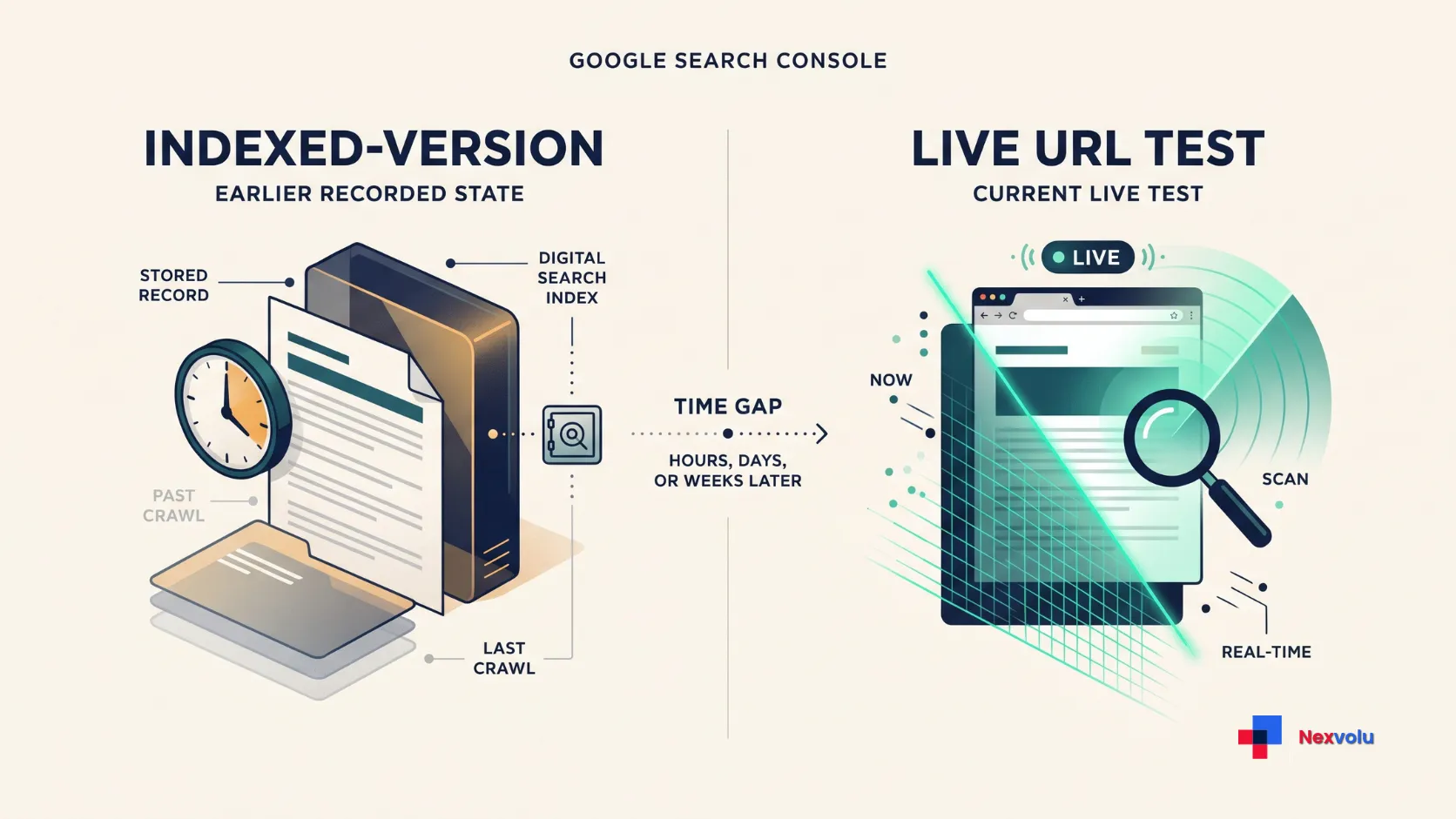
Search Console reports what Google last recorded, not a complete explanation of its decisions. If you recently changed the page, compare the recorded crawl with a live test before making another change.
Decide which URLs matter before fixing anything
Use Indexing → Pages to spot patterns, not to diagnose one URL. Google’s report shows a sample of examples, limited to 1,000 URLs, and may not list every affected page. For an individual page, use URL Inspection.
Google also says sites with fewer than 500 pages may not need this report; start by searching for important URLs directly. Prioritize pages that should be useful search entry points, such as a substantive guide or service page. You do not need every URL indexed.
Next, separate important pages from navigation variants, duplicate addresses, and pages intended only for existing visitors. An unindexed URL may be a sensible outcome. For example, a tag archive with the same short list as a category page might not need its own search presence.
Record the exact URL, page type, intended purpose, last known crawl date, and next check. Also note whether the report is filtered to a particular sitemap: that filter changes which URLs you see. Start with a few representative pages rather than changing an entire site at once.
Inspect a crawled, currently not indexed URL in Search Console
Use Google’s URL Inspection tool on a page you actually want indexed. Choose the correct property, paste the full URL, and review the indexed-version report.
- Check the last crawl. Was it before or after your latest meaningful change? An older crawl cannot confirm what Google saw after that change.
- Review availability and indexing details. Note any reported fetch failure, crawl restriction, or indexing directive. If Google provides canonical information, compare the declared and Google-selected versions.
- Run “Test live URL.” This fetches the current page and checks for some indexability issues. Open the available crawled-page details to inspect the response and rendered content.
- Compare the two views. A live test can show that a recent issue is fixed while the indexed report still reflects an earlier crawl.
A successful live test is useful, but it is not proof of indexing. It cannot predict Google’s canonical choice, determine whether the URL is a duplicate, or check every quality and security condition required for Search. It also does not check manual actions, content removals, or temporarily blocked URLs. The live test follows redirects without showing the final URL tested, so inspect the destination separately when the submitted URL redirects.
Check the canonical URL and page access
Canonicalization is Google’s process of selecting a representative URL from similar or duplicate pages. A canonical tag is your preference, not a command. Google can select a different URL, and canonical information may be unavailable for some inspected pages.
Compare the preferred version in your internal links, sitemap, redirects, and rel="canonical" declaration. Look for variants such as HTTP versus HTTPS, www versus non-www, trailing slashes, and tracking parameters.
Use a permanent redirect when an alternate URL should no longer be available; use rel="canonical" when duplicate or very similar URLs must remain accessible. Google treats redirects and canonical annotations as strong signals, while sitemap inclusion is weaker. Keep the signals consistent and link internally to the preferred URL. See Google’s canonicalization guidance.
For an important WordPress page, check that the preferred URL returns successfully (normally HTTP 200) and that the rendered main content is visible.
Under Settings → Reading, confirm that Discourage search engines from indexing this site is unchecked on a public website. Then check the page-level indexing option in Yoast’s Advanced settings and any X-Robots-Tag response header for an accidental noindex. See WordPress Reading settings and Yoast’s noindex settings.
Google must be able to crawl the URL to read a noindex directive, so do not block that URL in robots.txt when you intend to use noindex. A canonical tag and noindex serve different purposes: canonicalization consolidates duplicate URLs, while noindex excludes a page from Search.
Review internal links and content before a rewrite
Once access and canonical signals make sense, look at how the page serves readers. Can someone reach it from a relevant category or related article? Do those links use descriptive text and point to the intended URL? A sitemap can aid discovery, but it is not a promise of indexing and does not replace useful navigation.
Then compare the page with other material on your own site. If two articles answer the same question for the same reader, decide whether each has a distinct job. If the intended page contains an incomplete answer, outdated instructions, or a missing example, improve that specific weakness.
For example, a WordPress guide that says only “check your settings” could add the exact setting to inspect and explain what each outcome means. That is a reader-focused improvement. Adding 500 generic words merely to reach a length target is not.
A good-looking page and a clean live test do not explain why Google excluded a URL. Google notes that pages may not appear in search results even after crawling when there is insufficient value or user demand; the status alone does not tell you whether either factor applies here.
Compare the page with current search results for the same intent and ask what useful step, verified detail, or example it adds. A missing backlink or short word count alone is not a diagnosis. If the page is already distinct, useful, accessible, and current, record your checks and monitor it rather than rewriting on a schedule.
A WordPress decision tree: keep out, investigate, improve, or consolidate
The following examples are fictional. They show how to choose an action, not what Google concluded about any real website.
| Illustrative URL | Evidence to check | Decision |
|---|---|---|
Useful article: /guide/ | Intended for search; live test shows an unexpected noindex. | Investigate: Find the WordPress or plugin setting causing it. Remove it only if unintended, then retest. |
Tag archive: /tag/news/ | Repeats a category list and has little independent purpose in search. | Keep out: Retain it for navigation if useful; consider an intentional, crawlable noindex. |
Duplicate: /guide/?ref=example | Same content as /guide/; inspect canonical and redirects. | Consolidate: Consistently link to the preferred URL; use appropriate canonical or redirect signals. |
Article: /setup/ | Accessible and distinct, but its instructions omit essential steps. | Improve: Add the missing steps and verify them; do not claim this was the exclusion cause. |
Before applying a site-wide change, check more than one example. An archive might be valuable if it organizes a substantial topic; a parameter may generate a genuinely different page. If a plugin affects many URLs, test a safe change with a developer and document how to reverse it.
Crawled, currently not indexed: request indexing and monitor the result
After a meaningful fix to an important URL, run the live test again. If the URL is accessible and you manage the Search Console property, you can select Request indexing to ask Google to recrawl it. This does not guarantee inclusion. Do not repeatedly submit the same URL; Google says multiple requests will not make it crawl faster. You need owner or full user access to request indexing.
Google says recrawling can take a few days to a few weeks. For multiple changed URLs, maintain a sitemap containing preferred, indexable pages, with accurate lastmod dates when meaningful changes are made. A sitemap helps Google discover URLs but does not guarantee a crawl or index entry. See Google’s recrawl request guidance.
Use Validate fix only when the Page indexing report shows a separate issue with a validation workflow and you have corrected all affected URLs. It asks Google to check the reported issue; it is not a way to force a Crawled – currently not indexed URL into the index. Wait until the validation cycle finishes before requesting another one.
Record the change date and the next review date. Later, inspect the URL again and compare the last crawl date, canonical information, and index status. If a critical section remains excluded or a site-wide failure appears, gather examples and involve a qualified technical SEO or developer. Avoid assuming one explanation fits every URL.
Once a page appears in search, you can explore its AI-feature impressions in our Search Console Generative AI report guide. This is an optional visibility check, not a way to diagnose why a URL was excluded.
Common questions
Does crawled, currently not indexed mean my content is poor?
No. The status confirms a crawl and a current non-indexed state, not a specific quality verdict. Inspect the URL and its purpose before deciding whether to change the content.
Should I request indexing again?
Not simply because the status remains. After an important change, one request through URL Inspection can ask Google to recrawl the page, provided it is accessible and you manage the Search Console property. Repeated requests for the same URL do not make Google crawl faster. Then monitor the result; inclusion is not guaranteed.
Can a live test say a URL is indexable while the report says it is not indexed?
Yes. The live test checks the page now for some possible issues, while the indexed-version report reflects Google’s last recorded information. A live pass does not check every condition or guarantee a future index entry.
Bottom line:
Treat “crawled, currently not indexed” as a starting point, not a rewrite order. Decide whether the URL deserves a search role, collect the evidence, and make the smallest justified change.