

Why Your AI Prompts Don’t Work (and How to Write Better AI Prompts)
You ask an AI assistant for a useful answer and get a polished response that misses the point. The problem is not always the tool. Often, the request leaves out the goal, the relevant context, or the standard you will use to judge the result. To learn how to write better AI prompts, start by identifying what went wrong instead of collecting magic phrases.
A better prompt gives the assistant a clear task, the information it is allowed to use, and an output you can actually evaluate. However, even a carefully written prompt cannot guarantee an accurate answer, create access to missing information, or overcome a tool limitation.
This guide focuses on text-based prompting in general-purpose assistants such as ChatGPT, Claude, and Gemini. The examples are illustrative, not results of comparative product testing. Provider guidance checked November 7, 2026.
Table of contents
- Why AI prompts fail and how to write better AI prompts
- How to write better AI prompts: diagnose the result
- Seven AI prompt mistakes and their fixes
- Before-and-after AI prompt examples
- How to write better AI prompts with a reusable template
- How to write better AI prompts: test and improve
- When a better AI prompt is not enough
- How to write better AI prompts: a final checklist
- Nexvolu’s verdict
- Frequently asked questions about AI prompts
Why AI prompts fail and how to write better AI prompts
A prompt is the instruction or input you give an AI assistant. For this guide, we are focusing on text prompts for general-purpose assistants such as ChatGPT, Claude, and Gemini. The principles can also help with other tools, although capabilities and instructions vary.
A response can fail for several reasons. Your request may be vague, your source material may be missing, or the answer may be outside the tool’s capabilities. Sometimes the response follows the prompt but still contains an error. Therefore, treat a poor answer as a clue, not proof that you chose the wrong words.
OpenAI’s ChatGPT prompting guide recommends clear, specific instructions, relevant context, and iterative refinement. Anthropic’s Claude prompting guide also emphasizes direct instructions, useful context, relevant examples, and clear structure.
Google’s Gemini Apps Help explains how to edit a submitted prompt and, for some prompts, review alternative drafts. This is another example of improving an answer through follow-up refinement rather than relying on a perfect first attempt.
These are useful starting principles, not guarantees that any particular wording will produce a correct answer.
How to write better AI prompts: diagnose the result
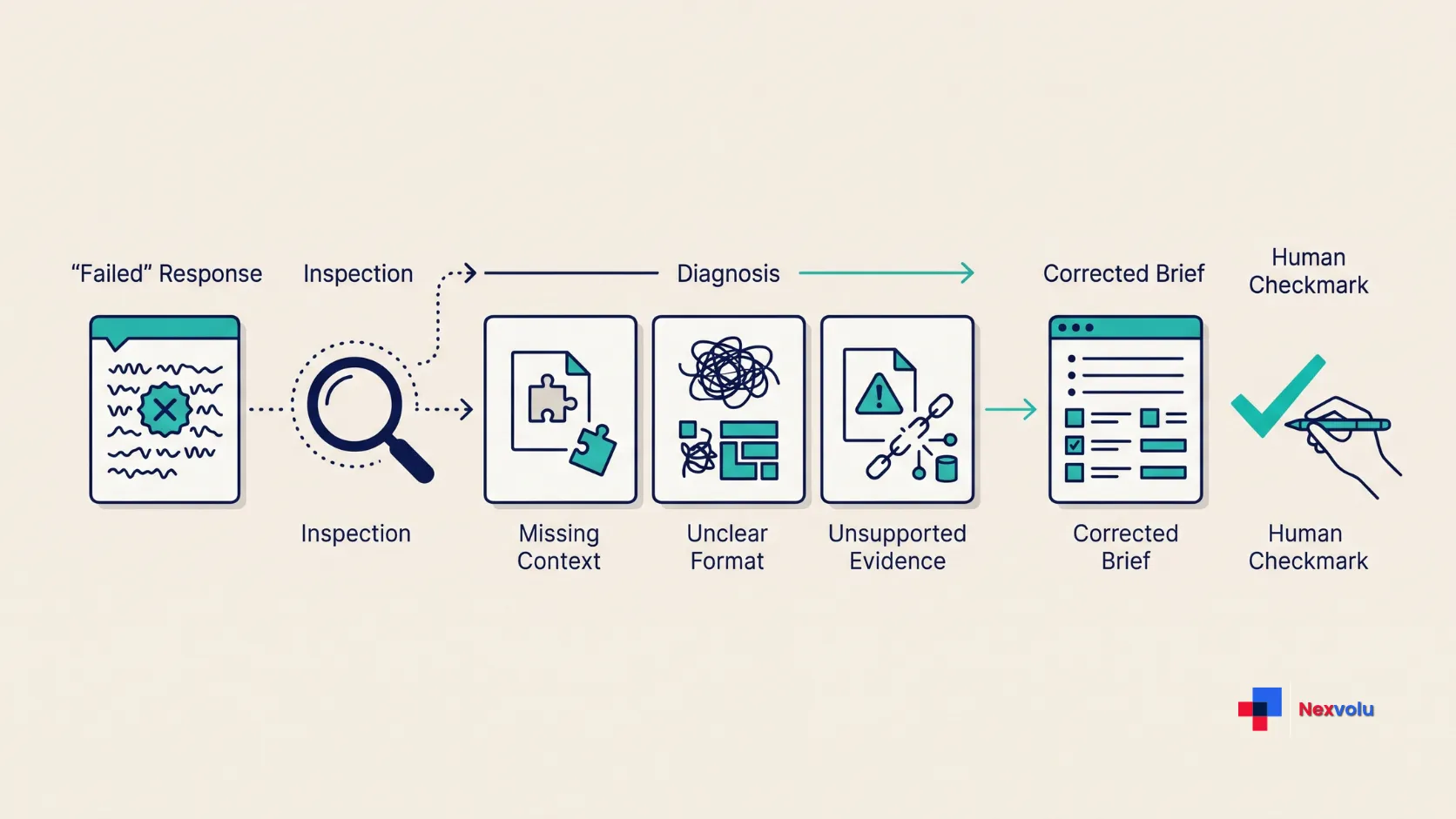
Use the symptom to decide what to change first. These are practical starting points, not proven diagnoses: several causes may produce the same result. To understand how to write better AI prompts, match the failure to a change you can test.
| What went wrong | Possible cause to investigate | First change to try |
|---|---|---|
| The answer is generic | The audience, purpose, or requested action is unclear. | State who the answer is for and what the reader should be able to do with it. |
| The answer sounds confident but lacks support | Evidence is missing, weak, or unverified. | Supply permitted sources, ask for supported claims, and independently check important statements. |
| Important details are missing | The input may be incomplete, unclear, or difficult to process. | Check that the source was received and isolate the relevant information. |
| The format is unusable | The requested structure or acceptance criteria are vague. | Specify headings, length, item count, or a suitable example. |
| The wrong parts change during revision | The target of the revision and protected material are not identified. | Quote the passage to revise and state which facts or sections must remain unchanged. |
| The assistant cannot access a source | The feature, permission, attachment, or connection may be unavailable. | Provide an approved excerpt or use a tool with the required access. |
Start with one suspected issue when practical. Then compare the new answer against the same task. If you change the tool, source material, and instruction at once, you will not know which change helped.
Seven AI prompt mistakes and their fixes
1. How to write better AI prompts: define the task
“Tell me about customer onboarding” leaves the assistant to decide whether you want a definition, a checklist, or a strategy. That freedom can be useful for brainstorming. It is less useful when you need a specific deliverable.
Learning how to write better AI prompts starts with choosing an action: summarize, compare, classify, draft, or explain. Add the decision the output should support. For example, ask for a three-step onboarding checklist for a small software team that wants to reduce setup confusion.
Do not make a simple request complicated just to sound technical. “Explain compound interest with a small numerical example” already contains a clear task and a useful output.
2. How to write better AI prompts: add useful context
An assistant cannot reliably infer your audience, approved facts, or business rules from a short request. A customer-facing email and a note to a colleague may need different levels of detail, even when they discuss the same event.
Include the facts that matter: the reader, purpose, situation, and any fixed decisions. For example, say that the email is for existing customers and that a delivery is delayed by two days. If the reason for the delay has not been confirmed, tell the assistant not to invent one.
Knowing how to write better AI prompts also means choosing context carefully; more is not automatically better. Long, irrelevant background can hide the task. Use only material that is relevant and approved for the tool. Before adding work information, check your employer’s rules on using AI at work.
3. How to write better AI prompts: specify the output
“Make it professional” is hard to review because it means different things to different people. Replace it with observable instructions when possible: “Use a warm, direct tone; write one subject line and an email under 100 words.”
You can also show a short example of the style or structure you want. Make sure the example is appropriate for the task and contains no private information you are not allowed to share. An example can steer the answer; it does not guarantee the assistant will copy every requirement correctly.
A clear format is useful when you are learning how to write better AI prompts for tasks you repeat. If the output must fit a real limit, count it yourself. An assistant can miss an exact word count, even when you state it clearly.
4. You mix incompatible instructions
“Cover every detail in one sentence” creates a trade-off. So does “use only the supplied document” combined with “include the latest market statistics” when the document contains no current data.
Choose what matters most. If completeness is essential, allow a longer answer. If the source is the only permitted evidence, ask the assistant to mark missing information instead of filling the gaps. You can also state a priority: “Accuracy and source fidelity matter more than brevity.”
When deciding how to write better AI prompts, review your own constraints before blaming the assistant.
5. You expect the assistant to know or access what it cannot
A prompt cannot create permission to open a private file, guarantee a live web search, or turn an incomplete document into a complete one. Features and access depend on the product, account, settings, and connection available to you.
Knowing how to write better AI prompts includes checking access before revising the wording. First, confirm the attachment or source is actually available. Next, ask the assistant to identify the document title and summarize a passage you can recognize. This is a quick soundness check, not proof that it processed every page or table correctly.
For research across uploaded sources, our NotebookLM research workflow explains how to check imports and inspect supporting passages. If the source cannot be accessed, provide a permitted excerpt or use a suitable tool instead of repeatedly rewriting the same prompt.
6. You ask for too much without a review point
Learning how to write better AI prompts for important documents often starts by separating the work into stages: extract the relevant facts, review them, then draft the final output.
For example, before asking for a comparison of three reports, request a short list of each report’s date, scope, and main findings. Check that list against the originals. Only then ask for the comparison. This helps you catch a wrong source interpretation before it spreads through the final draft.
Staging adds time, so use it where errors matter. A short, low-stakes request may not need multiple rounds.
7. You ask for accuracy without defining how to check it
An assistant can produce a convincing explanation that contains an incorrect number, an invented citation, or a misread source. Asking it to “be accurate” or “never hallucinate” is not an independent check. Learning how to write better AI prompts includes specifying the evidence you need.
Instead, tell it which sources to use, ask it to identify uncertainty, and verify the important claims yourself. Open the original source and check whether it actually supports the statement. For current facts, consult the appropriate current primary source. Our guide to fact-checking AI answers gives a practical verification workflow.
For medical, legal, or financial decisions, use appropriate authoritative sources and qualified professional advice. A better prompt is not a substitute for either.
Before-and-after AI prompt examples
These illustrative examples show how to write better AI prompts for different tasks; they are not hands-on test results. Replace the sample facts with information you are authorized to use.
Example 1: How to write better AI prompts for a customer email
Before: “Write an email about the delay.”
After: “Draft an email to existing customers whose orders will arrive two days late. Use a calm, direct tone. State the delay, apologize once, and say we will send an update tomorrow. Do not invent the cause or promise compensation. Give me a subject line and an email under 100 words.”
Why this is more useful: The task identifies the audience, approved facts, tone, and boundaries. A reviewer can check whether the draft includes an invented explanation or an unauthorized promise.
Example 2: How to write better AI prompts for a research summary
Before: “Summarize these reports and tell me the best solution.”
After: “Using only the three attached reports, compare the options they discuss. For each option, list the stated benefit, limitation, and supporting report and page when available. Separate the authors’ conclusions from your synthesis. If a report does not support a claim, say ‘not stated.’ Do not recommend a winner until I review the comparison.”
Why this is more useful: It separates evidence extraction from the later decision. Still, the assistant may misread a page or invent a citation, so open each important source and verify it.
Example 3: A revision that preserves good work
Before: “Make it better.”
After: “Revise only the second paragraph below. Keep the original facts and friendly tone. Remove repetition and shorten it to approximately 60 words. Do not change the first or third paragraphs.”
Why this is more useful: It identifies the target, the desired change, and what should remain untouched. Check the final text: the assistant may still alter facts or miss the length target.
Example 4: A comparison with missing information
Before: “Which software plan should our team buy?”
After: “Compare the two plans using the published plan details I provide below. Our fictional team has six members and needs shared access. Return a table with price, shared-access support, and unclear points. Do not guess missing prices or features. List the questions we should answer before choosing.”
Why this is more useful: The request defines the decision criteria and makes room for unknowns. Price and availability can change, so confirm them with the vendor before purchasing.
Example 5: A project update with missing information
Before: Write a project update from these notes.
This request leaves several questions unanswered. Who will read the update? What information should it contain? How should missing dates or owners be handled?
After: Using only the notes below, draft an internal project update for a six-person team. Organize it under three headings: Completed, Blocked, and Next. Use short bullet points and keep the update under 120 words. Include an owner or date only when the notes explicitly provide one. Write “not stated” when an important detail is missing. Do not infer that work is complete, invent a deadline, or assign responsibility.
Notes: [Paste your approved project notes here.]
Review the result against the same five criteria:
- Does it use only the supplied information?
- Does it contain all three requested headings?
- Are owners and dates supported by the notes?
- Does it stay within the requested length?
- Does it identify missing information instead of guessing?
Why this is more useful: The revised prompt defines the audience, task, structure, limits, and missing-information behavior. The review criteria also make it easier to identify exactly what needs changing if the result is still unsuitable.
This is an illustrative example, not a reported test result.
How to write better AI prompts with a reusable template
A useful prompt template should cover the parts of a task that actually affect the result. You do not need to fill in every field for every request. Remove anything that does not apply.
Task: State exactly what you want the assistant to do.
Audience and purpose: Explain who will use the result and what it should help them accomplish.
Context and sources: Provide relevant, permitted information. Specify whether the assistant must use only supplied material or can consult other sources.
Output: Define the preferred format, length, structure, and level of detail.
Success criteria: State what a satisfactory answer must include or get right.
Boundaries: Identify important exclusions, facts that must remain unchanged, and how missing information should be handled.
Review: Ask the assistant to flag uncertain or unsupported information. Independently verify important claims before relying on the result.
For example: Explain the refund policy below to a first-time customer in three short bullet points. Use only the supplied policy. Include the refund deadline and any restocking fee if stated. If either detail is missing, say so. Do not add legal claims. A useful answer must preserve every important policy condition and stay under 90 words.
Then provide the authorized policy text.
The goal is not to turn every short question into a complicated instruction. Use only the details that help the assistant produce an answer you can evaluate.
How to write better AI prompts: test and improve
You do not need a lab to learn how to write better AI prompts. You do need a consistent way to judge the result.
- Choose a realistic task. Use a sample you are permitted to share and know well enough to review.
- Write three pass criteria. For an email, these might be: correct facts, no invented promise, and a usable subject line.
- Run the initial prompt. Save the instruction and output so you can compare them later.
- Identify the failure. Was the problem factual accuracy, missing context, tone, format, or tool access?
- Change the relevant instruction. For example, add approved facts if the draft invents details. Re-run and review against the same criteria.
- Try a second realistic case. A prompt that works once may fail when the input changes. Check an edge case, such as a document that does not contain the requested answer.
For a fair comparison, keep the task, source material, model, and relevant settings the same when comparing the original and revised prompts, where possible. Save both responses and review them against the same pass criteria. If you change the prompt, model, and source material simultaneously, you will not know which change influenced the result.
For important repeatable workflows, test more than one realistic input. A prompt that works on a single example may still fail when the information is incomplete, the format changes, or an unusual case appears. This is a practical review method, not a standardized benchmark or a guarantee of repeatable model performance.
Results can vary between runs, so one improvement is a useful signal, not proof of a universal rule. For a recurring workflow, review several examples over time.
When a better AI prompt is not enough
Knowing how to write better AI prompts is only one part of a useful AI workflow. A better instruction will not fix an inaccessible file, an outdated source, a tool that lacks the required feature, or a policy that prohibits sharing the material.
If an assistant repeatedly misses a scanned table, inspect the source file and its extracted text. For current information, check whether the tool can access current sources and then verify them. When a document contains sensitive data, use only an approved tool and data type. Removing names alone may not make information safe to share.
Training controls, chat history, and data retention are separate concerns. Our guide to stopping AI training on your data explains why an opt-out is not the same as preventing all processing or storage.
For work you repeat, a workspace or saved instruction may help organize context. Compare the approaches in our guide to ChatGPT Projects, Gemini Gems, and Claude Projects. Check the current product documentation before relying on specific features, which can change.
How to write better AI prompts: a final checklist
Use this checklist as you learn how to write better AI prompts:
- Is the action clear, and do I know what I want the answer to help me do?
- Have I included the audience and relevant context without unnecessary detail?
- Can the tool actually access the approved material it needs?
- Have I specified the format, limits, and what a useful answer must include?
- Have I told it what to do when the information is missing?
- Am I allowed to share the input with this tool and account?
- Do I have a plan to check important facts and the final output?
- Have I defined how I will judge whether the response actually solves the task?
Nexvolu’s verdict
When deciding how to write better AI prompts, stop searching for a perfect sentence and start diagnosing the result. A clear task, useful context, and a checkable output give the assistant a better brief. When the answer fails, fix the relevant part and compare it against the same criteria.
The boundary matters just as much: prompts can guide an assistant, but they cannot guarantee truth, supply missing access, or override privacy rules. Use the tool for a draft or a structured comparison, then verify what matters before you act on it.
Frequently asked questions about AI prompts
Do longer prompts produce better answers?
Not necessarily. A longer prompt can help when it supplies relevant sources, constraints, and examples. However, extra background can also bury the task. Start with what the assistant needs, then add detail when the result shows a gap.
Should I tell an AI to act as an expert?
A role can help communicate the perspective or audience you want. It does not give the tool credentials or guarantee expert-level accuracy. For high-stakes work, provide reliable evidence and consult an appropriately qualified person.
Do the same prompts work in ChatGPT, Claude, and Gemini?
To learn how to write better AI prompts across tools, start with a clear task, relevant context, and an explicit output. However, products differ in features, access, and model behavior. Check the instructions and capabilities of the tool you use, and test your prompt on your own task.
Why does the AI ignore part of my prompt?
The instruction may be buried, ambiguous, or in conflict with another requirement. A missing attachment or a tool limitation can also be responsible. Restate the highest-priority requirement, check access, and try breaking the task into reviewable stages.