
Google Drive vs OneDrive vs Dropbox comes down to one question before price or storage size. Which office suite do you already live in? Pick the storage that ships with that suite.
Google Drive fits a Google Workspace life; OneDrive fits a Microsoft 365 life; Dropbox fits a life that uses neither suite as its home base.
That rule settles most choices in a minute. Fast. The rest of this guide tests it against price and file limits, with sharing controls and the backup gap that most comparisons treat as an afterthought, even though a sync folder can lose files as fast as it saves them.
Most comparisons rank the three services feature by feature and leave you with a tie. That approach wastes time. Google sells Drive as part of Workspace; Microsoft sells OneDrive as part of Microsoft 365; Dropbox sells sync and sharing as its whole product.
Every dollar figure below comes from a US price check in October or November 2026, with the source named beside it. Check the vendor page at checkout.
The office suite rule for Google Drive vs OneDrive vs Dropbox
Start with your inbox and your documents. Open the app where you write most days. If you open Gmail and Docs, you already pay for Google Drive in habits and shared folders, even before you pay for storage.
When you open Outlook and Word, you already live in OneDrive territory. If you open a mix of tools, or you share large files with clients who use a mix of tools, Dropbox earns a look.
The logic runs on friction. A storage service feels fast when it stays out of the way. Google Drive feels fast inside Docs because comments and sharing sit in the same window as the document.
OneDrive feels fast inside Word because autosave and coauthoring share the same file. Dropbox feels fast when you drag a folder of video files into a shared link and the other side just opens it, no setup dance, no app mismatch to explain over email.
Name the suite you would keep if you could keep only one. That answer picks your storage. If you name Google Workspace, buy more Google storage when you outgrow the free tier. If you name Microsoft 365, buy more Microsoft storage.
Switching suites costs more than switching storage. Moving files takes an afternoon. Moving email and shared folders takes weeks. The cheapest plan on paper can turn into the most expensive choice once you count retraining and broken links, which is why a storage comparison that ignores switching cost gives bad advice.
Google Drive vs OneDrive vs Dropbox: what each service costs in November 2026
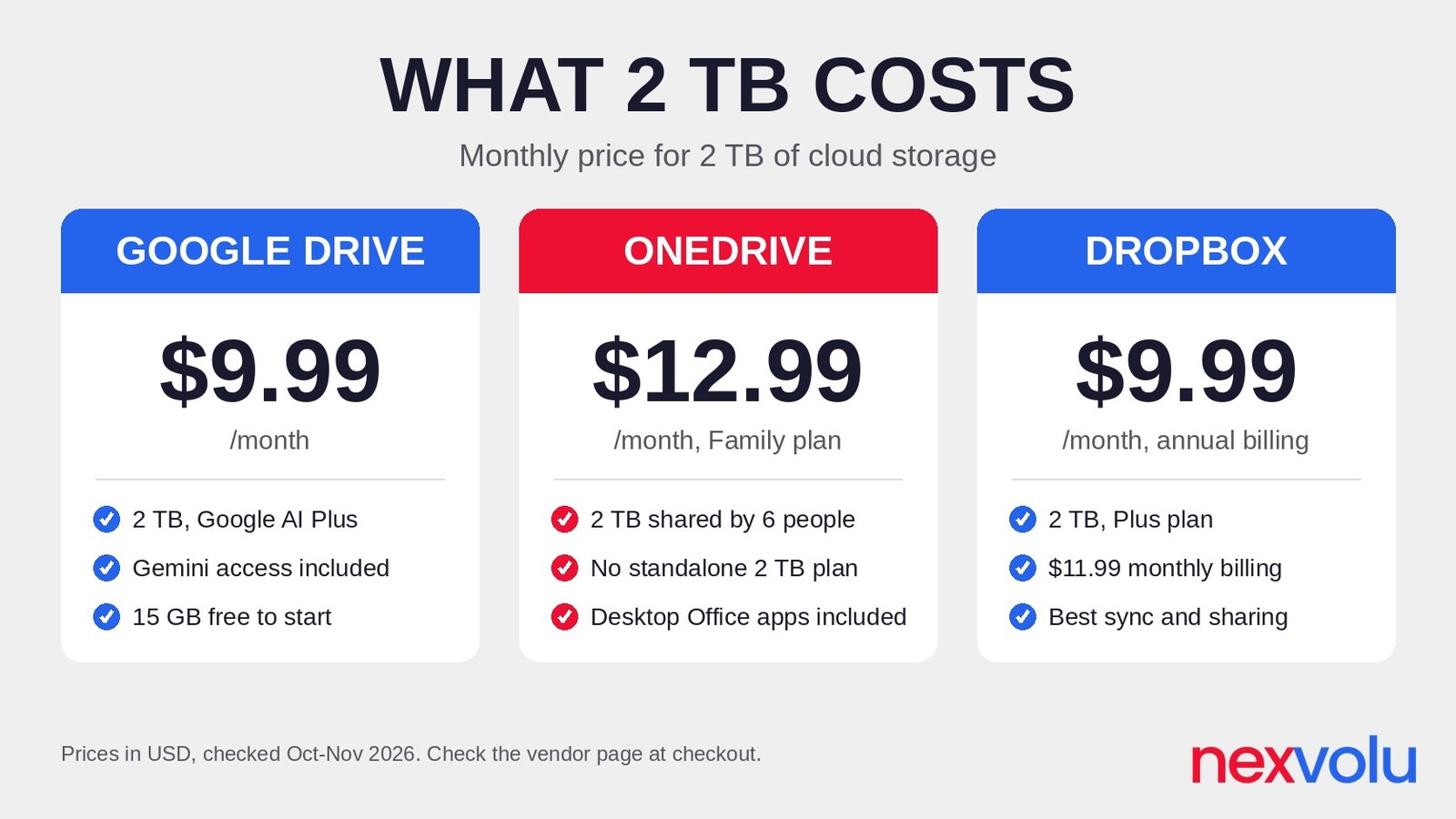
For example, Google sells extra Drive storage through Google One. BravoTech checked Google One US prices on November 11, 2026. Basic costs $1.99 a month for 100 GB.
In fact, standard costs $2.99 a month for 200 GB. Google AI Plus costs $4.99 a month for 400 GB or $9.99 a month for 2 TB. Google AI Pro costs $19.99 a month for 5 TB.
In addition, every Google account starts with up to 15 GB free. That pool covers Gmail and Drive. Photos draws on the same pool too.
Overall, Google bundles AI features into every plan above 200 GB, so the 2 TB and 5 TB prices buy Gemini access along with storage.
Google Drive vs OneDrive vs Dropbox: Microsoft and Dropbox prices
Microsoft sells OneDrive storage through Microsoft 365. SaaS CRM Review checked US prices on November 8, 2026. Microsoft 365 Basic costs $19.99 a year or $1.99 a month for 100 GB.
Personal costs $99.99 a year or $9.99 a month for 1 TB, plus desktop Word and Excel. Microsoft 365 Family costs $129.99 a year or $12.99 a month for up to six people sharing 2 TB, on subscriptions started from October 7, 2026.
Read those Microsoft numbers as a bundle. Personal at $99.99 a year looks steep next to Google Basic at $1.99 a month, until you count the desktop Office apps. A buyer who already pays for Word and Excel gets 1 TB of OneDrive storage as part of that same bill.
Dropbox sells storage alone, with no office suite attached. Internxt and Orangedox, both checked against Dropbox plan pages in 2026, list Plus at $9.99 a month on annual billing, or $11.99 a month on monthly billing, for 2 TB. Professional costs $16.58 a month on annual billing, or $19.99 a month on monthly billing, for 3 TB.
Compare the three at 2 TB
Put the three ladders side by side and a pattern appears. Google gives the cheapest first step at $1.99 a month for 100 GB. Microsoft matches that first step.
Dropbox jumps from free 2 GB to 2 TB at $9.99 a month on annual billing. That jump tells you who Dropbox serves: a buyer who already knows they need terabytes and cares about sync quality more than a cheap entry tier.
| Service | Free storage | First paid step | 2 TB price | What the price also buys |
|---|---|---|---|---|
| Google Drive | 15 GB | $1.99 a month for 100 GB | $9.99 a month | Gemini AI features on AI plans |
| OneDrive | 5 GB | $1.99 a month for 100 GB | No standalone 2 TB personal plan | Desktop Office apps from Personal up |
| Dropbox | 2 GB | $9.99 a month on annual billing for 2 TB | $9.99 a month on annual billing | Sync tools and sharing controls |
Annual billing cuts the monthly figure on all three, by roughly 16 percent on Google and Dropbox and about 17 percent on Microsoft home plans. That split is why Google Drive vs OneDrive vs Dropbox pricing resists a simple winner. Check the annual option if you plan to keep a plan for a year. Taxes sit outside every figure above, and prices differ by country.
Free tiers: why the free numbers feel so different
Google gives 15 GB free; OneDrive gives 5 GB free; Dropbox gives 2 GB free.
Those numbers look close on a chart. They feel miles apart in daily use.
Google counts Gmail and Drive against the same 15 GB. Photos draws on that pool as well. A full inbox eats Drive space. BravoTech reported in November 2026 that Google accounts created from March 9, 2026 start with 5 GB, then gain another 10 GB after the owner verifies a phone number.
OneDrive counts files and Outlook.com attachments against its 5 GB. Microsoft keeps the Outlook.com mailbox separate at 15 GB, according to a November 2026 free plan comparison. Five gigabytes covers documents and a modest photo set. Video kills it fast.
Dropbox gives 2 GB free, and that amount works as a trial, rather than a home for your files. A single shared folder from a client can fill it. Dropbox also caps the free Basic plan at three signed in devices, per Dupple in September 2026.
Free tier advice stays simple. Use Google free if you want a real free plan that can run for months. Stay on OneDrive free if you live on Windows and need a small sync folder for documents. Use Dropbox free only to receive files or to test the sync client with one project.
Google Drive vs OneDrive vs Dropbox: sync and sharing
Dropbox built its name on sync, and that reputation still holds up in 2026 comparisons. Dropbox splits files into 4 MB blocks and uploads only the blocks that changed, according to Adwaitx. Edit one slide in a large deck and save.
Dropbox sends a small update. Google Drive uploads a fresh copy of the whole file in that same situation, per the same comparison, which adds up fast when a team saves the same large file ten times a day.
That difference matters for video editors and designers, and for anyone who saves large files ten times a day. It matters far less for a writer who edits text documents.
File size caps show a different split. Google Drive allows a single file up to 5 TB. Dropbox allows a single file up to 2 TB on paid plans.
OneDrive caps a single file at 250 GB. Those figures come from Dupple in September 2026. A buyer who backs up raw video will touch the OneDrive cap first.
Google Drive vs OneDrive vs Dropbox: sharing controls and search
Sharing controls split the three in a way that surprises Google fans. Google Drive offers no password protected link on any plan, per Dupple. OneDrive and Dropbox offer password protected links and expiring links, but only on paid tiers.
Dropbox gates those controls behind Standard at $15 per user a month and up, per Dupple in September 2026. OneDrive gates them behind a Microsoft 365 subscription.
A freelancer who sends client files through links should weigh that gap before choosing Google on price alone.
Search and collaboration tilt back toward Google. Drive search finds text inside documents, and Docs lets several people edit the same file at once with live cursors. OneDrive matches that live editing inside Word and Excel. Dropbox wins on the desktop client itself, with LAN sync that moves files between computers on the same network without a round trip to the cloud.
Encryption gives no clear winner. TheDrive.ai reported in October 2026 that all three services use AES 256 encryption at rest. None of the three offers zero knowledge encryption on a standard personal plan.
Google Drive vs OneDrive vs Dropbox: sync is not backup
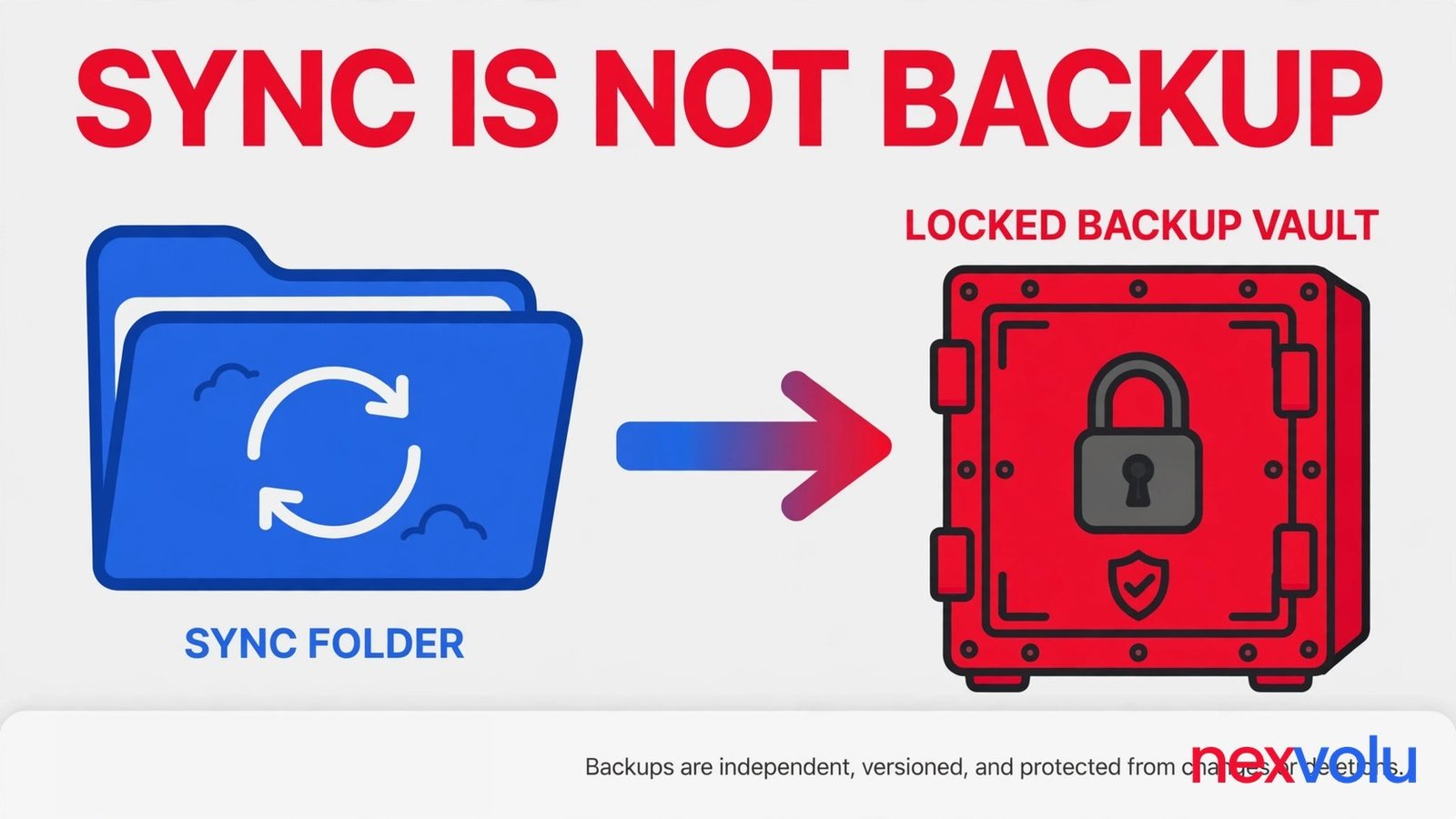
Sync mirrors your files. Backup keeps a separate copy that your daily mistakes cannot touch. Those two jobs sound alike. They behave in opposite ways when something goes wrong.
Delete a folder by accident and sync deletes it everywhere, while ransomware that encrypts files on your laptop gets uploaded as encrypted versions to the cloud before you notice what happened. Tismtek put it plainly in September 2026.
The three services replicate whatever happens to your files. Deletion or ransomware encryption spreads the same way. A backup keeps at least one copy apart from that chain. Safe.
Version history helps, but it has limits. Dropbox Plus keeps deleted files and earlier versions for 30 days. Professional extends that window to 180 days.
A 30 day window saves you from a mistake you notice this week. It saves nothing from a mistake you notice in two months.
Google Drive vs OneDrive vs Dropbox: the 3-2-1 backup rule
The 3-2-1 rule gives a plain target. Keep three copies of important data, on two different media types, with one copy off site. AllCloudHub traces the rule to photographer Peter Krogh and notes that the US Computer Emergency Readiness Team recommends it.
A cloud sync folder counts as one copy. A second copy on an external drive counts as a second copy on a different medium. The third copy in a separate backup service gives you the off site leg.
Google Drive vs OneDrive vs Dropbox: the five backup steps
- List the files you could not rebuild in a week. Contracts and client work belong on that list. Photos and tax records belong there too.
- Turn on version history and trash retention in your cloud account, and check the window on your plan. Write the number of days down somewhere you will see it.
- Add a dedicated backup tool, or a scheduled copy to an external drive, for the files on that list. Set it to run on its own schedule, apart from sync.
- Test a restore once. Pick one file, delete the local copy, and bring it back from the backup. A backup you never tested is a guess, and guesses fail on the worst day.
- Check who can delete files in shared folders. Remove access for people who left the project, and turn off public links you no longer need.
Small teams skip step 4 most often. They buy the backup, they watch the first backup finish, and they assume the restore works. It often does.
The one time it fails, it fails for the file that matters most. Test it. Spend twenty minutes on a restore this month.
One more risk deserves a line. A single cloud account can lock you out through a billing failure or a hacked password. Sync spreads that lockout to every device at once. A separate backup copy breaks that chain.
Google Drive vs OneDrive vs Dropbox: best cloud storage for business
The best cloud storage for business starts with the suite your team already uses. Google Workspace Business Starter costs $7 per user a month on an annual commitment, with 30 GB of pooled storage per user. Business Standard costs $14 per user a month, with 2 TB pooled per user.
Business Plus costs $22 per user a month, with 5 TB pooled per user. Those figures come from Google pricing pages read in October 2026.
Microsoft 365 Business Basic costs $7 per user a month, paid yearly, with 1 TB of OneDrive storage per user. That figure comes from Microsoft business pricing checked in November 2026. Business Basic adds custom business email and Teams.
It leaves out desktop Office apps. Business Standard with Copilot costs $23.50 per user a month on yearly billing. It adds desktop apps and Copilot.
Business Premium with Copilot costs $32 per user a month on yearly billing. It adds device security and management.
Storage stays at 1 TB per user across those business tiers, so buy a higher tier for apps and security, rather than for space. Google Workspace Starter and Microsoft 365 Business Basic both cost $7 per user a month on annual terms. Microsoft gives each user 1 TB. Google gives each user 30 GB from a shared pool.
A document heavy team fits fine in 30 GB per user. A team that lives in Excel and Word will take the Microsoft 1 TB and never think about storage again.
Dropbox Business and admin controls
Dropbox Business serves a different buyer. It suits a team that shares large files with clients outside the company, or a team that works across Google and Microsoft tools without committing to either suite. Dupple listed Dropbox Standard at $15 per user a month in September 2026, with pooled storage starting at 3 TB for the team.
A team that already pays for Workspace or Microsoft 365 will find Dropbox an extra bill on top of a suite bill, which makes sense only if external sharing drives revenue.
Admin controls decide more business purchases than storage size does. Google Workspace and Microsoft 365 both include an admin console and user management on business plans. Personal plans include none of that. A business that runs on personal accounts will struggle to remove a departing employee, or to audit who shared a client folder.
SmartDataCollective, in an October 2026 business comparison, put the same point in one line. Start with Google Drive for Google Workspace teams or OneDrive for Microsoft 365 teams.
How to pick in ten minutes
- Write down the suite your team opens first each morning. That suite picks your storage.
- Check your current storage use in that service. If you sit under the free tier, stay free. Set a calendar reminder to check again in three months.
- If you need more space, buy the smallest paid step in that suite first. Google Basic and Microsoft 365 Basic both cost $1.99 a month for 100 GB in the US.
- If you share large files with outside clients every week, trial Dropbox Plus for one project.
- Set up a separate backup for the files on your cannot lose list, using the five steps in the backup section above. Do this in the same week you pick a storage plan, while the decision still feels fresh.
Which service gives the most free storage?
Google Drive gives 15 GB free, shared across Gmail and Drive. Photos draws on the same pool. OneDrive gives 5 GB free.
Dropbox gives 2 GB free. New Google accounts start at 5 GB until phone verification adds the rest.
Can I use Google Drive vs OneDrive vs Dropbox for backup?
Use any of the three for sync and sharing, and add a separate backup for files you cannot lose. Sync copies deletions and ransomware damage. A backup keeps a copy apart from that chain, with its own schedule and its own restore test.
Which service suits a small business best?
The best cloud storage for business follows the suite your team already uses. Google Workspace suits Gmail and Docs teams. Microsoft 365 suits Outlook and Office teams. Dropbox Business suits teams that share large files with outside clients and use no single suite.
Does Dropbox justify its price with no office apps?
It justifies its price for teams that move large files daily and need block level sync and strong sharing controls. It fails as a value pick for a buyer who wants cheap storage alone.
In Google Drive vs OneDrive vs Dropbox, pick the suite first, pay for storage inside that suite, and protect the result with a backup that sync cannot overwrite. That order saves money and saves files. Start today. Now.
Related reading
- External Hard Drive Not Showing Up on Windows 11
- Does Storage Sense Delete Files on Windows 11
- Reset Windows 11 and Keep My Files
- Stop AI Training on Your Data
Sources
- Dupple, Google Drive vs OneDrive vs Dropbox (2026), September 2026
- BravoTech, Google One Storage Plans, facts checked November 11, 2026
- SaaS CRM Review, OneDrive Pricing 2026, checked November 8, 2026
- Internxt, Dropbox Storage Prices in 2026
- Orangedox, Dropbox Pricing 2026
- Tismtek, The 3-2-1 Backup Strategy, September 2026
- DataBackup.com, Cloud Backup vs Cloud Storage, updated October 26, 2026
- SmartDataCollective, Cloud Storage for Business, prices checked October 16, 2026
- BravoTech, Microsoft 365 vs Google Workspace, checked October 17, 2026
- Fast.io, Dropbox vs Google Drive vs OneDrive Comparison (2026)
Sobia Aslam writes about AI and digital marketing for Nexvolu, with a focus on practical guides that help readers make clear decisions. Read more at Nexvolu.