
A SIM swap attack moves your phone number onto a criminal’s SIM card. Your phone goes dark. Their phone starts getting your calls and texts, including the codes that open your email and bank accounts. The carrier moves the number because someone on the phone sounded enough like you, or knew enough about you, to pass the check.
Nobody touches your phone. Nobody needs your password.
That is the whole trick, and it works because so many accounts treat a text message as proof of who you are. Change where the number points and the proof goes to the wrong person. This guide stays on the US side of the problem, with the numbers the FBI published, the carrier locks that stop a swap, and a first hour plan for the morning your phone shows No Service for no reason.
The US numbers fell. The UK numbers jumped.
The FBI’s Internet Crime Complaint Center, IC3, counted 971 SIM swap complaints in 2025, with reported losses of $17,366,758. Three years earlier the same table showed 2,026 complaints and $72,652,571 in losses.
Complaints fell by about half. Losses fell by about three quarters. The average loss per complaint dropped from about $35,900 to about $17,900.
That looks like good news, and in one sense it is. Carriers added locks and transfer PINs, and the FBI’s own count moved down every year from 2022 through 2025. The 2023 total was 1,075 complaints and $48,798,103 in losses. The 2024 total was 982 complaints and $25,983,946.
But the average loss still sits near $17,900, which puts SIM swap fraud among the most expensive complaints IC3 tracks per victim. And the count only covers complaints people filed with the FBI. Many victims report the drained bank account or the hijacked email, not the swap that opened the door, so the swap never enters the table.
The decline also hides a split. Losses reported by victims aged 60 and over rose 6.3 percent in 2025 to $6.7 million while every other age group fell, according to an analysis of IC3 data by Axis Intelligence. Seniors ended the year carrying 38.8 percent of all reported SIM swap losses.
SIM swap attack: the UK numbers jumped
Across the Atlantic the line points the other way. Cifas, the UK fraud prevention service, recorded a 1,055 percent rise in unauthorized SIM swaps in 2024, with nearly 3,000 cases filed to its National Fraud Database. Mobile phone accounts made up 48 percent of all account takeover filings that year. The rise kept going, up another 38 percent in 2025 and 402 percent in the first half of 2026.
The two sets of numbers measure different things, so a straight comparison misleads. IC3 counts US victim complaints and the dollars they report. Cifas counts UK cases its member organizations file.
What both sets agree on is simpler: the technique did not die. It got harder in one market and found room in another, and the per victim cost stayed high enough to matter.
How a SIM swap attack actually works
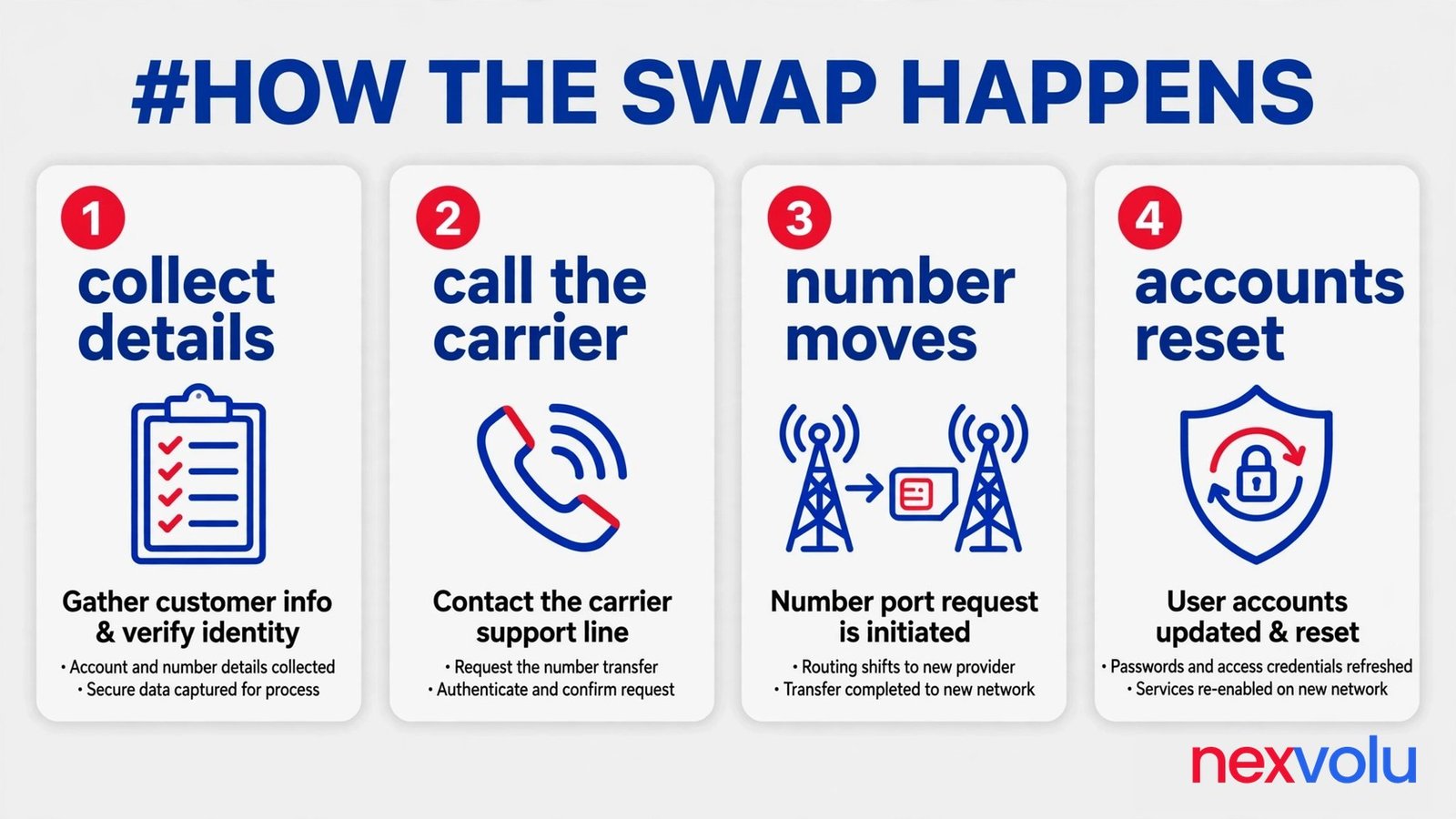
SIM swap fraud has four moves, and none of them touches your phone.
The criminal collects your details. Name, address, date of birth, the last four digits of your Social Security number, maybe an old account PIN. The raw material comes from data breaches, phishing emails, and whatever you post in public. The FBI’s February 2022 warning lists three ways in: talk a carrier employee into it, pay a carrier or store employee to do it, or phish a carrier employee for system access. All three start with your details, not your device.
They call the carrier and pretend to be you. Lost phone, broken phone, new phone, same story every time. They ask for a replacement SIM or an eSIM on a device they hold, and if the carrier’s check leans on facts a breach already exposed, the impersonation passes.
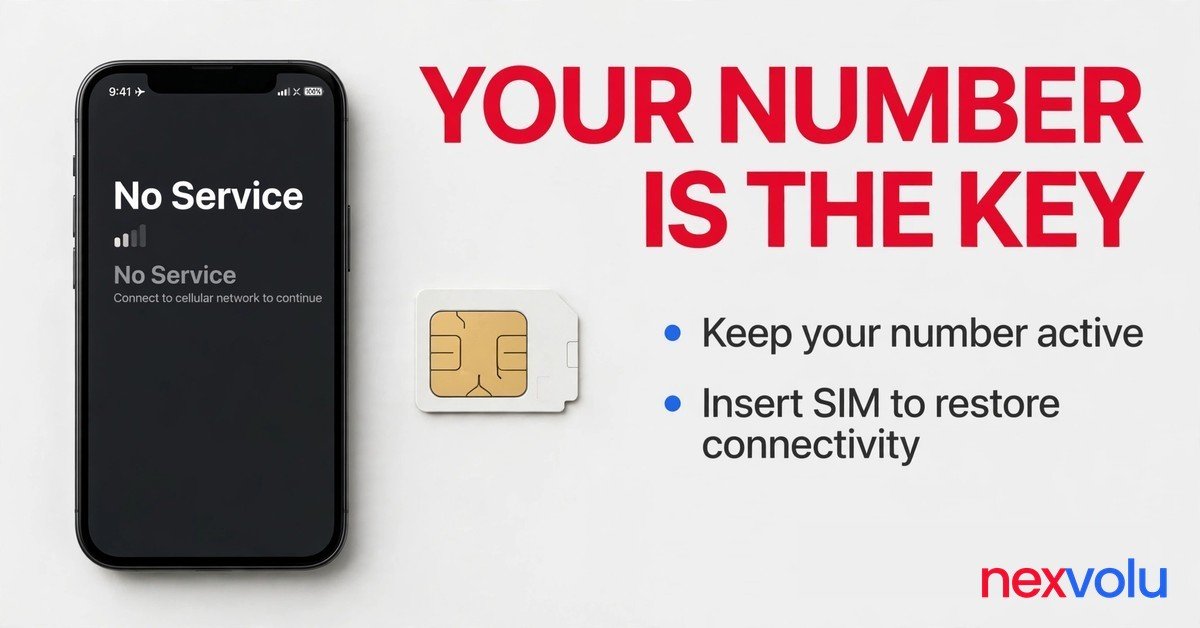
The carrier moves the number. Your SIM goes dead and your phone shows No Service or SOS Only, while their SIM goes live and starts collecting your calls and texts. The swap itself takes minutes, and some victims first notice it in a place where their phone always worked.
They reset your accounts. Forgot password, new code by text, new password, done. Email goes first because email resets almost everything else, and bank accounts, crypto exchanges, and social media follow in whatever order pays best.
SIM swap attack: port-out fraud and eSIM
A close cousin, port-out fraud, moves your number to a different carrier instead of a new SIM on the same one. The FBI also warns about two lighter variants, call forwarding and simultaneous ring, where the criminal gets the carrier to forward your calls or ring a second phone.
eSIM made the swap quicker. No store visit, no plastic card, no waiting for the mail. A criminal with your details can push an eSIM onto a phone from anywhere.
SIM swap attack: two cases that show the range
Two cases show the range. In January 2024, attackers took over the SEC’s X account through a SIM swap path. The SEC later said staff had turned off multi-factor authentication on that account in July 2023.
In November 2022, attackers moved more than $400 million in crypto from FTX hot wallets after a SIM swap at an AT&T store. One case cost an agency its account for a day. The other cost a company hundreds of millions. The method was the same.
Your phone goes dark. Now what do you check first?
The clearest warning sign is the blunt one. Your phone shows No Service or SOS Only in a place where it normally has bars. That alone proves nothing.
A dead zone, a damaged SIM, an unpaid bill, or a carrier outage can all do the same thing. The sign matters because of what it pairs with.
Check the pairing before you panic. Restart the phone. Ask someone near you on the same carrier if they have signal. Connect to Wi-Fi and check the carrier’s outage page.
If the network looks fine for everyone else and dead for you, treat it as a SIM swap attack until the carrier tells you otherwise.
Watch for the other signs too. A text or email says your SIM or eSIM changed, and you never asked for that. Password reset emails arrive that you never triggered.
Your apps log you out on their own. Friends tell you they got odd messages from your number. Your two-factor codes stop arriving at all.
Any one of these can have a dull explanation. Two or more together, inside the same hour, is the pattern. The criminal counts on you treating each sign as a glitch and waiting until tomorrow. Do the carrier check now, while the window is still open.
A swap usually lands at a moment when you will not notice fast, late at night or while you travel, and the account resets start within minutes of the number moving. If your phone dies and your inbox fills with reset emails in the same hour, read them as one event. That is the sequence.
SIM swap attack: lock the number at the carrier
This is the move that matters most, and it takes about ten minutes. Everything else in this guide helps. This one stops SIM swap fraud at the door.
A carrier account has three different protections, and people mix them up. An account PIN or passcode is the secret a carrier agent asks for when you call or walk into a store. A port lock blocks your number from moving to a different carrier. A SIM lock blocks your number from moving to a new SIM or eSIM on the same carrier.
You want all three, because each one blocks a different move.
Start with the PIN. Pick a number a criminal cannot guess from a breach or your social media: something other than your birth year, the last four digits of your Social Security number, or the code on your gym locker.
Write it in your password manager and nowhere else. The FTC recommends a PIN or password on every cellular account. The PIN is the check the impersonator has to beat.
Then turn on the locks. The names change by carrier, so find yours below.
SIM swap attack: locks by carrier
Verizon splits the job in two. Number Lock, in the My Verizon app under Security, blocks port-outs for that line. SIM Protection, on the same page, blocks any transaction that needs a new SIM, including swaps, upgrades, and bring-your-own-device activations. Turn on both, line by line.
Number Lock alone does not stop a SIM change, which Verizon says in its own FAQ. The Number Transfer PIN is separate, a short code you generate only when you actually switch carriers, and it stays valid for seven days.
T-Mobile splits it the same way. Account Takeover Protection blocks port-outs, and SIM Protection blocks SIM and eSIM changes. Add each one per line in the T-Life app or on the site.
T-Mobile also sets a 6 to 15 digit account PIN, and the digits cannot run in sequence. If you set yours years ago and forgot it, fix that now.
AT&T puts both protections behind one switch. Wireless Account Lock lives in the myAT&T app, and it blocks number transfers, SIM swaps, billing changes, and device purchases while it stays on. Set the Extra Security Passcode too, which agents ask for on every support call. The transfer PIN expires after four days, so generate it only when you move.
SIM swap attack: two details that trip people up
Two details trip people up. First, the two locks cover different doors. A port lock stops a port-out. A SIM lock stops a SIM swap.
Second, the locks are free. The FCC’s November 2023 order, FCC 23-95, requires carriers to offer every customer a free lock against SIM changes and port-outs, to check identity with a secure method before moving a number, and to tell the customer right away when a SIM change or port-out is requested. Parts of that rule were still waiting on a compliance date in late 2026, so set the lock yourself instead of waiting for a notice that may never arrive.
If you use a smaller carrier that rents network space, Mint, Visible, Cricket, or Boost, the same idea applies. Search the app for SIM protection or port-out protection and turn on whatever you find. If the app offers nothing, call and ask for an account PIN and a port freeze in plain words.
Do the same for every line on the account, including the old phone in the drawer that still has a live SIM. A criminal only needs the weakest line.
SIM swap attack: take your number out of your logins
A text code goes to the number, not to the device. Whoever holds the number gets the code. That single fact is why an authenticator app beats SMS, and why a security key beats both.
Start with email. Your email account resets almost everything else, so give it the strongest login you have. Switch it to an authenticator app or a passkey, and take SMS off the recovery options.
If the email account still trusts a text message, a SIM swap still opens it, and through it, everything else. Do the same for your password manager next, then your bank, then your Apple or Google account. Four accounts, in that order, cover most of the damage a swap can do.
SIM swap attack: authenticator apps and security keys
An authenticator app generates a fresh six digit code on your phone every thirty seconds. The code never travels over the phone network, so a swapped SIM cannot intercept it. Apps like Google Authenticator or Microsoft Authenticator do this for free.
When you set one up, print the backup codes and store them somewhere offline, not in a note on the same phone. If you lose the phone, those codes are your way back in. Our guide to where to store 2FA backup codes covers the storage part, and if the app itself goes missing, here is how to recover your accounts.
A passkey or a hardware security key goes further. CISA calls FIDO authentication the only phishing-resistant kind, and its December 2024 mobile guidance says plainly, “Do not use SMS as a second factor for authentication. SMS messages are not encrypted.” NIST’s July 2025 guideline, SP 800-63B-4, lists codes sent over the phone network as the only restricted authenticator, the one category whose resistance to attack has worn thin.
That does not mean SMS is worthless. Google’s 2019 study found that an SMS challenge blocked 100 percent of automated bots and 96 percent of bulk phishing. It stopped 76 percent of targeted attacks too.
A text code still beats a password alone by a wide margin. Keep SMS where a service offers nothing better. The fix is to move the accounts that matter off SMS.

SIM swap attack: the first hour after a swap
SIM swap fraud moves fast. The swap itself takes minutes, and the account resets start right after.
Your job in the first hour is to beat the criminal to the accounts that matter, in the right order. Do not use the phone that lost service for any of this. Use a computer, a tablet, or a borrowed phone.
The 60-minute plan
Minutes 0 to 10. Call the carrier. Use another phone and the number printed on your bill or on the carrier’s site, never a number from a text about the swap. Tell them someone swapped your number without your permission. Ask them to restore the number to your SIM, freeze the account against further changes, and give you a case number. Ask them to mark the swap as fraud on the account.
Minutes 10 to 20: call your bank and your card issuers. Tell them someone hijacked the phone number on the account, and ask them to freeze the cards and flag the account, then walk through the last transactions together. Change your email password from the computer, and pick a password you have never used anywhere else.
Minutes 20 to 40: lock down the email account. Check the forwarding rules and the recovery phone number, then the recovery email address, because a criminal who gets in often sets a forwarding rule to keep reading your mail after you change the password. Sign out of every session and device, then do the same for your password manager and your Apple or Google account.
Minutes 40 to 60: work through the rest. Check each bank, investment, crypto, or social account for password changes, new devices, or transactions you do not recognize, and file a report with the FBI at ic3.gov. Report the identity theft at IdentityTheft.gov, which walks you through a recovery plan, and ask each of the three big credit bureaus for a fraud alert and a credit freeze, starting with Equifax, then Experian and TransUnion.
SIM swap attack: what not to do in the first hour
A few things not to do. Do not click a link in a text about the swap, even if it looks like it came from the carrier. Never pay anyone who calls offering to fix it for a fee. Do not wait until morning if the swap hits at night, because the criminal does not keep office hours.
Keep a single note through the whole hour. Write down every case number. Note the name of each person you spoke to and the time of each call.
You will need that note for the IC3 report and for the bank dispute, and again if the swap happens twice.
If the money already moved, tell the bank the exact time you noticed the swap and the carrier case number. Banks move faster on fraud reports that come with a timeline and a case number.
What a SIM swap cannot touch
A swap hands over the number. It does not hand over the device in your pocket, the security key in your drawer, or the accounts that never trusted a text message in the first place.
A passkey lives on your device and answers only to the real site, so a criminal with your number still cannot sign in with it. An authenticator app keeps generating codes on your phone while the swapped SIM sits in someone else’s hand. That is the whole point of moving off SMS: the number stops being the key.
SIM swap attack: set the lock before you need it
Open your carrier app now and turn on the locks. Set the account PIN while you are there. Then move your email to an authenticator app or a passkey, print the backup codes, and put them somewhere offline. The whole job takes about half an hour, and most of it is waiting for codes to arrive.
A SIM swap attack works because too many accounts still treat a phone number as proof of who you are. The carrier lock closes the easiest door. The authenticator app closes the next one. Do both today, while the phone in your hand still answers to you.
If you do one thing from this guide, make it the carrier lock. It costs nothing, it takes ten minutes, and it is the step most victims wish they had taken the week before.
Related reading
- [Are password managers safe?]()
- [Lost your authenticator app? How to recover your accounts]()
- [Where to store 2FA backup codes]()
- [How to check and freeze your child’s credit file]()
Sources
- FBI Internet Crime Complaint Center, 2025 Internet Crime Report, April 2026
- FBI Internet Crime Complaint Center, 2024 Internet Crime Report, April 2025
- FBI Internet Crime Complaint Center, Public Service Announcement I-020822-PSA, February 8, 2022
- Cifas, Fraudscape 2025 and Fraudscape 2026 (UK unauthorized SIM swap filings and mobile share of account takeovers)
- Federal Communications Commission, Report and Order FCC 23-95, adopted November 15, 2023
- National Institute of Standards and Technology, SP 800-63B-4, Digital Identity Guidelines: Authentication and Authenticator Management, July 2025
- Cybersecurity and Infrastructure Security Agency, Mobile Communications Best Practice Guidance, December 2024
- Federal Trade Commission, consumer advice on SIM swapping and phone account PINs
- Axis Intelligence, SIM Swap Statistics 2026 (analysis of IC3 data by victim age)
- Google, account hijacking study, 2019, as summarized by TwoLine
Sobia Aslam writes about cybersecurity and digital privacy for Nexvolu, with a focus on practical steps readers can use the same day. Read more at nexvolu.com.