
Pinterest marketing for small business works when you stop treating Pinterest like Instagram. People open Pinterest to plan a kitchen remodel, find a gift for a coworker, or pick a paint color before the weekend. That is search behavior, and it changes every decision you make on the platform. A pin that matches a real search phrase can bring clicks for months after you publish it.
Pinterest reported 661 million monthly active users worldwide in the third quarter of 2026, a record for the company. The platform also handles more than 80 billion searches a month, according to chief executive Bill Ready, who has said half of those searches are commercial. Hundreds of millions of people type in what they want to buy or build, then save the answers for later.
Pinterest marketing for small business starts with search, not followers
On most social platforms, your reach depends on who follows you and how the feed treats your post in the first few hours. Pinterest works the other way around. Most pin impressions come from search results and related pin suggestions, not from followers seeing fresh posts. Pinterest says 96 percent of its top searches are unbranded.
People search for “small bathroom storage ideas” or “linen blazer women” instead of a brand name they already know. You compete on whether your pin answers the search, not on how big your account is. A small audience can still show up in those results when the words match.
The search-first view also explains why pins last so long. A pin can keep sending traffic months after you publish it, because it sits in search results and keeps getting saved into new boards. Every save puts your pin in front of new people and feeds Pinterest fresh signals about what the pin covers.
There is a catch. Every pin needs a landing page that delivers on the promise in the image. If the pin says “small business budget template” and the link opens a generic homepage, people leave and the pin fades.
Check that the page behind each pin answers the exact question in the pin title. That one habit will do more for your results than any posting schedule.
Nexvolu runs its own account at @nexvolu with nexvolu.com claimed. The account exists to put useful guides in front of people who search for them. The same search-first rules in this guide shape what gets published there.
Pinterest marketing for small business: who searches on Pinterest
Pew Research Center found in its 2024 survey that 36 percent of US adults use Pinterest. Among women the figure was 51 percent, against 19 percent of men. Use was 43 percent among adults aged 18 to 29 and the same 43 percent among those aged 30 to 49. Pinterest itself says women make up roughly two-thirds of its users and that Gen Z users now make up over half of its user base.
If your customers are women aged 25 to 45 who plan purchases, you are in the heart of the audience. If your customers are men, the pond is smaller and your keyword targeting has to be sharper.
Check the fit before you invest by typing your five best product phrases into the Pinterest search bar.
The more useful question is what people do once they arrive. Pinterest reports that users save more than 1.5 billion pins every week. Sprout Social’s 2026 content strategy report found that 70 percent of Pinterest users interact with brand content at least once a week, rising to 78 percent among Gen Z users. And 85 percent of weekly Pinterest users have made a purchase based on a pin from a brand, according to figures Pinterest has published.
Those numbers describe intent, not idle scrolling. People come to Pinterest with a project in mind and a wallet not far behind. Home decor and recipes do well here, and so do fashion and weddings.
A bakery or a wedding photographer has natural material here. So does a garden center or a boutique hotel. A tax consultancy has a harder road, and a firm that sells printable planners has an easier one.
Pinterest marketing for small business: finding the keywords people type
Keyword research on Pinterest costs nothing, and the platform hands you the data. Pinterest has two free tools built in, and they tell you exactly how people phrase their searches. That is the core of Pinterest marketing for small business. The words matter more than the follower count.
- Start with the search bar and its suggestions. Type a broad term into the Pinterest search bar, something like “small kitchen ideas.” Before you press enter, watch the colored suggestion bubbles that appear under the bar. Those are guided search terms, and they show the exact phrases people add to narrow a search. After you search, more bubbles appear at the top of the results, and each one is a longer phrase worth writing down.
- Sort the phrases into buying searches and browsing searches. “Small kitchen storage ideas on a budget” is a browsing search, while “small kitchen pull out pantry organizer” sits much closer to a purchase. Both have value, but they need different pins. The browsing phrase earns a guide and the buying phrase earns a product page.
- Use the words your customers use, not the words your industry uses. A florist might call it “seasonal arrangement design.” Customers search for “fall centerpiece ideas.” Pinterest ranks pins on the words people type, so industry jargon is dead weight in a title.
- Check each phrase in Pinterest Trends, the free tool inside every business account. Set your region to the United States or the United Kingdom, depending on where your customers live, and type in the phrase. The graph is indexed from 0 to 100, so it shows relative interest rather than raw search counts. You can compare up to four keywords on one graph, which settles arguments about which phrasing belongs in a title.
Pinterest marketing for small business: using Pinterest Trends
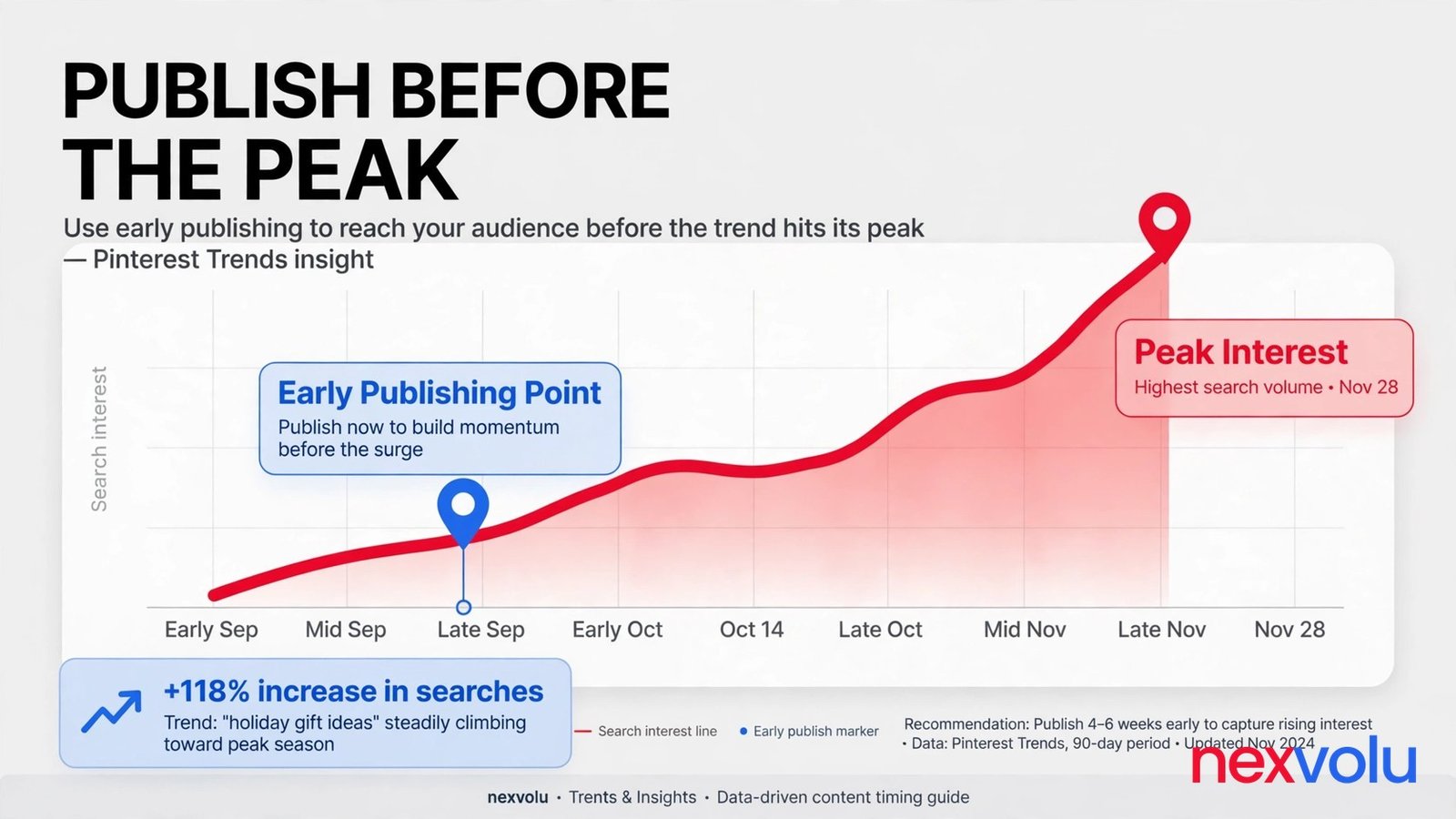
Set the date range to two years. A two-year view shows whether a spike repeats every year or happened once. Seasonal topics are the big win here, since holiday decor and wedding planning climb at the same time each year. One practical rule is to publish when a seasonal keyword sits at roughly 25 to 30 percent of its peak, which gives Pinterest time to index the pin before demand arrives.
Pinterest Trends also shows related searches for each term, plus demographic splits and the top pins for that keyword. Each related search is a more specific pin waiting to be made. The top pins show you the image style and title format that already ranks for that phrase.
Pinterest Predicts is the company’s annual forecast, published each December and built from billions of searches. Pinterest says 80 percent of its predictions came true over the five years before its 2025 report, and that trends from the report last nearly twice as long as trends that start elsewhere. Treat the report as a planning prompt. A trend only helps if it connects to something you actually sell.
Keep every phrase in one list, grouped by topic, and let it become your content plan. When it is time to publish, you pick a phrase from the list instead of staring at a blank screen. Most small businesses need 20 to 30 phrases to start, and the search bar hands you ten of them in a single session.
Pinterest marketing for small business: one piece of content, 3 to 5 pins
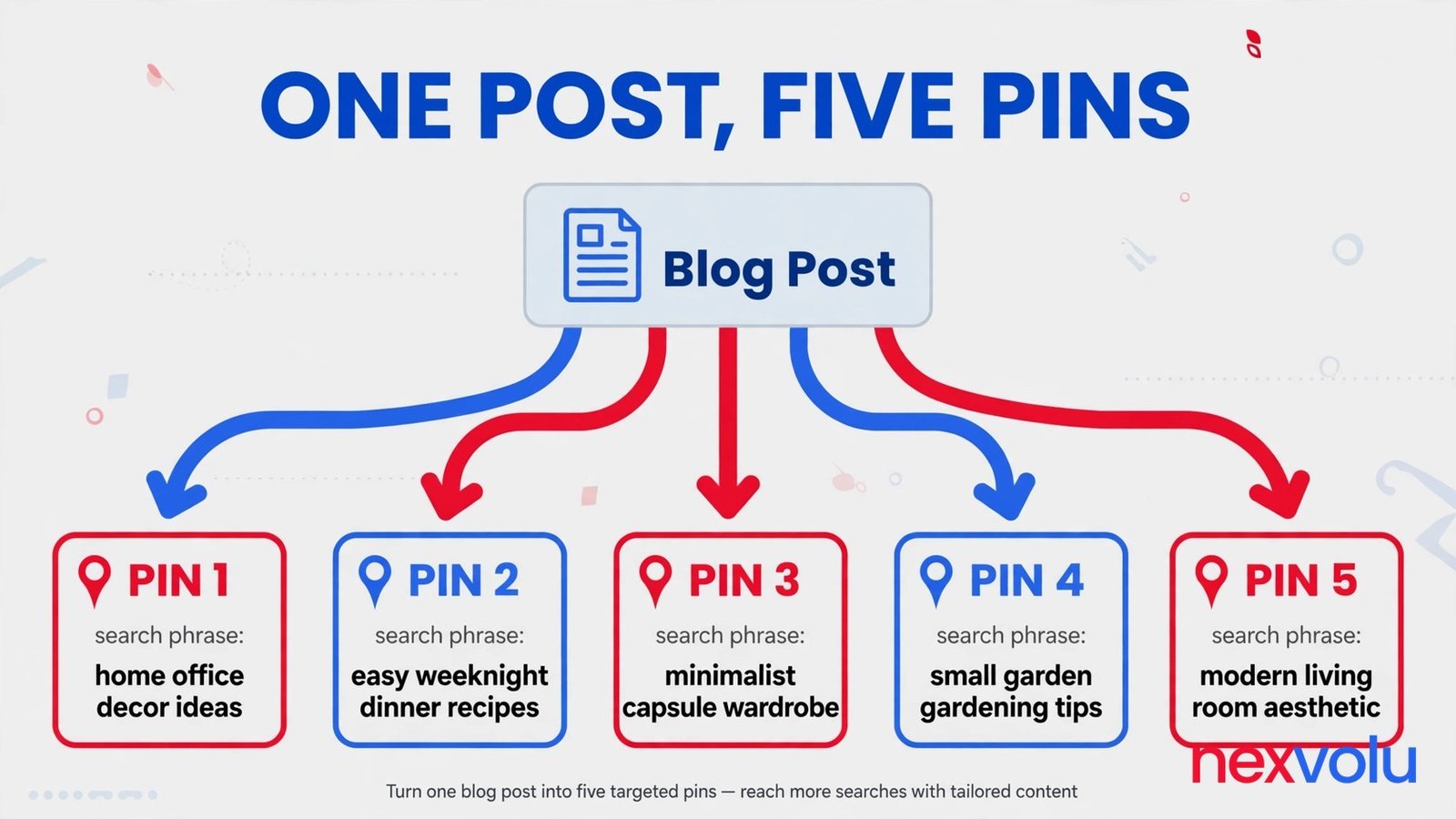
Here is the workflow that makes Pinterest affordable for a small team. One blog post, one product, or one guide becomes 3 to 5 pins. Three to five is enough to test different hooks and keywords without flooding your own boards. Each pin links to the same page but leads with a different angle and a different image.
Start with the page. Pick a post or product page that answers a search phrase from your keyword list. Read it once and pull out the distinct angles inside it. A guide to small business budgeting might contain a template and a checklist, and each of those is a pin.
- Write the titles first, one per pin, each built around a different phrase from your keyword list. Keep titles under 100 characters, and put the keyword near the front, since only about the first 40 characters show in the feed. A title like “Small kitchen storage ideas that cost under $50” works, because it contains a phrase people search for.
- Design one image per pin, in the vertical 1000 by 1500 pixel format Pinterest recommends. Use a different photo or graphic for each angle, and a different headline on the image. The images should look related, not identical.
Steps 3 to 5
- Write a description of one or two sentences for each pin, using the same keyword naturally and adding one detail the title left out. Descriptions can run up to 800 characters, but the first sentence does the work. Say what the reader gets when they click. “A free budget template for small business owners, with categories for rent and payroll” tells the reader exactly what waits behind the click.
- Publish the first two pins on the day the content goes live, then space the rest out over the next two to three weeks. Spacing them out gives each pin its own chance to be picked up by search. It also keeps your profile from looking like a spam burst.
- After 30 days, check which pin earned the most outbound clicks in Pinterest Analytics. Make one more pin in the style of the winner, with a fresh image and a slightly different title, and link it to the same page. Then stop. If none of the pins earned clicks, the problem is usually the keyword or the landing page.
This workflow forces you to reuse content you already paid to create. A blog post that took four hours to write deserves more than a single pin. Five pins from one post means each hour of writing works five times as hard, and each pin points at a page that already exists.
You do not need more content. You need more doors into the content you have.
Boards are keyword categories, not mood collections
Boards tell Pinterest what your pins are about. Treat them like categories on a blog, not like folders on a phone. Each board should map to a real search phrase your customers use. “Small business marketing” is a board, and “Ideas I like” is not one.
Keep the board count small at first. Five to eight boards that match your core topics are plenty. A bakery might have boards for wedding cakes and birthday cakes, plus one for cake decorating tips. Each board gets a keyword-rich title and a one-sentence description that uses the phrase naturally.
Fill each board with your own pins first. You can add a few relevant pins from others if they help the reader, but a board full of other people’s content builds their authority instead of yours. Use one simple template for board covers, with the board name in readable text.
Pinterest marketing for small business: what a pin needs to rank
The image comes first because it is what people see. Pinterest recommends a vertical 1000 by 1500 pixel image, a 2 to 3 ratio. Tall images take up more space in the feed, and more space means more attention. Keep any text on the image short, since a headline of five to eight words in large type will beat a paragraph crammed into a small space.
The title carries the keyword. Put the phrase near the front and keep it under 100 characters. The description adds context in one or two sentences and can run up to 800 characters. Two natural uses of the phrase are enough, because keyword stuffing reads badly to people and Pinterest has said it does not help rankings.
The link matters more than most beginners think. Every pin should link to the specific page that matches the pin, not to your homepage. A pin about a budget template should open the budget template page. Pinterest tracks whether people click and then stay, and a mismatch between pin and page will drag the pin down.
Fresh images help, and Pinterest says it values new pins over re-saves of old ones. That is another reason the 3 to 5 pin workflow works, since each pin uses a new image while the landing page stays the same. The old advice to pin 15 to 30 times a day, mostly other people’s content, belongs in the past. Publish fewer pins and link each one to your own site.
How to tell if it works
Pinterest Analytics comes free with a business account. It shows which pins send clicks to your site and which search phrases bring people to your pins. It also shows which boards earn the most saves. Check it once a month, since more often than that you will react to noise.
Outbound clicks are the number that matters most in Pinterest marketing for small business. Impressions look impressive and mean very little on their own. A pin with 50,000 impressions and 12 clicks is a design that people notice and ignore. A pin with 2,000 impressions and 80 clicks is a pin that matches a search and earns the visit.
Give a new pin 30 days before you judge it. Pinterest search takes time to index new content, and seasonal pins need even longer. If a pin has almost no impressions after 30 days, the keyword is probably wrong or the image is weak. Change one thing, not both, and swap the title phrase first, since that is the cheapest fix.
One more check lives outside Pinterest. Tag your pin links with UTM parameters so Google Analytics can show you what Pinterest visitors do after they arrive. A pin that sends 40 visitors who join the email list beats one that sends 200 visitors who leave in five seconds.
Where ads fit, and where they do not
Pinterest ads work best after organic pins prove which keywords and images earn clicks. Pinterest reports that brands using its Shopping ads see 15 percent higher return on ad spend and 2.6 times higher conversion rates than their other campaigns. Those are Pinterest’s own figures, not a promise for every account. Publish organic pins for a month, find the two or three that earn the most outbound clicks, then put a small budget behind those exact pins.
Start with a small daily budget, something you can afford to lose while you learn, and run the test for at least two weeks. Judge the ads on cost per outbound click and cost per conversion, not on impressions. If the numbers lag behind your other channels, stop and fix the organic pins first. Ads amplify what already works.
Pinterest for business starts with a free account, and it unlocks analytics and ads, plus the ability to claim your website. Claiming matters because it ties pins saved from your site back to your account. Set it up before you publish anything. It takes a few minutes and it costs nothing.
What Pinterest will not do for you
Pinterest is a poor tool for customer service and breaking news. If your business needs fast replies to customer questions, that work belongs on email or on a platform built for messaging. Pinterest also moves slowly by design, and a pin can take weeks to find its audience.
Pinterest pays late, and it pays for a long time. Test it with ten pins and a month of patience, then decide with data instead of hope.
Questions small businesses ask about Pinterest
Is Pinterest for business free to use?
Yes. A Pinterest business account is free, and it unlocks analytics and ads, plus website claiming. You only pay if you choose to run ads or buy scheduling tools.
How often should a small business post on Pinterest?
Two to five fresh pins a week is a realistic pace for a small team, and it beats a burst of 30 pins followed by silence. Consistency matters more than volume, because Pinterest rewards accounts that publish steadily over months.
How long does it take to see traffic from Pinterest?
Expect the first meaningful clicks in four to eight weeks, with stronger results after two to three months as pins age into search results. Seasonal pins need more lead time, so publish them before the season starts.
Do I need a big following to get traffic from Pinterest?
No. Because 96 percent of top searches are unbranded, a pin can rank for a search phrase even when the account behind it has few followers. Follower count helps a little. Keyword match helps far more.
Your first month on Pinterest
Pick one topic from your keyword list, the one closest to a product or page that already earns you money. Build 3 to 5 pins for it using the workflow above, publish the first two this week, and space the rest out over the next three weeks. Claim your website and check Pinterest Analytics after 30 days, then repeat the workflow for the next topic if the pins earned clicks. If they did not, change the keyword first and test again.
Related reading
- SEO vs PPC for Small Business
- Google Ads Search Terms Audit
- UTM Tracking Mistakes in GA4
- Search Console Clicks vs GA4 Sessions
Sources
- Pinterest, Q3 2026 results, reported via StatisticsGlobal: 661 million monthly active users worldwide, up 10 percent year over year.
- Pinterest Q4 2025 results, reported via SearchLab: more than 80 billion searches per month, half of searches commercial.
- Sprout Social, 29 Essential Pinterest Statistics for Marketers in 2026: 619 million monthly active users in Q4 2025, 96 percent of searches unbranded, 85 percent of weekly Pinners made a purchase based on a brand pin, 1.5 billion pins saved weekly, 70 percent of users interact with brand content weekly.
- Pew Research Center, 2024 survey: 36 percent of US adults use Pinterest, 51 percent of women and 19 percent of men, 43 percent of adults aged 18 to 29 and 43 percent aged 30 to 49.
- Pinterest, via StatisticsGlobal: Gen Z users make up over half of the user base, women roughly two-thirds.
Pinterest marketing for small business: sources on Trends and workflow
- Pinterest Create, Pinterest Predicts 2025: 80 percent of predictions came true over five years, trends last nearly twice as long as trends from elsewhere.
- Sprout Social, Pinterest for Small Business Marketing: 2026 Guide: search bar suggestion bubbles, Pinterest Trends, 1000 by 1500 pixel pin size, 2 to 3 ratio.
- SocialKit, Pinterest Marketing Guide (2026): pin titles allow 100 characters with about 40 visible in feeds, descriptions allow up to 800 characters, boards as keyword categories, old high-volume pinning playbook is dead.
- PinBoostr, Pinterest Trends: How to Use the Trends Tool (2026): Trends shows up to two years of history, compares up to four keywords, scores indexed 0 to 100, region control.
- Mary Lumley, Pinterest Trends Tool: Your Campaign Planning Engine: publish seasonal pins when a keyword sits at roughly 25 to 30 percent of its peak.
- Sprout Social, Pinterest statistics: Shopping ads see 15 percent higher return on ad spend and 2.6 times higher conversion rates.
Sobia Aslam writes about digital marketing and SEO for small businesses at nexvolu.com, where she covers the search and analytics tactics that help small teams compete with bigger budgets.